
Stop Fighting the Bot: How Structure Turns AI From a Distraction Into a Time-Saving Machine
Running a small business is a balancing act, but leveraging AI for small business operations is the secret to reclaiming your schedule. You’ve probably tried an AI chatbot at least once. Maybe you asked it to write a quick client email and it came back with three paragraphs of stiff corporate nonsense. So you closed the tab and went back to doing the work yourself.
But most people are using these tools the wrong way. The trick isn’t asking better questions—it’s giving the AI a little structure before it starts working. Once you do that, something interesting happens: tasks that used to take an hour start taking ten minutes.
The Power of the “State File”
The biggest flaw with most AI interactions is the blank slate. Every time you open a new chat, the system forgets who you are, what your budget is, and what you’re trying to achieve. You end up wasting the first ten minutes of every session just trying to get the AI up to speed.
The solution is establishing a simple ‘State File’ — essentially a short document that gives the AI context about your business. This is a simple, cleanly formatted text document listing your current projects, financial constraints, blockers, and active goals. You paste or upload this file at the start of your session so the AI has the context it needs to work with.
You can keep this in a simple Google Doc, Notion page, or even a text file that you paste into your AI chat when starting a task.
Your ‘state file’ can literally just be a short document like this:
Business goals this quarter: Increase website leads by 20% – Launch spring promotion – Improve Google review rating
Current constraints: Marketing budget: $2,000/month – Only one employee managing social media
Active projects: Website redesign – New service packages
Once your context is loaded, you give it some behavioral ground rules. This is where the system starts producing more useful results. Instead of making generic requests, you give the AI strict rules of engagement.
Assume the AI is a confident liar until you’ve manually proven otherwise.
Prompt Template 1: The Scope-Creep Defender
For example, copy and paste this instruction after loading your state file to keep yourself on track:
This transforms a compliant chatbot into a strict operational partner that actually pushes back against your worst habits.
From Chatbot to Quiet Coworker
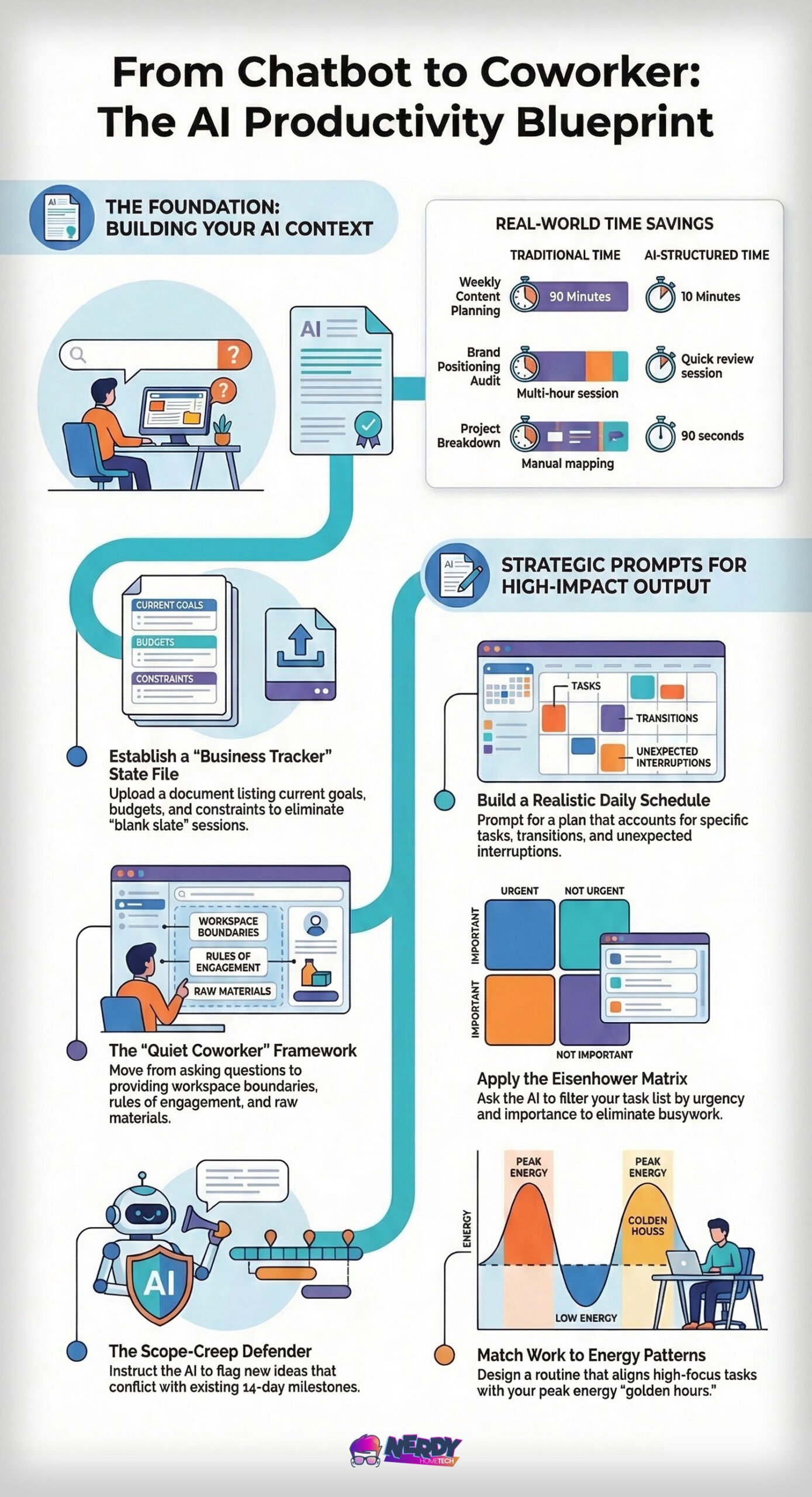
If you’re still treating AI like a Google search bar—typing a question and waiting for a static answer—you’re barely scratching the surface. The real shift happens when you move from a “chatbot” mentality to a “quiet coworker” framework.
Not all tools are built for the same tasks. If you need to build a system or analyze data, use ChatGPT. But if you are drafting client-facing emails or blog posts, switch to Claude. Claude naturally avoids the stiff, corporate jargon that plagues most AI for small business outputs, keeping your communications sounding human.
Think of this approach like giving an assistant a workspace with clear boundaries. You provide the guardrails (your state file), the rules (your prompt frameworks), and the raw materials (your messy notes or data). Instead of asking the AI one question at a time, you give it the background and let it work through the task with you.
You aren’t micromanaging the conversation anymore. You’re simply providing the boundaries and letting the AI help work through the task faster. It’s the difference between asking a tool for a quick fact and asking a colleague to draft a preliminary report based on your company’s playbook.
Where AI for Small Business Actually Reclaims Your Time
Tossing out claims means nothing without context. Let’s look at how this practically plays out in the real world.
Take Sarah, a landscaping business owner. She used to lose 90 minutes every Monday to the ‘blank screen’ of content planning. Now? Ten minutes. Sarah’s experience isn’t an outlier; it’s the result of a structured workflow that other founders are now adopting to audit brand positioning and draft internal communications.
Founders report previously spending hours locked in internal debates trying to nail down their brand positioning. By feeding their current marketing materials into an AI alongside a structured “Positioning Audit” prompt, they cut a multi-hour headache down to a quick, decisive review session.
Stack a few of those small improvements across the week and the time savings start adding up.
Here’s what that kind of shift can look like in everyday business tasks.
| Task / Activity | Old Way (Typical Time & Pain) | New Way (Structured AI) |
|---|---|---|
| Weekly content calendar | 90 minutes of staring at a blank screen, stress | 10–15 minutes — AI generates a draft you refine |
| Brand positioning audit | Hours of internal debate and scattered notes | 10 minutes — AI reviews materials and gives clear takeaways |
| Client/vendor email drafting | 20–40 minutes rewriting raw thoughts into professional tone | 2–5 minutes — brain-dump bullets → crisp, firm email |
Stack those daily wins to see the actual weekly math. If an owner uses AI for small business workflows to process 15 emails a week (saving 25 minutes each), generates one content calendar (saving 75 minutes), and drafts three sales follow-ups (saving 45 minutes), the cumulative return easily crosses the 480-minute mark. You are reclaiming a full 8-hour workday.
Four Tasks AI Handles Surprisingly Well
- Drafting professional, firm emails from your messiest raw notes
- Turning messy ideas into structured plans
- Reviewing marketing materials for positioning gaps
- Generating low-pressure sales follow-ups that offer direct value instead of relying on the cliché ‘just checking in.’

 Walmart.com

Structure Over Requests
Most users fail because they want the AI to do the thinking for them. If you want high-quality output, you have to tell the AI how to think. Even with perfect structure, expect the AI to hand you an 80% complete draft. The remaining 20% requires your manual review to inject your specific expertise and personality. If you expect a 100% publish-ready document on the first click, you will fail.
A simple structure helps a lot: tell the AI who it should act like, give it context, explain the task, and tell it what the final output should look like. Here are two more highly effective examples to keep in your toolkit.
Prompt Template 2: The Contrarian Consultant
For example, when you’re about to make a big business decision, try this prompt:
This forces the system to hunt for weaknesses in your strategy, providing a balanced risk/benefit analysis rather than blindly validating your thoughts.
Prompt Template 3: The Email Translator
When you just need to get a message out without overthinking the tone, try this prompt instead of writing from scratch. Brain dump your raw thoughts and let the AI format them.
Consider the tangible shift in a typical Monday morning. Before: A 90-minute calendar panic, getting dragged into scope-creep rabbit holes, and staring blankly at an empty email draft. After: A 2-minute calendar generation, an AI proactively pushing back on distracting new ideas, and crisp emails formatted from raw bullet points while you review the week’s actual priorities.

ErGear Height Adjustable Electric Standing Desk

The Honest Risks

Let me be brutally honest. AI is a tool, not a savior. Integrating it into your workflow carries significant risks, and ignoring them can severely damage your business.
First, there’s the massive issue of data privacy. One business owner recently pasted sensitive client contracts into a public AI chat just to summarize the terms. The problem? Some AI tools may store or review conversation data unless you’re using business or enterprise plans. They had inadvertently exposed confidential client information to a third-party AI system.
Confidentiality breaches are a very real threat. To mitigate this, ensure you are utilizing ‘Temporary Chat’ modes or have explicitly opted out of ‘Model Training’ within your AI’s data privacy settings.
Most consumer AI interfaces require you to manually opt-out of data training in the ‘Settings’ menu or use ‘Temporary/Incognito’ chat modes to ensure your inputs aren’t reviewed by human contractors.
Second, we have the problem of “Shadow AI.” This occurs when your employees use unsanctioned, unvetted AI tools on their personal devices to speed up their work. They mean well, but they’re entirely bypassing your security protocols and exposing your data without your knowledge.
Third, there’s the undeniable risk of skill atrophy. When you allow a machine to draft all your communications or analyze your operational data, your critical thinking skills begin to dull. You stop knowing why a decision is good, and just accept that the machine said it was.
Fourth, hallucinations remain a persistent threat. These models will confidently invent facts, cite fake precedents, or fabricate statistics. The tradeoff for high-speed generation is the absolute necessity of human verification.
To protect your business, you need to set firm ground rules:
- Create an AI Acceptable Use Policy: Put it in writing and define exactly what tools are approved for company use.
- Never input client PII: Treat public AI models like a public billboard; keep personal and financial data out.
- Verify every output: Assume the AI is a confident liar until you’ve manually proven otherwise.
- Standardize your tools: Ensure the AI platform you use explicitly states it doesn’t train its models on your proprietary data.
Your Next Steps
All of these examples work right now inside the free tier of whatever AI you already use—Claude, ChatGPT, Gemini, or similar.
Here’s a simple experiment. Tomorrow morning, before starting your workday, try this experiment: paste your ‘State File’ into your chosen AI for small business tool and see how much mental overhead it removes. Then ask it to help plan your day. You might be surprised how much less explaining you have to do.
Once you’ve mastered the State File, check out our guide on Better AI Prompting Techniques to further refine your results.
Frequently Asked Questions
How do I safely roll out AI implementation to my employees?
To prevent the dangers of unsanctioned “Shadow AI,” create a clear acceptable use policy that defines exactly which artificial intelligence tools are approved for company devices. Conduct a brief training session focused on data privacy for small business, ensuring your team understands never to input sensitive client data or proprietary financials into public chatbots.
Do I own the copyright to the content generated by AI writing tools?
Currently, content generated entirely by AI cannot be copyrighted in most jurisdictions, which is why the 80/20 rule of manual editing is so crucial. By injecting your unique entrepreneur mindset and specific industry expertise into the final 20% of the draft, you create original work that safely protects your small business strategy.
How often should I update my business State File?
You should refresh your State File at the beginning of each quarter or whenever your company undergoes a major digital transformation or product launch. Keeping this core context document current ensures your workflow optimization efforts remain accurately aligned with your active financial constraints and operational goals.
Are there practical AI applications beyond writing emails and content?
Yes, AI for small business extends far beyond text generation; owners are rapidly adopting AI-driven CRM platforms, automated bookkeeping software, and predictive inventory systems. Exploring these broader business automation trends is the next logical step toward achieving comprehensive operational efficiency and significantly reducing overhead.
How can I accurately measure the ROI of my new AI workflow?
The most effective way to track founder productivity gains is to run a simple time-tracking audit on routine tasks for one week before and after adopting these prompt frameworks. Once you begin quantifying the hours saved on daily administrative chores, the true financial value of reclaiming time for scaling a small business becomes undeniable.
Is implementing AI expensive for a small business?
Most basic artificial intelligence tools offer robust free tiers that are more than sufficient for AI for beginners. Upgrading to paid enterprise plans is usually only necessary when your small business growth demands strict data privacy features or specialized API access. Ultimately, the software’s monthly cost is easily offset by reducing overhead through automating routine administrative tasks.
Do I need coding skills to use these prompt frameworks?
You don’t need any coding experience to master these time management tips and structured workflows. Successful tech for small business relies on plain-language technical problem solving, much like delegating a task to a human assistant. Adopting this practical entrepreneur mindset is far more valuable than trying to learn complex programming languages.
Will my clients be able to tell I’m using AI to write emails?
If you rely on lazy, one-sentence requests, your clients will definitely spot the robotic tone. But by using a structured State File with your AI email assistants, the output will closely match your authentic, human voice. This level of deliberate business tech integration ensures you maintain professional efficiency without sounding like a machine.
How do I choose the right platform for my industry?
Start by auditing your daily bottlenecks to see if you need help primarily with writing, data crunching, or administrative automation. Claude is widely recommended for drafting natural-sounding text, while ChatGPT often excels at complex logic and broader smart business solutions. A realistic AI adoption strategy involves testing a few different platforms before locking your operations into a single ecosystem.
Can I manage these AI workflows from my phone?
Yes, the major AI platforms offer mobile apps that sync seamlessly with your smart home office or standard desktop workspace. This allows for effective streamlining operations even when you’re traveling or jumping between client sites. Keeping your State File accessible on a mobile cloud drive ensures your founder productivity doesn’t drop just because you’re away from your desk.
Sources: 97% and 90%+ stats from Reason Why Nov 2025; shadow AI examples and workflows from One82 Guide July 2025 and Claude community discussions.