Top Picks For Home Office Gear
| Category | Product | Score | Read More |
|---|---|---|---|
Most Versatile Cleaner | WOLFBOX Air Duster | 92/100 | |
Best Budget Chair | BestOffice Ergonomic Chair | 85/100 | |
Best Noise Cancelling | Soundcore Q20i Headphones | 90/100 | |
Best Adjustable Lighting | Airlonv LED Desk Lamp | 88/100 | |
Best Sit-Stand Desk | ErGear Standing Desk | 91/100 |
How We Chose
We didn't just look for the flashiest specs. Instead, we focused on three core pillars: ergonomic support, environmental control, and long-term value. A chair that breaks in six months or a lamp that flickers isn't a deal—it's a liability. We prioritized items that offer customizability, because your office needs to adapt to you, not the other way around.
Our selection process also heavily weighed the physical footprint of each item. Many of us are working in multi-purpose rooms or small apartments, so gear that manages space efficiently earned extra points. Finally, we looked for tech that offers a tangible workflow benefit, like electric height presets or active noise cancellation, to ensure these tools actually earn their keep on your desk.
WOLFBOX MF50 Air Duster

Stop wasting money on freezing aerosol cans that lose pressure mid-clean. The WOLFBOX MF50 transforms tech maintenance from a chore into a quick, satisfying blast. While canned air leaves behind a chemical residue and frost, this rechargeable blower provides a consistent, high-pressure stream that reaches the deepest crevices of your mechanical keyboard or PC tower without the waste.
This duster won its spot because it solves the hidden cost problem of workspace hygiene. You buy it once, and you’re set for years. It’s the smarter, nerdier way to ensure your expensive hardware doesn't die a slow, dusty death.
Pros
- Infinite air supply with no refills.
- Fast USB-C charging for quick use.
- Lightweight and easy to maneuver.
- Higher pressure than aerosol cans.
Cons
- Loud operation on highest setting.
- High initial cost vs one air can.
Tech Specs
| Feature | Detail |
|---|---|
Major Features |
|
Interface | 3-Gear adjustable speed |
Power Requirement | USB rechargeable (Fast Charging) |
Workflow Benefit | 3.39 x 3.39 x 5.12 inches; 7.2 ounces |
Hardware Specificity | Manual button control |
Ideal For
- Tech enthusiasts with multiple gadgets.
- People looking to reduce aerosol waste.
- Clean-desk advocates who hate dust.
Not For
- Users who only clean once a year.
- Anyone requiring a silent cleaning tool.
Editor's Take
It’s a satisfy-your-inner-neat-freak kind of tool that pays for itself after about ten cans of the disposable stuff. You’ll find yourself using it for everything from the office to the car vents.

Better Homes & Gardens 12 Cube Storage Organizer

BestOffice™ Ergonomic Office Chair
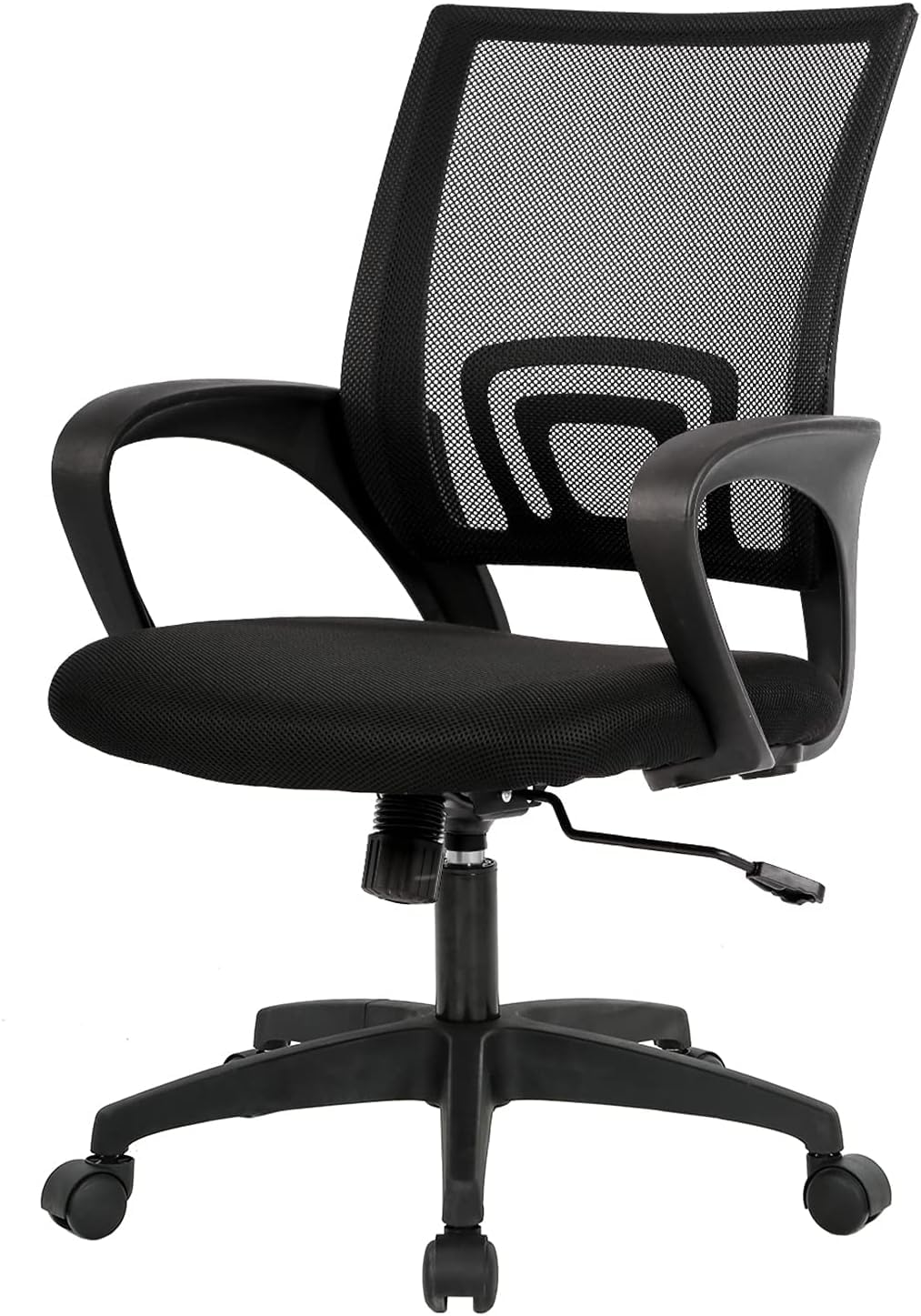
The $500 you save on a bargain chair today might cost you $5,000 in physical therapy tomorrow. This BestOffice model proves you don't need a designer label to protect your spinal health.
While high-end chairs complicate things with forty different levers, this one focuses on the fundamentals: a breathable mesh back that stops you from overheating and built-in lumbar support that keeps you upright when the afternoon slump hits.
This chair beat out more expensive rivals by proving that fundamental ergonomics—like seat height and tilt—can be delivered reliably at a fraction of the cost. It’s a solid, no-nonsense foundation for any home office upgrade.
Pros
- Breathable mesh prevents sweating.
- Easy to assemble in under 20 mins.
- Fits well in very small rooms.
- Stable base for the price point.
Cons
- Non-adjustable lumbar support.
- Backrest is too short for tall people.
Tech Specs
| Feature | Detail |
|---|---|
Major Features |
|
Interface | Height and Tilt adjustment; 360° Swivel |
Power Requirement | N/A (Manual Furniture) |
Workflow Benefit | 18 x 18 x 38 inches; 19 pounds |
Hardware Specificity | Manual levers |
Ideal For
- Students or remote workers on a budget.
- Users in warmer climates who need mesh.
- People with small workspace footprints.
Not For
- Taller users (it is a mid-back chair).
- Anyone requiring adjustable armrests.
Editor's Take
Think of this as the reliable Honda Civic of office chairs. It won't win any design awards, but it protects your back and keeps you focused for a very fair price.
Soundcore by Anker Q20i Headphones

Silence isn't a luxury; when you're working from home, it's a prerequisite. The Soundcore Q20i headphones act as a physical barrier between you and the chaos of laundry machines, barking dogs, or nearby construction. While most budget headphones just muffle sound, these use hybrid ANC to actively delete distracting low-frequency hums, allowing your brain to finally settle into deep work.
They earned their spot by offering a 40-hour battery life with ANC engaged, which is enough to get you through a full work week on a single charge. For the price, the build quality and noise reduction are surprisingly sophisticated.
Pros
- Excellent noise reduction for price.
- Insane 40-hour battery with ANC.
- Comfortable cushions for long wear.
- Customizable sound via the app.
Cons
- Must register for app features.
- Can get warm during long sessions.
Tech Specs
| Feature | Detail |
|---|---|
Major Features |
|
Interface | Hybrid ANC; Custom EQ via App |
Power Requirement | Battery (40h-60h) |
Workflow Benefit | 9.12 ounces; Foldable design |
Hardware Specificity | Soundcore App; Bluetooth 5.0 |
Ideal For
- Workers in noisy open-concept homes.
- Frequent travelers or commuters.
- Anyone who enjoys bass-rich audio.
Not For
- Audiophiles seeking high-res wired sound.
- Users who dislike over-ear pressure.
Editor's Take
These are the ultimate productivity hack. When you put them on, you’re signaling to your brain (and your family) that you’re officially "in the zone."
Pilot G2 Retractable Gel Ink Pens
Airlonv LED Desk Lamp
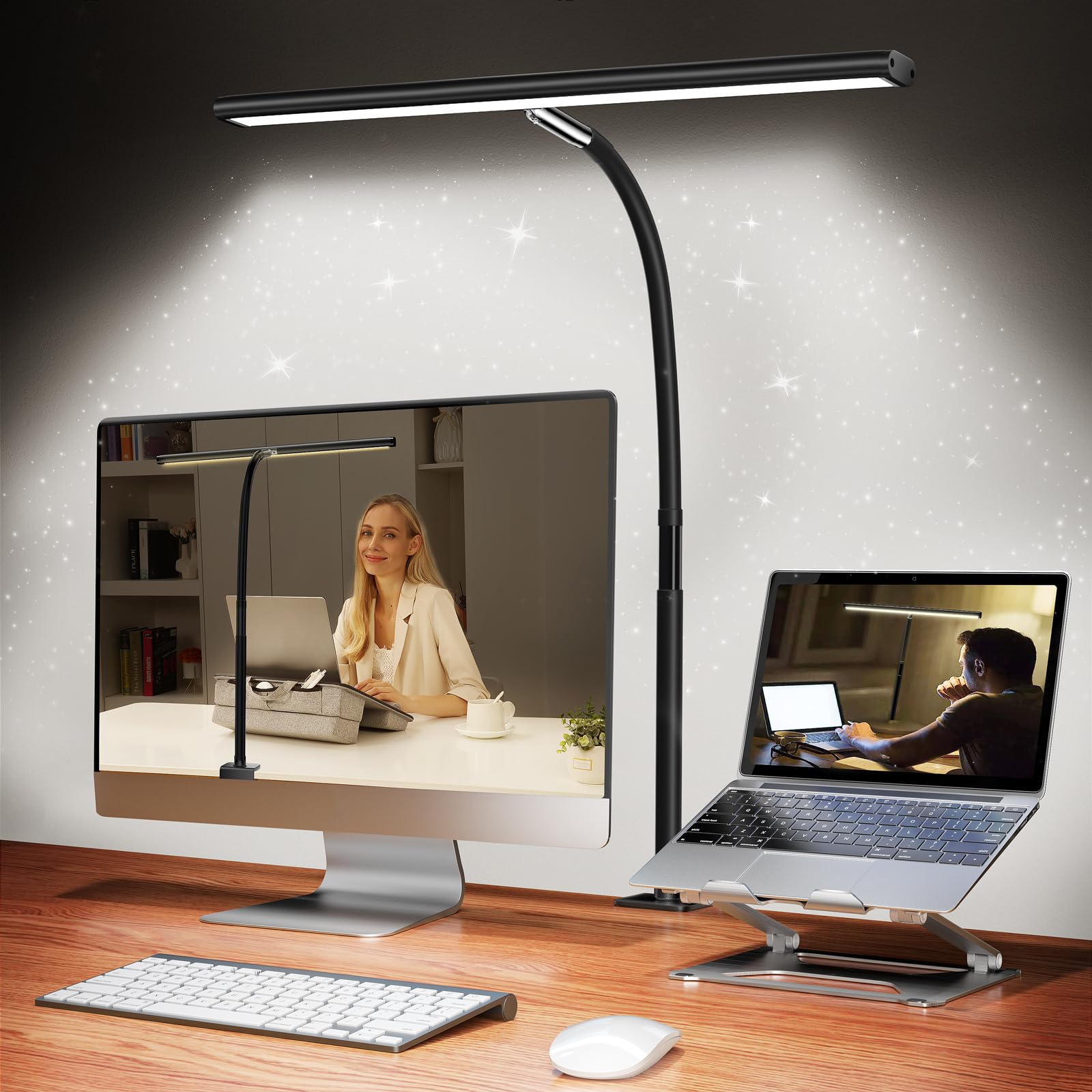
Squinting at a dim screen in a dark room is a recipe for a 4:00 PM headache. Most office lamps take up a quarter of your desk with a bulky base; the Airlonv clamps to the edge, reclaiming that space for your actual work. It’s not just a light—it’s an eye-care tool that lets you shift from searchlight mode for reading to sunset mode for evening wind-downs, reducing the blue light that ruins your sleep cycle.
It beat out traditional base-standing lamps by being more adaptable to different desk setups. Because it clamps to the edge, you have more room for your keyboard, mouse, and coffee mug.
Pros
- Saves massive amounts of desk space.
- Perfect dimming level control.
- Gooseneck holds its position well.
- Warm mode helps prevent eye strain.
Cons
- Requires a solid desk edge to clamp.
- Cable is a bit short for tall desks.
Tech Specs
| Feature | Detail |
|---|---|
Major Features |
|
Interface | Stepless dimming; Adjustable color |
Power Requirement | USB-powered (Includes 10W Adapter) |
Workflow Benefit | 17-inch neck; Clamp-on base |
Hardware Specificity | Inline/Touch controls |
Ideal For
- Late-night workers and bookworms.
- People with very small or crowded desks.
- Hobbyists doing fine manual tasks.
Not For
- Desks with edges thicker than 2 inches.
- Anyone requiring a smart/WiFi light.
Editor's Take
Lighting is the most underrated part of office ergonomics. Being able to shift from focus mode to chill mode with a quick touch is a major lifestyle upgrade.
Livhil Desktop Organizer 4-Tier Desk Organizer
ErGear Standing Desk
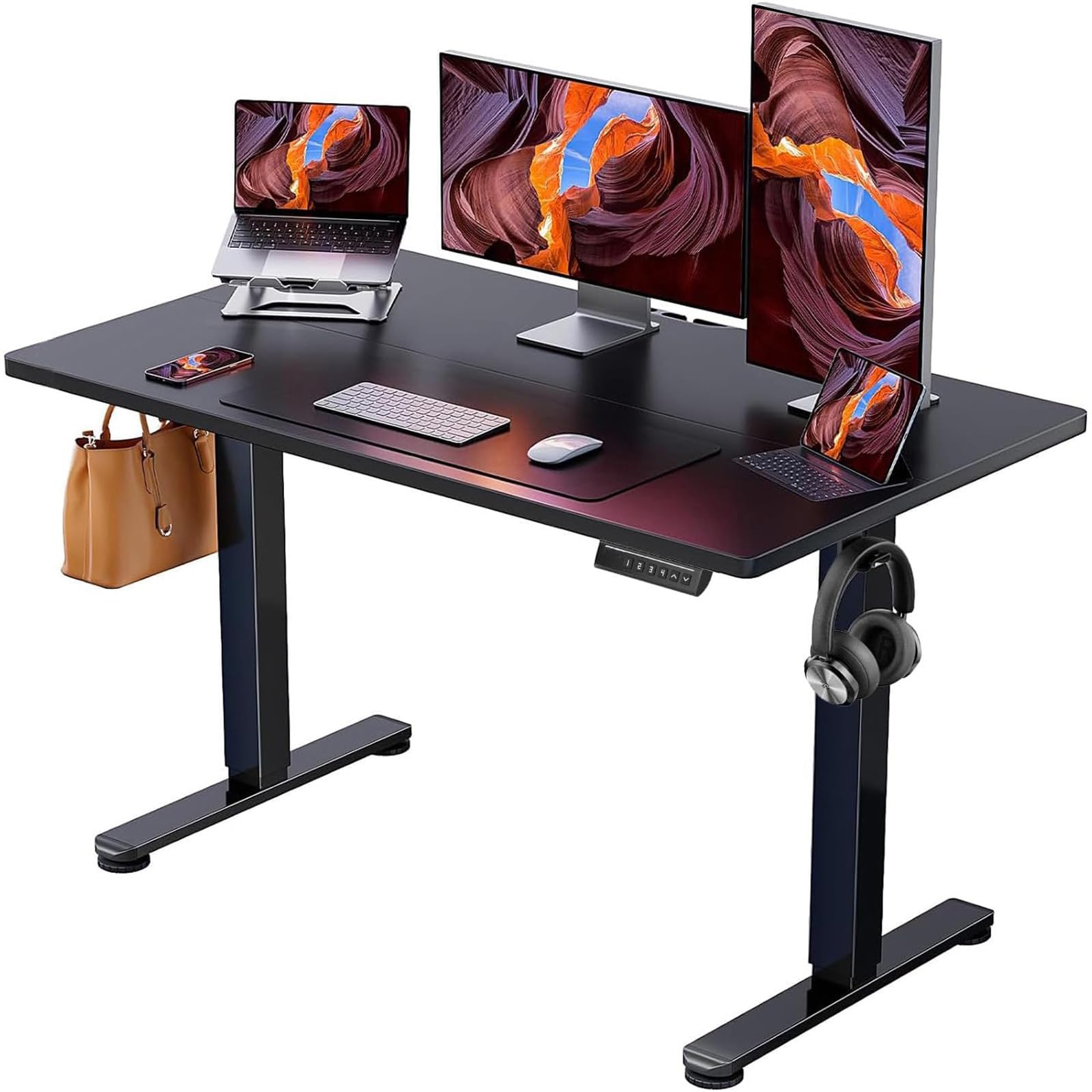
Stagnation is the enemy of productivity. When you sit for ten hours straight, your energy levels bottom out and your posture collapses. The ErGear electric desk changes the physics of your workday. With a smooth, quiet motor and memory presets, you can go from sitting to standing in seconds without interrupting your flow or guessing your height. It’s about keeping your blood moving so your brain stays sharp.
It secured its place in this roundup by balancing stability with price. It doesn't wobble nearly as much as other budget standing desks, and the 48-inch surface is the Goldilocks size for a standard laptop-plus-monitor setup.
Pros
- Motor is surprisingly quiet.
- Memory presets save tons of time.
- Stable even at standing height.
- Simple to assemble for one person.
Cons
- Desktop comes in two pieces.
- Cable management tray is basic.
Tech Specs
| Feature | Detail |
|---|---|
Major Features |
|
Interface | Electric height; Memory presets |
Power Requirement | AC Wall Outlet |
Workflow Benefit | 47.2 x 23.6 inch surface; 43.8 lbs |
Hardware Specificity | Control panel with LED display |
Ideal For
- Full-time remote workers.
- Gamers who want to stretch mid-match.
- Multiple users sharing one workspace.
Not For
- Anyone requiring a built-in drawer.
- Users with extremely heavy PC builds.
Editor's Take
A standing desk changes your energy levels. If you hit that afternoon slump, just hitting the Stand preset can be enough to wake your brain up and finish the day strong.
Product Comparison
| Product | Features | Score | See Price |
|---|---|---|---|
WOLFBOX Duster |
| 92 | |
BestOffice Chair |
| 85 | |
Soundcore Q20i |
| 90 | |
Airlonv Lamp |
| 88 | |
ErGear Desk |
| 91 |
Buyer’s Checklist
| Feature to Consider | Why It Matters |
|---|---|
Available Depth | Measure your desk edge for clamp-style lamps and monitor mounts to ensure they’ll fit. |
Cable Paths | Count your devices before buying a desk to see if you need extra cable management trays. |
Wall Proximity | Standing desks need a small gap from the wall to avoid scraping during height changes. |
Back Height | If you're over 6 feet tall, prioritize high-back chairs over mid-back budget models. |
Ecosystem Check | See if your headphones have app support for firmware updates and EQ tuning. |