Beyond the Spec Sheet: The True Cost of Convenience
Ditching an analog deadbolt for a fingerprint smart lock means trading a solid piece of brass for internal motors, battery management, and network protocols. While modern biometric sensors are highly responsive, going keyless introduces necessary technical tradeoffs.
A sleek design means nothing if a network outage or a dead battery leaves you locked out in the rain. A smart lock is only as good as its fail-safes. Because of this, we evaluated these contenders not just on raw sensor speed, but on ecosystem compatibility—specifically whether they require a separate bridge or connect directly to a standard router—and long-term power management.
Our primary focus is how each device handles daily friction and worst-case scenarios, from Wi-Fi battery drain and environmental interference to localized storage versus cloud subscriptions. True convenience does not involve compromising the reliability of your front door.
Note: All models on this list require replacing your entire deadbolt assembly. If you rent and cannot change your exterior hardware, you will need to look at interior-only retrofit locks instead like the August Smart Lock which is our choice.
Top Picks
| Category | Lock Model | CURRENT PRICE |
|---|---|---|
| Best Overall | Wyze Auto-Lock Bolt | SEE PRICE |
| Best Value | TP-Link Tapo Smart Door Lock | SEE PRICE |
| Best Premium Option | eufy Video Smart Lock E330 | SEE PRICE |
| Best for Smart Home Integration | Aqara Smart Lock U100 | SEE PRICE |
| Best for Versatility | ULTRALOQ Bolt Fingerprint Smart Lock | SEE PRICE |
Quick Comparison: Specs at a Glance
| Lock Model | Connectivity Protocol | Power Source | Data Storage |
|---|---|---|---|
| Wyze Auto-Lock Bolt | Bluetooth Only | 4 AA Batteries | Local Hardware |
| eufy Video Smart Lock E330 | Wi-Fi (Built-in) | Rechargeable Battery | Local SD Card (No Fees) |
| TP-Link Tapo DL110 | Wi-Fi / Bluetooth | Rechargeable Battery | Cloud / App |
| Yale Assure Lock 2 Touch | Wi-Fi (via Module) / Bluetooth | 4 AA Batteries | Cloud / App |
| ULTRALOQ Bolt | Wi-Fi (Built-in) | 8 AA Batteries | Cloud / App |
| Aqara Smart Lock U100 | Zigbee / Thread (Matter) | 4 AA Batteries | Local Hardware / HomeKit |
Wyze Auto-Lock Bolt

The Wyze Auto-Lock Bolt is a budget-first deadbolt replacement that prioritizes raw speed over broad connectivity. At roughly $70, it features one of the fastest fingerprint sensors in its price bracket, clocking in at 0.5 seconds.
However, there is a technical tradeoff: this is a Bluetooth-only lock. Without a separate gateway, you cannot manage codes or check logs unless you are physically within 30 feet of the door. It is a localized solution for users who want to ditch physical keys without paying a premium for remote Wi-Fi access.
What People Say
Users generally praise the hardware’s responsiveness and the straightforward 15-minute installation process, though long-term reliability often depends on your environmental conditions.
Love Wyze products. Extremely good quality for a low price. I replaced the existing deadbolt with the keyless entry in less than 15 minutes. Extremely easy to install. Love the app on the phone and easy programming. You are able to program the thumb print to multiple people. Everyone in the family can access the door just with a fingerprint. Highly recommend this product.
– Mary Scherkenbach
Wyze has really made a great product. This lock really makes it easy to go in and out of your house. The best feature is the fingerprint reader. I suggest you set it up for at least two fingerprints for each person. The auto-relock feature is a favorite of mine. I have recommended this product to several of my friends.
– Barbara French
The Technical Breakdown
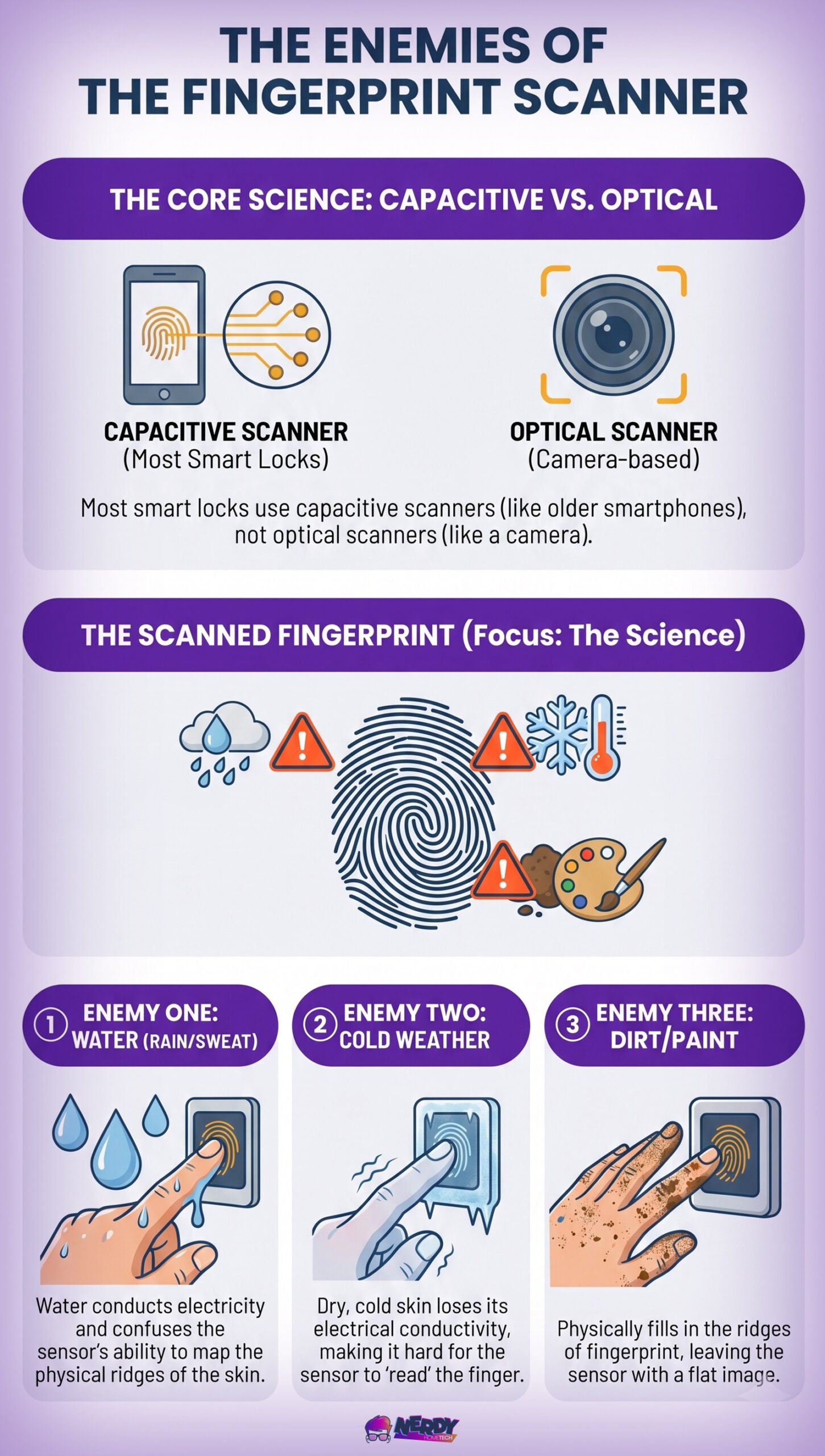
- Sub-Second Recognition: Snappy capacitive sensor, though it will occasionally fail if your hands are wet or pruned.
- Data Sovereignty: Stores up to 50 fingerprints strictly on the local hardware.
- Anti-Peep Keypad: Enter decoy digits before or after your actual code to foil shoulder-surfers.
- Standard Retrofit: Fits most standard 2 1/8″ bore holes without requiring additional door frame drilling.
The Reality Check
This isn’t the lock for a landlord or someone needing to let a contractor in from the office. Because it lacks native Wi-Fi, you must be physically present to update user permissions. It’s a hardware-heavy, software-light choice that trades smart cloud features for local reliability.
eufy Video Smart Lock E330

The eufy Video Smart Lock E330 attempts to solve a congested front porch by rolling a fingerprint lock, 2K camera, and video doorbell into a single, somewhat bulky housing. The standout feature here isn’t just the hardware integration; it’s the local storage.
Unlike competitors that push you into monthly subscription traps for video history, eufy relies on a local SD system. Because it runs an active camera and native Wi-Fi, it requires a massive, proprietary rechargeable battery. You will be trading the sleekness of a standard deadbolt for heavy-duty utility.
What People Say
Users appreciate the consolidated hardware, noting that it simplifies their entryway. However, the heavy battery draw means you will be taking the battery pack out to charge more frequently than a standard lock.
We’ve wanted a video doorbell for years but didn’t want to pay for the expensive brand-name one. This lock has a fingerprint keyless entry and is amazing! As a parent, it makes getting into the door after school easy and so much safer. The videos store locally, the alerts are quick, and you can even monitor it live.
– Sarah B.
I chose this Eufy door lock because of its top rating from Consumer Reports. The installation was quick and painless, and there are so many ways to open this lock. The event log records exactly who entered and when, and the video quality is fantastic. Plus, there’s no ongoing subscription required, which is a huge plus.
– H. J. Matthews
The Technical Breakdown
- No Cloud Fees: Video is processed and stored locally, protecting both your privacy and your wallet.
- High-Drain Wi-Fi: Built-in Wi-Fi and 2K video monitoring will drain the battery significantly faster than a basic Zigbee lock.
- Consolidated Hardware: Removes the need for a separate Ring or Nest doorbell.
- Heavy Footprint: Requires careful installation; older or misaligned doors may struggle under the extra hardware weight.
The Reality Check
This is for the homeowner who wants maximum surveillance at the point of entry without paying a monthly ransom for their own data. Just be prepared for downtime when that large battery inevitably needs to hit the charger.
- Built-in 2K video
- Many unlock options
- Local storage support
- Huge battery handles 2K video drain
- Fast fingerprint reader
- Large indoor unit
- Price is fairly high
- No Matter support
- Setup can take time
- App alerts can lag
TP-Link Tapo Smart Door Lock DL110

The TP-Link Tapo Smart Door Lock DL110 is a solid entry for users already invested in the Kasa/Tapo smart home ecosystem. It steps away from standard AA batteries, opting instead for a proprietary rechargeable power block. While this saves money on disposable batteries, it introduces a practical tradeoff: when the battery needs charging, your lock is offline unless you purchase a secondary hot-swap battery.
Fortunately, TP-Link included an external USB-C port at the bottom of the keypad, allowing you to “jump-start” the lock with a power bank if you ever get locked out with a dead battery.
What People Say
Users highlight the clean aesthetics and the USB-C emergency port as major wins. The integration into the Tapo app is highly rated by existing TP-Link camera users.
I replaced another brand of similar type lock that was powered by 4 AA batteries that had to be replaced every two weeks. I’ve had this installed for six weeks now and it was easy to install, works great with the fingerprint reader, manual PIN code or app and the batteries are still at 100%. I will save enough in battery costs this year to pay for the cost of it.
– Amazon Customer Rick
I have tested and used smart locks from all of the major manufacturers and this is the best one I have ever come across. I love the TP-Link /Kasa products in general and this lock integrated perfectly into the product line. No detail was missing in the design of the lock. A clean look, Rechargeable battery, USB-C for external power if the battery dies, a hidden keyhole behind a door bell, chamfered edges on the deadbolt to reduce jamming and a good user interface.
– Neptune
The Technical Breakdown
- USB-C Emergency Power: A crucial failsafe that allows you to power the lock externally if the internal battery dies.
- Ecosystem Dependent: Shines brightest if you are already using Tapo cameras and smart plugs.
- Chamfered Deadbolt: The physical deadbolt edge is tapered, which reduces the chance of the motor jamming on a misaligned strike plate.
- Rechargeable Downtime: You will experience lock downtime while the proprietary battery is plugged into the wall.
The Reality Check
If you hate buying AA batteries and already use the Tapo app, this is a highly logical addition to your smart home. Just keep a portable power bank in your car or garage in case you ignore the low-battery warnings for too long.
- Affordable price
- Built-in Wi-Fi
- Easy to install
- Auto-lock feature
- Clear app controls
- No Matter support
- No fingerprint unlock
- Basic design
- Needs app for setup
- Lock goes offline during charging
Yale Assure Lock 2 Touch Deadbolt

The Yale Assure Lock 2 Touch Deadbolt leans heavily into modular premium hardware. Yale’s approach is unique: the base lock operates on Bluetooth, but you can plug in a specific module (Wi-Fi, Z-Wave, or Matter) depending on your smart home backbone. This flexibility is excellent for advanced users, but there is a harsh reality to the Wi-Fi module specifically: it is notorious for eating through 4 AA batteries in a matter of months.
If you rely heavily on the Auto-Lock feature, ensure your door closes perfectly flush every time; otherwise, the motor will constantly grind and fail to engage, draining power even faster.
What People Say
Users appreciate the high-end build quality and the DoorSense technology (which tells you if the door is actually closed, not just locked). However, complaints about Wi-Fi module battery life are common.
I recently bought and installed two Yale Assure Lock 2 Touch door locks. The fingerprint access method is great and what everyone in my family prefers to use. The touch entry is amazing; you just have to touch your finger on the fingerprint reader and the lock opens instantly. Easy and convenient.
– Farragut’s Order</p
The Technical Breakdown
- Modular Connectivity: Upgradeable network modules mean you aren’t locked into one protocol if you switch from Wi-Fi to a Z-Wave hub later.
- DoorSense Sensor: A secondary magnetic sensor detects if the door is left ajar, preventing the deadbolt from deploying into thin air.
- Battery Drain: The Wi-Fi module variant requires frequent battery swaps compared to the Bluetooth or Z-Wave versions.
- Key-Free Design: Absolute reliance on the fingerprint/keypad. If the hardware fails completely, your backup is a 9V battery jumpstart, not a physical key.
The Reality Check
You are paying a premium for Yale’s trusted name in lock hardware and a sleek, low-profile aesthetic. It is highly recommended to pair this with a Z-Wave or Matter module via a hub, rather than relying on the battery-killing Wi-Fi module.
- Fast fingerprint unlock
- Slim modern design
- Good app support
- Easy keypad access
- Works with many platforms
- Wi-Fi module costs extra
- Battery life can vary
- Price is fairly high
- No physical keyway
- Fingerprint setup takes time
ULTRALOQ Bolt Fingerprint Smart Lock

The ULTRALOQ Bolt Fingerprint Smart Lock attempts to solve the built-in Wi-Fi battery drain issue with brute force: it requires a massive 8 AA batteries. While this design choice allows for native Wi-Fi without needing a secondary wall plug hub, it means every battery swap will cost you.
It offers native integration with Siri, Alexa, and Google Assistant straight out of the box, making it highly accessible for standard smart home users who don’t want to mess with Zigbee or Thread networks.
What People Say
Users praise the remote access reliability and the physical build. The weather resistance holds up well, though changing 8 batteries at once is frequently cited as a minor annoyance.
I own 3 Ultraloq deadbolts, this being the most recent one. I have them on my front and back door and my garage door for easy access. The locks are used in Vermont so we have well below zero as well as close to 100 in summer and have no issues. Wifi as well as remote access via the app works great.
– Schmedy
The Technical Breakdown
- Native Wi-Fi: Connects directly to your 2.4GHz router without requiring a bridge, though this sacrifices local control if your internet goes down.
- 8-Battery Capacity: Provides up to 10 months of life, but replacing 8 AAs is more expensive and environmentally taxing over time.
- Physical Key Backup: Includes a hidden keyhole, providing a mechanical failsafe that pure “touch” models lack.
- Temperature Tolerance: Hardware handles severe cold well, though standard alkaline batteries will suffer voltage drops in sub-zero climates; lithium AAs are recommended.
The Reality Check
This is a workhorse lock. It isn’t the sleekest on the market, but it combines native remote access, voice assistant compatibility, and a mechanical key override into a very practical, if battery-hungry, package.
- Fast fingerprint unlock
- Affordable price
- Easy DIY install
- Simple keypad entry
- Auto-lock feature
- No built-in Wi‑Fi
- No Matter support
- Basic app features
- Battery changes needed
- Bulky interior unit
Aqara Smart Lock U100

The Aqara Smart Lock U100 is arguably the most technically advanced lock on this list, heavily leaning into the Apple HomeKit ecosystem. Its standout feature is Apple Home Key support, allowing you to unlock the door by simply tapping your iPhone or Apple Watch to the keypad, even if the device’s battery is dead.
However, to unlock its full potential—including remote access and Matter compatibility—you are absolutely required to purchase a separate Aqara Zigbee 3.0 Hub. Without the hub, it functions purely as a localized Bluetooth and HomeKit lock.
What People Say
Tech enthusiasts rave about the Home Key integration and the local, rapid response times via Zigbee. Some users note the physical keypad is slightly cramped for larger hands.
The Aqara Smart Lock U100 is by far the best smart lock I’ve ever used! It combines top-notch security with cutting-edge technology, all wrapped up in a sleek design that looks great on my door. Setup was surprisingly straightforward, and it works flawlessly with Apple HomeKit, which means I can lock and unlock my door using Siri, the Home app, or even automations.
– Jukens
The Technical Breakdown
- Apple Home Key: Near Field Communication (NFC) unlocks the door instantly via your Apple wallet.
- Matter over Thread / Zigbee: Highly efficient communication protocols that preserve battery life much better than Wi-Fi.
- Hub Requirement: Remote access for Android/Alexa users requires a separate Aqara hub purchase (like the E1 or M2).
- IP65 Weatherproof: A robust build, though capacitive fingerprint scanners across all brands still falter with excess moisture.
The Reality Check
If you are heavily invested in the Apple ecosystem or operate a localized Zigbee/Home Assistant network, this is the gold standard. If you just want a simple lock that connects to your router out of the box, the added hub requirement makes this unnecessarily complex.
- Needs hub for Matter
- Android support is weaker
- Battery life can vary
- Large interior housing
- Matter requires separate Aqara hub