
Most “beginner guides” for smart home security read like they were written by an ADT salesperson. They promise “peace of mind”—an empty marketing buzzword designed to sell hardware—while ignoring the monthly subscription traps, the privacy nightmares, and the fact that Wi-Fi has some real vulnerabilities when deployed alone.
If you want a real security strategy—not just a collection of expensive plastic toys—you need to look past the marketing. This is the reality of building a smart security perimeter in an ecosystem designed to lock you in.
The “Camera Tax” & Contract Traps:
Understanding Total Cost of Ownership (TCO)
The biggest mistake beginners make is looking at the price tag on the box. That $80 camera often hides a $10/month subscription hiding underneath.
The Subscription Trap:
Many brands—Ring and Arlo especially—lock basic features like person detection or storing more than a few hours of footage behind recurring paywalls. Over five years, you’re looking at $600+ in subscription costs.
The Monitoring Contract Trap:
Cloud storage fees are bad, but legacy alarm companies are worse. Beware of traditional alarm companies pushing 36-month lock-in contracts with exorbitant cancellation fees. For a DIY setup, always look for month-to-month, contract-free monitoring options.
Insurance ROI and Asset Management:
Security isn’t strictly a cost center. A professionally monitored system can act as a yield-generating asset, netting up to a 20% discount on homeowners insurance premiums. Furthermore, establishing local, high-quality video logs acts as proactive asset management, providing indisputable evidence that speeds up claims and prevents refusals.
The Local Storage Alternative:
Look for brands that support local storage via a Network Video Recorder (NVR). Just understand the physical trade-off: an SD card tucked inside an exterior plastic camera is a glaring vulnerability. If a thief rips the camera off the wall, your evidence goes with them. True local storage requires a hidden, centralized NVR inside the house.
The ONVIF/RTSP Escape Hatch:
If a camera doesn’t support ONVIF protocols or expose an RTSP stream, it’s permanently locked to its own app. If it does, you can route the video into powerful third-party software like Blue Iris or Frigate. This is your ultimate defense against ecosystem lock-in.
DIY installations are growing at a rate of 15.8%, as users move away from legacy 36-month contracts.
Protocols Matter: Why Wi-Fi Alone Is a Weak Link
Most consumers default to Wi-Fi because it’s simple. It’s also the least reliable protocol for critical security cameras.
Congestion and Range:
Every smart bulb, laptop, and phone competes for bandwidth. A jammed network adds latency to alerts right when you need them most.
Network Segmentation & Router Hygiene:
Hardware isn’t your biggest threat—your network is. Start by changing your router’s default admin password and upgrading the encryption setting to WPA3 (or at least WPA2). Next, segment your network.
Putting a $30 smart camera on the exact same Wi-Fi network as your personal laptop or NAS drive is a massive risk. If your router supports it, isolate your security devices onto a separate “Guest” network or a dedicated VLAN to keep cheap IoT gadgets away from your sensitive personal data.
Wi-Fi Vulnerabilities:
Can Wi-Fi cameras be knocked offline with cheap deauthentication jammers? Yes. Relying on 2.4GHz Wi-Fi for your primary perimeter defense is a risk.
PoE:
The Unjammable Baseline: Power over Ethernet (PoE) delivers both power and data through one cable, eliminating wireless jamming entirely. It’s the most reliable option for hardwired installations.
ISP Dropouts & Cellular Backup:
What happens when a thief cuts your coaxial cable? High-end DIY hubs offer cellular/LTE backup modules. Without dual-path communication, a severed internet line renders cloud-based alerts completely dead.
The Power Problem: Batteries vs. Hardwiring
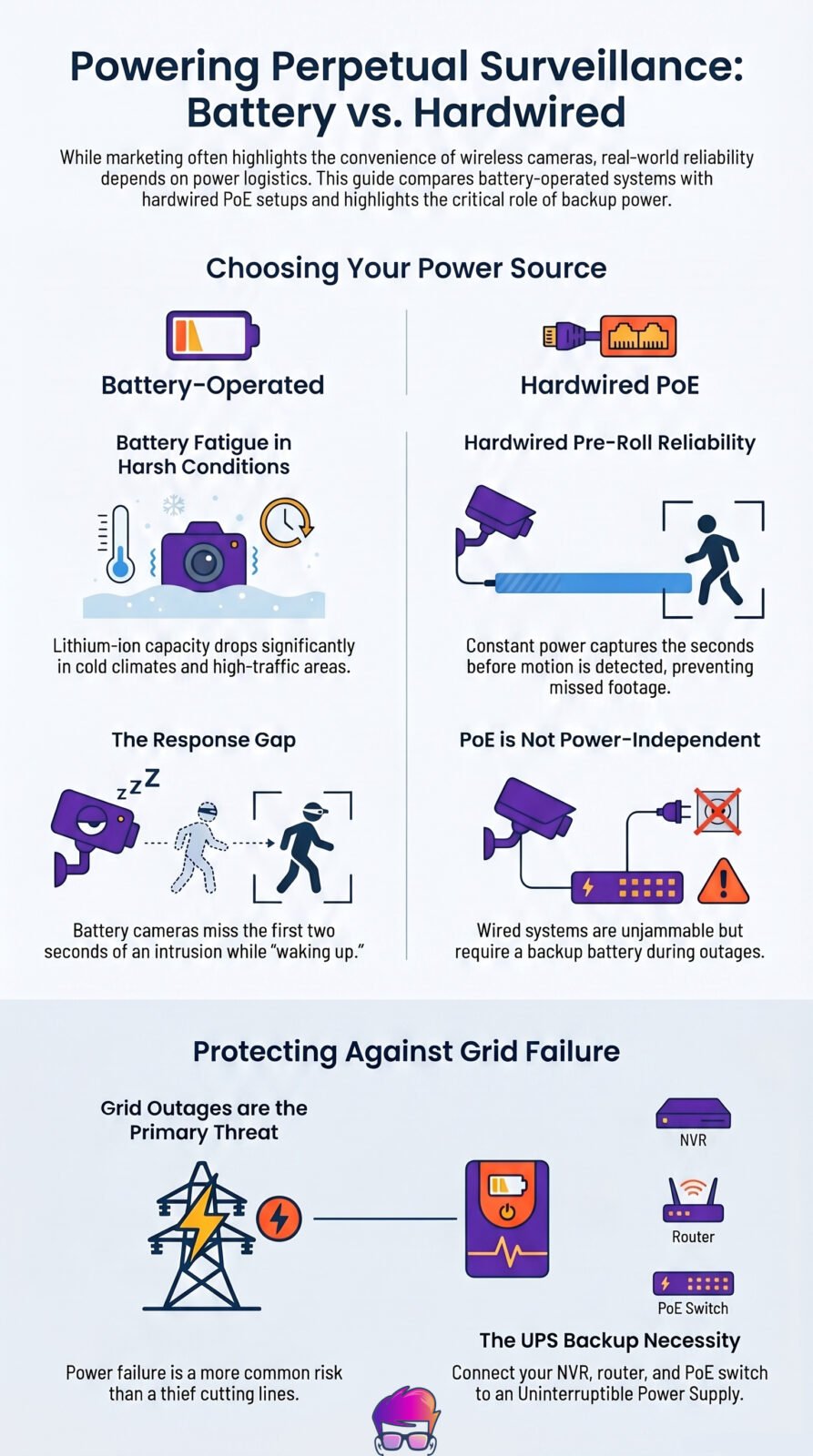
Marketing images show sleek, wire-free cameras. They don’t show you climbing a ladder every three months to recharge them in the snow.
Battery Fatigue:
In cold climates, lithium-ion battery capacity craters. In high-traffic areas, you’ll drain a battery in weeks, not months.
Hardwired Reliability:
Constant power enables pre-roll video—recording the seconds before motion is detected. Battery cameras wake up on motion, so they miss the first two seconds of an intrusion.
The Power Outage Reality (UPS Dependency):
While a thief cutting power at your exterior breaker box is a rare, targeted threat, grid outages aren’t. PoE might be unjammable, but it’s useless if your house loses power. You must plug your NVR, router, and PoE switch into an Uninterruptible Power Supply (UPS) battery backup.
Privacy: Who Is Watching the Watchers?
Smart home security requires trading privacy for convenience.
Law Enforcement Access:
Amazon (Ring) and Google (Nest) have documented histories of sharing footage with law enforcement without a warrant under “emergency circumstances.”
The Telemetry Trap:
If the hardware is dirt cheap, your data is the product. Many budget smart home apps act as data brokers, harvesting telemetry—like when you leave for work and what your home network looks like—to sell to third parties.
Firmware Rot, 2FA, & App Permissions:
The easiest way to get hacked isn’t a zero-day exploit; it’s leaving your password as “admin.” You must use unique credentials for every single device and mandate Two-Factor Authentication (2FA) on your accounts. Skip 2FA, and you’re one database breach away from someone watching your living room.
While you’re in the settings, audit your app permissions—a smart plug app does not need access to your phone’s microphone. Finally, patch your firmware regularly to prevent code rot.
Your Privacy Action Plan:
Check Storage Default:
Log into your camera’s app and find the storage settings. Verify if your footage is defaulting to “Cloud Storage” or “Local/SD Card.” If it’s cloud, make sure you understand the retention policy.
Verify Remote Encryption:
Check the manufacturer’s security documentation for “End-to-End Encryption” (E2EE). If it doesn’t explicitly state E2EE, assume the company holds the decryption keys and can view your footage.
Audit Your Passwords:
Stop using the same password for your Wi-Fi, NVR, and individual cameras. Use a password manager to generate and store a 16-character, completely random, unique password for every single piece of hardware on your network.
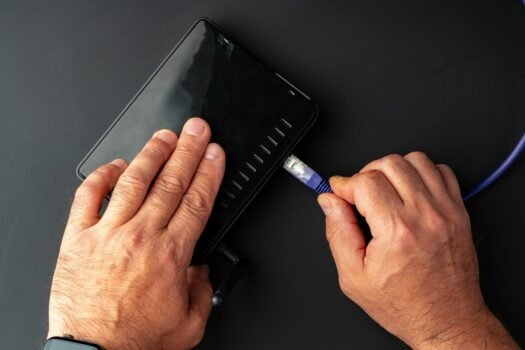
New Router Setup Tips: 10 Things to Do To Secure Your Network After Buying a New Router
System Reliability and Maintenance
A security system only works if you actually pay attention to it.
AI Filtering and Future Threats:
Cheap motion sensors trigger on spiders and swaying trees. Look for cameras with on-device AI to distinguish humans from vehicles so you aren’t bombarded with false alerts. Keep in mind that as AI gets smarter, so do the threats—security researchers are currently monitoring how deepfakes and adversarial AI might eventually trick these systems.
While that’s mostly a theoretical concern to watch today, having a system with enough local processing power to handle future software updates is a smart long-term bet.
The Peel-and-Stick Fallacy:
DIY systems push 30-minute setups using adhesive command strips. This is a massive physical vulnerability. Adhesives lose grip over time due to humidity and temperature fluctuations, causing sensors to crash to the floor at 3 AM and trigger false alarms, or worse, leaving a window completely unprotected. Always use mounting brackets and screws.
Analog Maintenance:
AI can filter out a spider notification, but it can’t see through a physical web covering the lens. Trim overgrown foliage blocking PIR motion sensors and clean IR glare from dirty lenses.
Building Your First Setup: Where to Actually Start
Don’t buy a 10-piece kit from a big retailer. You’ll end up with gadgets that don’t talk to each other.
Start with a Hardwired Smart Doorbell:
This is your anchor. Hardwired models are infinitely more reliable than battery-powered alternatives.
Add Entry Sensors (Doors and Windows):
For sensors, you want Zigbee or Z-Wave, not Wi-Fi. They use a “mesh network”—meaning every hardwired device acts as a repeater.
The Channel Collision Fix:
Standard Wi-Fi routers often crowd channels 1, 6, and 11, which heavily overlap with many Zigbee channels. If you’re using Zigbee, your sensors keep dropping offline, and your router supports manual channel assignment, try moving your Zigbee coordinator to channel 25 or 26 to get out of the Wi-Fi traffic jam.
Zigbee
Z-Wave / Z-Wave LR
Wi-Fi
Choose Your Hub Carefully: Avoid locking yourself into one manufacturer's ecosystem. A dedicated hub like Home Assistant or Hubitat lets you mix and match the best sensors and cameras from different brands while keeping your data local.
The Brands Worth Considering
| Brand | Best For | Cost | Connectivity & Backup |
|---|---|---|---|
| SimpliSafe | Small to mid-size homes wanting simple, contract-free security. | $$$$ | Dual-path Wi-Fi with cellular and 24-hour battery backup. |
| Ring | Condo/apartment dwellers heavily invested in Alexa and Ring cameras. | $$$$ | Z-Wave sensors with Wi-Fi/Ethernet hub and cellular backup. |
| Arlo | Smart-home geeks who hate sensor clutter but want deep coverage. | $$$$ | Wi-Fi connected keypad hub with multi-function wireless sensors. |
| Wyze | Budget-minded renters scaling up from basic Wi-Fi cameras. | $$$$ | Wi-Fi dependent hub with proprietary wireless sensors. |
| Abode | Tinkering smart-home owners wanting a central hub for deep automations. | $$$$ | Multi-protocol hub (Z-Wave, Zigbee, HomeKit) with cellular backup. |
| OSI | Larger homes wanting a traditional tablet-style panel without contracts. | $$$$ | Wi-Fi connectivity paired with 4G SIM SMS/cellular backup. |
| Tolviviov | Renters wanting budget, no-fee basic door/window alerts. | $$$$ | 2.4 GHz Wi-Fi only with no cellular backup option. |
Human Factors: Making the System Usable for Everyone
A technical system fails if the humans living in the house hate it.
Security enthusiasts often ignore the “Wife/Husband/Roommate Acceptance Factor” (WAF). If your DIY system requires opening an app, navigating two menus, and typing a code just to let the dog out at 6 AM, it won’t be used. A system that is too annoying to arm will simply be left disarmed. Ensure your setup includes simple, analog fallbacks like physical keypads or automated geofencing.
Final Strategy: Building Your Perimeter
Smart home security isn’t a “set it and forget it” product. It’s a resilient, layered perimeter.
The industry is rapidly shifting toward the adoption of Thread/Matter for better interoperability. Looking further ahead, advanced concepts like post-quantum encryption are theoretical considerations worth watching, though they are years away from mattering to your average doorbell camera.
If your entire system depends on a single cloud server, a 2.4GHz Wi-Fi connection, and grid power, you have an expensive convenience tool. If it’s hardwired, isolated on a separate network, backed up by a UPS, and easily operated by everyone in the house, you’ve built a perimeter actually worth defending.
Nerdy Home Tech's Recommendations
SimpliSafe
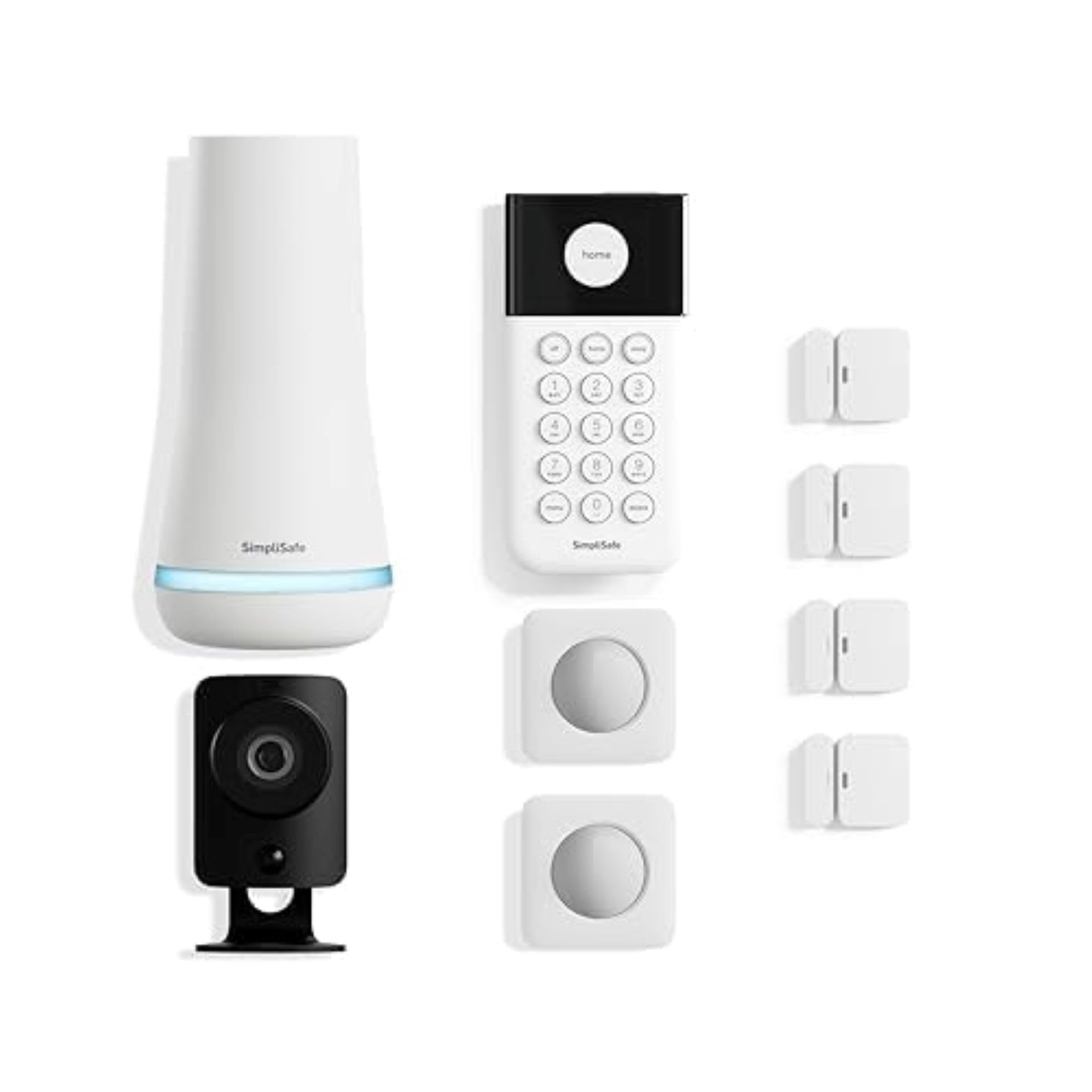
SimpliSafe 8 Piece Wireless Home Security System
SimpliSafe’s 8‑piece kit is basically “alarm system on easy mode” — you get a base station, wireless keypad, four entry sensors, and a motion sensor that are actually designed for normal humans to install, plus optional 24/7 monitoring with no scary long‑term contracts.
The base station rides out internet or power issues with dual Wi‑Fi and cellular plus a 24‑hour backup battery, so it is a lot harder to accidentally leave your house unprotected.
Pros
- Dual Wi‑Fi + cellular path
- Strong DIY‑friendly hardware
- No required long contracts
- Solid value monitoring plans
- Simple, clean app UX
Cons
- Limited deep integrations
- Extra sensors add cost
- No built‑in camera hub
- Pro install is optional upsell
- No native HomeKit support
Tech Specs
| Feature | Details |
|---|---|
| Kit Components | Base station, wireless keypad, 4 entry sensors, 1 motion sensor, 1 panic button (typical 8‑piece bundle). |
| Connectivity | Dual‑path alerts via built‑in Wi‑Fi plus cellular backup. |
| Power & Backup | Base station has ~24‑hour battery backup for power outages. |
| Monitoring Options | Optional 24/7 professional monitoring or self‑monitoring via app alerts. |
| Installation | True DIY: peel‑and‑stick sensors, app‑guided setup in under an hour. |
| Smart Home Support | Works with Alexa and Google Assistant for arming and status checks. |
| Standout Spec | Smash‑safe keypad and cellular backup help get an alarm out even if the keypad is attacked. |
Who Is This For?
This is a great fit if you own (or plan to own) a small to mid‑size home and want something more serious than a few cameras, but you are not interested in old‑school alarm contracts.
Think three‑bedroom house where the four entry sensors cover front and back doors plus a couple of ground‑floor windows, with the motion sensor watching a central hallway.
You arm the system from the keypad as you head out, and if a door opens when it shouldn’t, SimpliSafe pings your phone and, with monitoring enabled, can call in help.
It is especially nice if you want a set‑and‑forget system your less‑techy family members can actually use.
What Makes This Product Stand Out
SimpliSafe stands out for combining real dual‑path communication (Wi‑Fi plus cellular) with a contract‑free monitoring model that feels like a modern subscription instead of a cable‑company‑style commitment.
Among the kits here, it is one of the most proven options, refined over multiple hardware generations while still being approachable for first‑time DIY users.
Ring Alarm 5‑Piece Kit (2nd Gen)
Ring’s 5‑piece kit is the obvious pick if you are already running Ring doorbells or cameras and want everything under one app.
You get a base station, keypad, one contact sensor, one motion detector, and a range extender — just enough to lock down a smaller space without feeling overbuilt.
Pros
- Tight Ring ecosystem support
- Excellent Alexa integration
- Easy, clean DIY setup
- Mature, polished mobile app
- Scales well with add‑ons
Cons
- Works best with Ring cams
- Limited outside Alexa
- Monitoring adds monthly fee
- Starter kit is light on sensors
- No native HomeKit option
Tech Specs
| Feature | Details |
|---|---|
| Kit Components | 1 base station, 1 keypad, 1 contact sensor, 1 motion detector, 1 range extender. |
| Connectivity | Base station connects via Ethernet or Wi‑Fi; sensors use Z‑Wave (up to ~250 ft line‑of‑sight). |
| Power & Backup | Base station and range extender include ~24‑hour backup batteries. |
| Monitoring Options | Optional 24/7 professional monitoring and cellular backup with Ring Protect plans. |
| App & Ecosystem | Full control in Ring app; ties into Ring doorbells and cameras for unified alerts. |
| Smart Assistants | Deep Alexa integration including voice arming and Alexa Guard features. |
| Standout Spec | One of the strongest alarm + video ecosystems in a single app. |
Who Is This For?
This is perfect for condo and apartment dwellers or small homes already rocking a Ring doorbell or a couple of Ring cameras.
A common setup is one contact sensor on the front door, the motion sensor covering the main living area, and Ring video handling eyes on the entry.
When an alarm trips, you get a notification and can jump straight into a live view in the same app.
If you are heavily invested in Alexa, being able to arm/disarm and check status by voice is a nice quality‑of‑life win.
What Makes This Product Stand Out
Ring’s big advantage is ecosystem gravity — it is the only kit here with a massive installed base of compatible cameras, doorbells, and lights all controlled from one app.
If you want your alarm events, camera clips, and doorbell notifications all in one place, Ring makes that happen with almost zero glue‑code effort.
Arlo Home Security System
Arlo’s system is for the “I want fewer boxes on my walls” crowd: each compact 8‑in‑1 sensor can handle motion, open/close, leaks, temp, light, tilt, and even listen for traditional smoke/CO alarms.
The keypad sensor hub doubles as a motion sensor and control pad, tying everything into the Arlo app alongside your Arlo cameras.
Pros
- Super‑versatile 8‑in‑1 sensors
- Minimal hardware footprint
- Great with Arlo cameras
- Flexible monitoring options
- Modern, polished app
Cons
- Best if you own Arlo cams
- Fewer individual sensors
- Heavily cloud‑centric
- Monitoring adds ongoing cost
- No loud base‑station siren
Tech Specs
| Feature | Details |
|---|---|
| Kit Components | 1 keypad sensor hub plus 2 multi‑function 8‑in‑1 sensors. |
| Sensor Functions | Each sensor can detect motion, open/close, leaks, freeze/temperature, tilt, ambient light, and smoke/CO alarm sounds. |
| Connectivity | Keypad hub connects via Wi‑Fi; sensors link wirelessly to the hub. |
| Monitoring Options | Optional 24/7 professional monitoring via Arlo Secure with a trial in many bundles. |
| App & Ecosystem | Managed in the Arlo app; integrates smoothly with Arlo cameras. |
| Smart Assistants | Works with Alexa and Google Assistant through Arlo integrations. |
| Standout Spec | Extremely dense sensing per device, cutting down total hardware count. |
Who Is This For?
This is ideal for smart‑home geeks who hate sensor clutter but still want deep coverage.
Picture a townhome where one 8‑in‑1 sensor by the back door watches for open/close, motion, and leaks near the kitchen sink, while another hangs out by the garage catching tilt, motion, and temperature swings.
The keypad hub lives near the entry as both your control surface and a bonus motion sensor when you walk past.
When anything trips, the Arlo app pulls together notifications and camera views in one place, and monitoring can escalate if you want a full service experience.
What Makes This Product Stand Out
Arlo stands out by stuffing multiple sensing roles into each tiny sensor, something most competitors still solve with a pile of separate devices.
For anyone trying to keep the aesthetic clean while still being nerdy about data, Arlo delivers a high‑signal system with far fewer gadgets stuck to doors and walls.
Wyze Home Security Core Kit
The Wyze Home Security Core Kit is the budget‑friendly “let’s do this without melting the credit card” option, bundling a hub, keypad, motion sensor, and two entry sensors with professional monitoring time baked in.
It plugs into the rest of the Wyze world — cams, climate sensors, leak sensors — so you can slowly level up from bargain cameras to a real alarm system.
Pros
- Very wallet‑friendly price
- Monitoring often included early
- Ties into Wyze cameras
- Easy, quick DIY setup
- Flexible sensor expansion
Cons
- Monitoring is subscription‑only
- Less advanced automation tools
- No all‑in‑one camera hub
- Software polish can vary
- No native HomeKit support
Tech Specs
| Feature | Details |
|---|---|
| Kit Components | Hub, keypad, 1 motion sensor, 2 entry sensors; typically includes a multi‑month monitoring trial. |
| Connectivity | Hub ties into your network and talks wirelessly to Wyze Sense sensors. |
| Monitoring Options | Subscription‑based 24/7 monitoring, often with discounted or free hub on annual plans. |
| Ecosystem | Plays nicely with Wyze cams, climate sensors, and leak sensors. |
| Installation | App‑guided DIY; peel‑and‑stick sensors, ~40‑minute setup for most people. |
| Smart Home Support | Integrates with common assistants through the Wyze app and services. |
| Standout Spec | One of the cheapest paths into a “real” monitored system that still plugs into a bigger ecosystem. |
Who Is This For?
Wyze is made for budget‑minded renters and first‑time buyers who want to step up from “just cameras” without committing to a big‑name alarm bill.
Picture a starter home where two entry sensors cover front and back doors, the motion sensor watches the main hallway, and a couple of Wyze Cams keep visual tabs on key rooms.
You can try full monitoring during the included period, then decide if the monthly cost makes sense for your risk tolerance. If you are already in the Wyze ecosystem, this is an easy add‑on.
What Makes This Product Stand Out
This kit stands out by offering a legit monitored alarm experience at a price point that usually only buys you a single camera from bigger brands.
It is one of the most affordable ways to build a “real” system that still scales into a broader smart‑home setup as you add more Wyze gear.
Abode Iota All‑in‑One Security Kit
The Abode Iota kit is basically a smart‑home brain with a security system built in: a single device packs a 1080p camera, PIR motion sensor, 93 dB siren, and two‑way audio, paired with a mini contact sensor and key fob.
It talks Wi‑Fi, Ethernet, 4G (with plan), plus Z‑Wave and Zigbee, and plays nicely with HomeKit, Alexa, Google, and Abode’s own CUE automation engine.
Pros
- All‑in‑one camera + hub
- Broad automation support
- Native HomeKit support
- Flexible plan options
- Good video quality
Cons
- Hardware pricing creeps up
- App can feel a bit clunky
- Best in smaller spaces
- Add‑ons can get pricey
- Some learning curve
Tech Specs
| Feature | Details |
|---|---|
| Kit Components | 1 Iota hub (camera + motion + siren), 1 mini door/window sensor, 1 key fob. |
| Camera Specs | 1080p HD, 152° field of view, color night vision. |
| Built‑in Security | PIR motion sensor, 93 dB siren, mic + speaker for two‑way audio. |
| Connectivity | Wi‑Fi and Ethernet, plus 4G cellular backup with compatible plan. |
| Smart Home Support | HomeKit, Alexa, Google Assistant, and Abode CUE automations. |
| Monitoring Options | Self‑monitoring, or optional pro monitoring plans with cellular backup. |
| Standout Spec | True all‑in‑one hub that acts as both security system and smart‑home controller. |
Who Is This For?
Iota is built for apartment and small‑home dwellers who want one main device that does almost everything.
Imagine a city condo where Iota lives on a shelf near the front door, watching the entry and living area while a single contact sensor covers the door.
From there, you tie it into HomeKit or Alexa so arming the system can also turn off lights and lock supported smart locks in one shot. It is also a solid “move‑friendly” option since most of your system is literally one box and a couple of sensors.
What Makes This Product Stand Out
Iota stands out as the most smart‑home‑centric kit in the lineup, with a built‑in camera and deep protocol support including HomeKit, which many alarm systems still skip.
If you want your security hub to also be the brains of your automations instead of just an alarm box, Iota is hard to beat among these options.
Abode 3 Piece Wireless Security Kit
The Abode 3 Piece Wireless Security Kit is the “classic” hub‑plus‑sensor starter pack — simple on day one but built to scale.
You get an Abode Security Hub, a mini door/window sensor, and a key fob, with self‑monitoring out of the box and an easy upgrade path to paid monitoring if you want it.
Pros
- Strong hub in a small kit
- No contracts required
- Good long‑term upgrade path
- Alexa/Google friendly
- Often discounted heavily
Cons
- Only one contact sensor
- Needs add‑ons for full cover
- App UX not top‑tier
- HomeKit not on all hubs
- Cellular requires subscription
Tech Specs
| Feature | Details |
|---|---|
| Kit Components | Abode Security Hub, 1 mini door/window sensor, 1 key fob. |
| Hub Specs | Built‑in 93 dB siren, Ethernet + 2.4 GHz Wi‑Fi, battery backup, 4G cellular backup with plan. |
| Monitoring Options | Self‑monitoring, with optional Standard/Pro plans for pro monitoring + cellular backup. |
| Smart Home Support | Alexa and Google Assistant support plus Abode CUE automations (HomeKit support depends on hub model). |
| Installation | DIY, no‑tools install with wireless sensors and app‑guided onboarding. |
| Standout Spec | Powerful hub features (siren, backup, automation) even in the bare‑bones starter kit. |
Who Is This For?
This kit is for DIY‑minded users who want to start minimal and gradually build a more capable system over time.
Imagine a small apartment where one contact sensor covers the front door and the hub handles siren + notifications while you get a feel for the platform.
As your needs grow, you add motion sensors, window contacts, and cameras instead of swapping the whole system. It is a nice base for tinkerers who plan to grow into automation rather than buy it all at once.
What Makes This Product Stand Out
Unlike many “starter” bundles that cheap out on the hub, Abode puts most of the value into the brain of the system, so you are not forced to upgrade the core hardware later.
That makes this 3‑piece kit a stronger long‑term foundation than some low‑end competitors that quickly hit a ceiling.
OSI Alarm System Gen 2 (4G)
The OSI Alarm System Gen 2 feels like a modern take on the classic touchscreen alarm panel: you get an 11‑piece kit with a 7‑inch control panel, multiple motion and contact sensors, a wireless strobe siren, and remote controls.
It is built for free self‑monitoring via the Smart Life app, with optional 24/7 monitoring and 4G SIM support for SMS alerts and backup connectivity.
Pros
- Large, easy‑to‑use touch panel
- 4G SIM backup support
- Free self‑monitoring option
- Loud wireless strobe siren
- Lots of sensors in the box
Cons
- Brand is less mainstream
- Relies on Smart Life app
- 4G requires separate SIM plan
- Pro monitoring limited by region
- Fewer deep smart‑home hooks
Tech Specs
| Feature | Details |
|---|---|
| Kit Components | 7" touchscreen control panel, 2 motion sensors, 5 contact sensors, wireless strobe siren, 2 remote controllers (11‑piece set). |
| Interface | Large color touchscreen with guided setup wizard and SOS/emergency controls. |
| Connectivity | Wi‑Fi connectivity plus 4G SIM support for SMS alerts and remote notifications. |
| Power & Backup | Extended ~24‑hour backup battery in panel; long‑life batteries in wireless sensors. |
| Monitoring Options | Free self‑monitoring via Smart Life app; optional 24/7 professional monitoring in supported regions. |
| Installation | DIY setup with peel‑and‑stick sensors; panel can be wall‑mounted or placed on a stand. |
| Standout Spec | One of the only DIY kits offering a big tablet‑style panel plus 4G connectivity at this price. |
Who Is This For?
OSI Gen 2 is a solid pick if you want the feel of a “real” alarm panel with a big screen and local controls, but you still want to install it yourself and avoid forced subscriptions.
Think larger homes where the panel lives by the main entrance, motion sensors cover traffic zones, and contact sensors protect a mix of doors and high‑risk windows.
In areas with spotty internet, the 4G SIM support and strong backup battery make this especially attractive so alerts do not rely solely on your router staying up.
It offers a lot of traditional alarm feel without the usual alarm‑company baggage.
What Makes This Product Stand Out
OSI stands out by bringing a feature‑rich, tablet‑style control panel and optional 4G connectivity into a fully DIY kit, something bigger brands usually reserve for pro installs or their highest tiers.
If you want that “alarm company panel” experience without signing a multi‑year contract, this is the closest match in the roundup.
Tolviviov WiFi Door Alarm System
The tolviviov WiFi Door Alarm System is a “budget but surprisingly capable” 8‑piece kit with an alarm siren hub, five door/window sensors, and two remote controls.
It runs over 2.4 GHz Wi‑Fi, uses a simple app for configuration, and does not force any monthly fees, which is rare at this price point.
Pros
- Extremely budget‑friendly
- No mandatory monthly fees
- Good number of sensors
- Alexa/Google voice control
- Easy peel‑and‑stick install
Cons
- 2.4 GHz Wi‑Fi only
- No pro monitoring option
- App and UX are basic
- Brand support is limited
- Hub battery is short‑term
Tech Specs
| Feature | Details |
|---|---|
| Kit Components | 1 alarm siren hub, 5 door/window sensors, 2 remote controls (8‑piece kit). |
| Connectivity | 2.4 GHz Wi‑Fi only; pairs with a Smart Life/Tuya‑style app for control. |
| Power & Backup | Hub stays plugged into AC with an internal battery offering up to around 8 hours of backup. |
| Monitoring Model | No required subscription; app‑based push notifications and local siren alerts. |
| Smart Home Support | Supports Alexa and Google Assistant for basic voice arming/disarming and modes. |
| Expansion | Supports up to about 20 sensors and 5 remotes/keypads, so you can scale coverage over time. |
| Standout Spec | Very low‑cost, no‑fee system with a generous sensor limit for apartments and small homes. |
Who Is This For?
This is tailor‑made for renters, students, or anyone in a smaller space who wants “better than nothing” security without signing up for another subscription.
Picture a rental where the hub lives in the living room, five contact sensors cover front door, back door, and key windows, and the remote fobs make it easy for guests or roommates to arm/disarm without the app.
The loud local siren and instant push alerts give you solid peace of mind even without pro monitoring.
It is also a nice “starter system” for people just dipping their toes into smart home security.
What Makes This Product Stand Out
Tolviviov stands out by offering a truly no‑fee, Wi‑Fi‑only system with a lot of door/window sensors in the box at a price that usually only gets you a single contact sensor from bigger brands.
If you just want to lock down doors and windows on a tight budget without going full subscription, this is the outlier in the best way.

Last updated on 2026-09-13