Google Nest Thermostat (Latest Gen): Still the No‑Brainer Energy Upgrade
Let’s start with the most obvious upgrade. The latest Google Nest Thermostat is a massive seller because it actually lowers your utility bill in most households. It usually runs between $100 and $130 so it makes a highly accessible entry point for beginners. Just keep expectations realistic. A smart thermostat isn’t magic.
It won’t fix a drafty house or repair a failing HVAC unit. It only optimizes the equipment you already have installed. This is not guaranteed to cut your bill in half.
Feature | Benefit |
|---|---|
Optimizes comfort and cost automatically. | |
App & voice control | Adjust from anywhere via Google Assistant / Alexa. |
Energy usage insights | Visualizes where your energy is actually going. |
Eco modes & utility programs | Extra savings via demand‑response and rebates. |
Matter / ecosystem friendliness | Plays well in mixed‑brand homes. |
Why it’s trending in 2026
Energy bills aren’t getting any cheaper. Sustainability goals and local grid rebate programs keep this specific device highly relevant for homeowners. It’s also incredibly easy to install yourself.
How to use Google Smart Thermostat in a 2026 smart home
Tie the thermostat directly to your presence sensors. You can easily set up an “Away” routine that drops the temperature and locks the doors when the house is empty. Try integrating it with smart plugs to automatically shut off power-hungry devices during peak grid pricing hours.
Deep Dive: Maximizing the Google Nest Thermostat in 2026
While basic scheduling is a start, the real value in 2026 lies in cross-device synergy. A smart thermostat is only as “smart” as the data it receives. By moving beyond its internal sensors and integrating it into a wider ecosystem, you transition from reactive cooling to proactive energy management.
- Dynamic Presence Logic: Instead of relying solely on the thermostat’s built-in motion sensor—which can be limited if the unit is in a hallway—tie it to the mmWave presence sensors in your living areas. This ensures the HVAC doesn’t kick into “Eco Mode” just because you’re sitting still watching a movie. When these sensors detect a completely empty house, your “Away” routine can simultaneously set the air to a wider delta, lock the U-Bolt Pro, and arm your Aqara G5 cameras.
- Peak Pricing Automation: With utility companies increasingly moving toward time-of-use (TOU) pricing, your thermostat should act as the “energy conductor.” In 2026, you can automate your home to “pre-cool” or “pre-heat” 30 minutes before peak rates hit. During the actual peak window, the thermostat can signal your smart plugs to cut power to non-essential high-draw appliances (like dehumidifiers or secondary fridges), ensuring your comfort doesn’t result in a massive bill spike.
The Reality of HVAC Wear: It is vital to remember that aggressive cycling—turning the system on and off constantly to save a few cents—can put undue stress on your compressor. A balanced approach involves setting moderate offsets (3–5 degrees) rather than complete shutdowns, which often cost more in “recovery” energy later in the evening.
Tradeoffs to Consider:
Privacy vs. Efficiency: Using presence sensors for HVAC requires constant “active” monitoring of your location within the home.
Ecosystem Lock-in: While Matter has improved things, deep integration with grid-rebate programs often works best within the native Google Home app, which may limit your ability to use third-party automation engines for these specific tasks.
Initial Complexity: Setting up “if-this-then-that” logic for peak pricing requires a one-time time investment that may be daunting for the average user.

Google Nest Learning Thermostat

Amazon Echo Show 5 (3rd Gen): Affordable AI‑Centric Home Hub
Smart displays are taking over. The Echo Show 5 serves as a compact visual hub for your entire house. It fits perfectly on a nightstand or tucked away on a kitchen counter. You get to actually see your active timers and camera feeds instead of just listening to a voice assistant read them out to you. Keep in mind the screen is quite small and the interface can sometimes feel cluttered with Amazon promotions. You will definitely have to spend some time tweaking the settings to get a clean dashboard.
Feature | Benefit |
Compact smart display with camera | Serves as a small but capable home dashboard. |
Alexa assistant built‑in | Voice‑first control for lights, plugs, locks, more. |
Visual routines & widgets | Glanceable access to cameras, reminders, scenes. |
Streaming & recipes | Doubles as an entertainment and kitchen helper. |
Video calling & drop‑in | Simple family intercom and remote check‑ins. |
Why it’s trending in 2026
Visual context is simply better for managing a complex smart home. Seeing your driveway camera feed is far more useful than having Alexa merely tell you someone is at the door. Amazon keeps the hardware price very aggressive so it remains a low-risk addition to any room.
How to use Amazon Echo 5 in a 2026 smart home
Make the display your central routine launcher. A quick tap on the screen can trigger your “Movie Time” scene to instantly dim the lights and close the smart blinds. It also works as a fantastic intercom system if you have multiple units spread across a larger house.
By 2026, the Echo Show 5 has evolved from a bedside clock into a critical “glanceable” node for your home. The value isn’t just in what Alexa can say, but in what the screen can show you without you having to ask.
The Tactical Dashboard: While voice commands are convenient, they aren’t always ideal—especially late at night or during a meeting. Use the Echo Show 5 as a dedicated Routine Launcher. By customizing your home screen widgets, you can trigger complex scenes like “Movie Time” or “All Off” with a single tap. This eliminates the “voice friction” of repeating commands and provides immediate visual confirmation that your smart blinds are closing and the lights are dimming.
Whole-Home Video Intercom: In a larger 2026 smart home setup, these devices function as a modern intercom system. Using the “Drop In” feature, you can initiate a quick video or audio check-in with other rooms. It’s particularly effective when paired with an Aqara G5 Camera in a nursery or playroom, allowing you to keep a persistent “picture-in-picture” view of the feed while you’re working in the kitchen or office.
Visual Context for Security: The real 2026 “pro tip” is using the display for automated camera ducking. When someone rings your smart lock’s integrated doorbell, the Echo Show can be programmed to automatically pull up the front porch feed. Seeing the high-resolution video immediately is far more useful than a generic voice announcement that “someone is at the door.”
Tradeoffs to Consider:
The “Ad-Ware” Struggle: Amazon remains aggressive with “Sidetrack” content and sponsored suggestions on the home screen. You will need to spend 10 minutes in the settings menu disabling “Discovery” features to maintain a clean, professional dashboard.
Screen Real Estate: At 5.5 inches, this is a “glance” device, not a “consumption” device. Attempting to manage a 50-device smart home map on this screen will feel cramped compared to a tablet or a larger Echo Show 15.
Processing Latency: While 2026 software is more optimized, the Echo Show 5 still relies heavily on the cloud for complex logic. If your internet fluctuates, the “instant” tap-to-run routines may experience a 1–2 second lag that local-only hubs (like the Aqara G5) avoid.
Amazon Echo Show 5 (newest model)

The Echo Show 5 is a compact smart display with a 5.5” screen, perfect for checking weather, streaming shows, or making video calls. Enjoy improved sound with deeper bass for music and podcasts. Control smart devices, monitor pets with the built-in camera, or display your favorite photos. Designed with privacy in mind and made with sustainable materials, it’s small in size but full of possibilities—all at your fingertips.
Aqara Camera Hub G5‑Series: Security Camera Meets Local Automation Brain
People are sick of their data being harvested. The Aqara G5-Series tackles this issue head-on by combining a security camera with a local automation brain. It acts as a Zigbee and Matter hub for your other sensors. The massive benefit here is local processing.
Your daily routines will keep running perfectly fine even if your internet goes down completely. The downside is that you are buying heavily into the Aqara ecosystem for your sensors. They are affordable but you need to be okay with their specific hardware aesthetics.
| Feature | Benefit |
|---|---|
2K video with smart detection | Clear footage and significantly fewer false alerts. |
Built‑in Zigbee/Matter hub | One device to bridge a whole ecosystem of sensors. |
Local automation engine | Routines keep working even if the internet is down. |
Smarter triggers for lights, sirens, and notifications. | |
Multi‑platform compatibility | Hooks into Alexa, Google, HomeKit, etc. |

Why it’s trending in 2026
People are tired of buying separate networking hubs for every single brand. Multi-function hardware dramatically reduces clutter. The cultural shift toward digital privacy also makes local automation engines highly desirable compared to traditional cloud-dependent cameras.
How to use the Aqara Camera Hub G5 in a 2026 smart home
Pair the hub with cheap contact sensors on your exterior doors. You can set the camera to start recording and trigger a loud siren if a door opens while you are away at work. All of this security logic happens locally without ever needing a third-party cloud service to process the command.
Deep Dive: Maximizing the Aqara Camera Hub G5 in 2026
In 2026, the Aqara Camera Hub G5 stands out not just as a lens, but as a “Local Intelligence” coordinator. While most cameras are essentially expensive doorbells that stop working when the internet flickers, the G5 serves as a hardened offline brain for your security and automation needs.
- Offline Security Perimeter: The most practical 2026 use case involves creating a “Local-First” alarm system. By pairing the hub with Aqara’s suite of contact sensors on your exterior doors and windows, you create a security loop that doesn’t rely on a cloud handshake. If a door is breached while the system is armed, the G5 can instantly trigger its internal siren and begin high-bitrate local recording to an SD card or NAS. This ensures that even if a sophisticated intruder uses a Wi-Fi jammer, your Zigbee-based sensors and local hub will still execute their defensive routine.
The Zero-Latency Automation Bridge: Beyond security, use the G5 as your primary Matter bridge for lighting and climate. In 2026, “voice lag” is a major annoyance for smart home users. By running your routines through the G5’s local engine, you can have your hallway lights trigger the millisecond the front door smart lock is engaged. This removes the 2-3 second “cloud delay” common in older systems, making the home feel responsive rather than robotic.
AI-Driven Nuisance Filtering: Use the G5’s on-device processing to set “logic-gated” notifications. Instead of getting a buzz on your phone for every passing car, configure the G5 to only alert you if it detects a “Person” staying within a specific “Linger Zone” for more than 15 seconds. This turns a constant stream of digital noise into actionable security data.
Tradeoffs to Consider:
Ecosystem Gravity: The G5 is a fantastic hub, but it primarily rewards those who stay within the Aqara ecosystem for their secondary sensors. While Matter helps, the most advanced “local-only” features often require native hardware to function flawlessly.
Storage Management: Since this setup prioritizes local privacy, you are responsible for your own data redundancy. If you don’t use a high-end, “high-endurance” microSD card, you risk losing critical footage during a hardware failure.
Initial Logic Overhead: Setting up a truly “smart” alarm that doesn’t trigger when you’re just letting the dog out requires careful “if-then” configuration. It isn’t a “plug-and-play” solution if you want to avoid frequent false sirens.
Roborock Flagship Robot Vacuum/Mop: Floor‑Cleaning as Infrastructure
Robot vacuums used to be terrible. Now they actually work. The latest flagship models from Roborock handle both vacuuming and mopping with minimal human intervention required. They smartly navigate around stray cables and automatically empty their own dustbins. They even wash their own dirty mop pads with hot water.
You still need to manually clean the base station occasionally and rescue the bot if it eats a rogue shoelace. It isn’t entirely maintenance-free but it is getting very close. These flagship units are incredibly expensive investments and you should expect mechanical wear over time.
Feature | Benefit |
Vacuum + mop combo | Handles daily floor care without manual effort. |
Obstacle avoidance | Less getting stuck on cords and random clutter. |
Self‑emptying, self‑washing dock | Maintenance drops to occasional refills and bin changes. |
Multi‑floor mapping | Targeted cleaning exactly where it is actually needed. |
App and assistant integration | Voice‑triggered spot cleans and scheduled routines. |
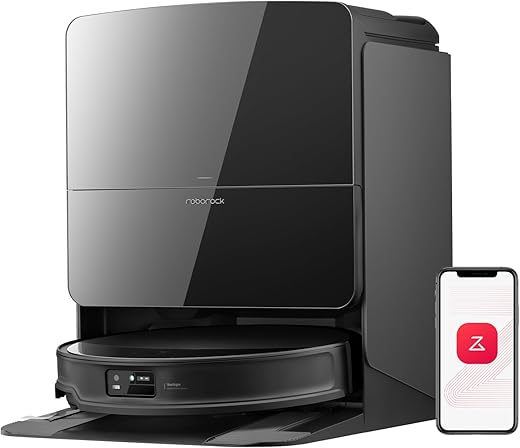
Roborock Saros 10R Robot Vacuum and Mop
Why it’s trending in 2026
The AI navigation software has improved drastically over the last two years. These machines no longer aimlessly bounce off your walls like the early models did. They map multiple floors accurately and clean highly methodically. Improved reliability has turned them from a fun novelty into a genuine household appliance.
How to use any smart vac in a 2026 smart home
Sync the daily cleaning schedule with your home state. Have the vacuum run its loudest high-power cycles only when everyone has physically left the house. You can also use quick voice commands to send it to the dining room for a spot clean right after dinner.
By 2026, the Roborock Saros 10R has redefined floor care from a “gadget” to essential home infrastructure. Unlike earlier models that required constant babysitting, the Saros 10R utilizes advanced AI navigation and a self-maintaining chassis to operate almost entirely in the background of a busy smart home.
- State-Aware Cleaning Logic: The most effective way to use the Saros 10R is to tie its cleaning cycles to your home’s “Occupancy State.” In 2026, you shouldn’t be manually starting your vacuum. Instead, program the bot to initiate its high-suction, deep-cleaning cycles—which are naturally loud—only when your smart lock confirms the house is empty. This ensures you always return to “vacuum lines” in the carpet without ever hearing the motor run.
- Infrastructure-Level Maintenance: The flagship benefit of the Saros 10R is its self-washing and self-emptying dock. In a 2026 ecosystem, this turns floor cleaning into a “set and forget” utility similar to a dishwasher. The dock uses hot water to sanitize mop pads and auto-dries them to prevent odors. For the user, this means your only interaction with the device is the occasional refill of the clean water tank and a monthly swap of the dust bag.
- Zero-Friction Spot Cleaning: Integration with voice assistants and presence sensors allows for “contextual cleaning.” If you finish dinner in the dining room, a simple voice command to your Echo Show 5 can dispatch the Saros 10R specifically to that zone for a quick mop and vac. Because of its improved AI obstacle avoidance, you no longer have to “pre-clean” the floor of stray cables or shoes before it arrives.
Tradeoffs to Consider:
- The Maintenance Debt: While the Saros 10R is “near-autonomous,” it is not maintenance-free. Neglecting to clean the base station’s internal filters or ignoring a tangled brush roll for months will lead to a significant drop in performance and potential hardware longevity issues.
- Privacy vs. Mapping: The Saros 10R uses advanced LiDAR and camera-based navigation to identify obstacles. While Roborock has implemented on-device processing to keep this data local, users must decide if they are comfortable with a mobile, camera-equipped device mapping the intimate details of their floor plan.
- Investment Cost: This is a high-end flagship. The cost of entry is steep, and in a 2026 market, you are paying a premium for the software and the dock’s “infrastructure” features. If you have a small, single-floor apartment, the Saros 10R may be over-engineered for your actual needs.