

Nest Learning Thermostat, Easy Control for Every Room, Stainless Steel (3rd Gen)


The ecobee Smart Thermostat Premium: Comprehensive Review
Google Nest Thermostat

Best for: Best budget smart thermostat
The Google Nest Thermostat is a solid entry point if you want to step into smart home automation without spending a fortune. What is particularly useful about this unit is how it adjusts temperatures on its own to save energy when you leave the house, then warms or cools things right before you get back.
It beat out other budget models by offering highly reliable occupancy detection through the Google Home ecosystem without a complicated, drawn-out setup process. This model is ideal for first-time buyers and those looking for straightforward energy savings, though users deeply entrenched in the Apple or Alexa ecosystems might find the Google-centric controls slightly limiting.
Pros
- Modern, sleek aesthetic
- Automatic away-mode adjustments
- Straightforward DIY installation
Cons
- Lacks a detailed touchscreen interface
- Optimized mostly for Google users
Tech Specs
| Major Features |
|
| Power Requirement | Battery powered (2 AA batteries) |
| Ecosystem Support | Google Home |
| Key Automation | Auto-adjusts based on location and habits |
| Connectivity | Wi-Fi, Bluetooth |
Ideal For
- First-time smart thermostat buyers
- Households already using Google Home
- Users who want hands-off schedule learning
Not For
- Buyers wanting a vibrant, full-color touchscreen
- Homes heavily reliant on Apple HomeKit
Editor's Take
This is a highly practical choice for anyone who just wants their HVAC system to run smarter without constant babysitting. If you use Google Assistant and want an affordable way to stop wasting energy when nobody is home, this unit handles the heavy lifting quietly in the background.
Amazon Smart Thermostat

Best for: Best value energy saver
The Amazon Smart Thermostat provides a surprisingly robust set of features for its low price tier, leaning heavily on Alexa to do the thinking. It is designed to work seamlessly with Ring and Alexa devices, giving you multiple ways to control the temperature through voice commands or automated routines.
It edged out similar budget options specifically for users heavily invested in Alexa, offering seamless voice routines and built-in indoor humidity sensing. This is tailored for busy households that want to set their climate preferences and forget them. However, it is crucial to note that this unit requires a C-wire to function, meaning it is not a universal plug-and-play solution for older homes.
Pros
- Very budget-friendly
- Excellent Alexa voice control
- Monitors indoor humidity
Cons
- Strict C-wire requirement
- No support for Google or Siri
Tech Specs
| Major Features |
|
| Power Requirement | Requires C-wire |
| Ecosystem Support | Alexa, Ring |
| Key Automation | Humidity sensing and Alexa routines |
| Connectivity | Wi-Fi 2.4 GHz |
Ideal For
- Dedicated Alexa smart home users
- Budget-conscious buyers
- Homeowners with verified C-wire wiring
Not For
- Homes without a dedicated C-wire
- Google Home or Apple HomeKit users
Editor's Take
If your house is already littered with Echo Dots and you have a C-wire ready to go in your wall, there is very little reason to spend more on a thermostat. It is a highly capable piece of hardware, provided you understand and meet the wiring prerequisites.
ecobee Smart Thermostat Essential

Best for: Best remote room sensor
The ecobee Smart Thermostat Essential brings a highly practical solution to a common household problem: uneven heating. Rather than just measuring the temperature in the hallway where the thermostat is mounted, it utilizes remote sensors placed throughout the house to inform the HVAC system of the actual climate in the rooms you are using.
It stands out from the pack because its remote room sensors physically measure temperatures in different zones, solving the problem of a hot upstairs and a freezing downstairs. It is great for multi-story homes and buyers who use multiple voice assistants.
A critical safety warning: always verify your specific HVAC wiring compatibility prior to purchase. While some marketing materials may casually mention battery power, smart thermostats with active Wi-Fi in this class typically require a C-wire or an included power extender kit to avoid rapid power drain.
Pros
- Excellent multi-platform compatibility
- Balances temperatures across rooms
- Proven track record for energy reduction
Cons
- Higher cost than entry-level models
- Wiring must be verified manually
Tech Specs
| Major Features |
|
| Power Requirement | Verify wiring compatibility prior to purchase |
| Ecosystem Support | Siri, Alexa, Google Assistant |
| Key Automation | Remote sensors for balanced heating |
| Connectivity | Wi-Fi |
Ideal For
- Homeowners with multiple floors or cold spots
- Households using a mix of voice assistants
- Energy-conscious users looking for measurable savings
Not For
- Small apartments where remote sensors are unnecessary
- Users intimidated by power extender kit installations
Editor's Take
The ecobee Essential is the most pragmatic choice if your home suffers from stubborn hot and cold spots. By acting on data from the rooms you actually live in rather than the hallway, it offers a tangible improvement in daily comfort, provided you check your furnace wiring before you buy.
Aqara Smart Thermostat W200
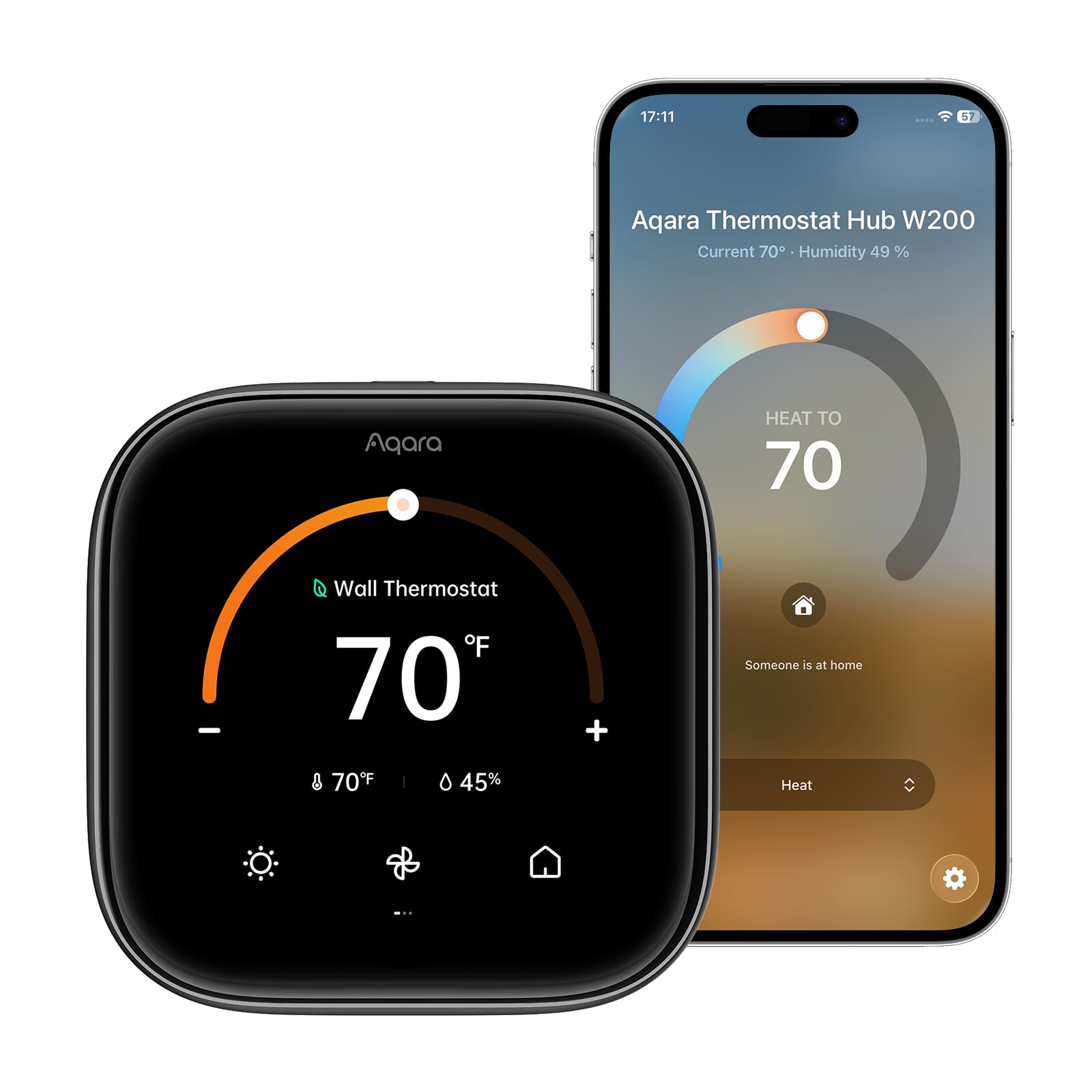
Best for: Best adaptive Apple HomeKit thermostat
The Aqara W200 caters to a very specific crowd: smart home enthusiasts heavily invested in the Apple ecosystem. Featuring a large 4-inch touchscreen and Clean Energy Guidance, it aims to reduce your carbon footprint while offering sleek manual controls.
It earns its spot by functioning as a dedicated Matter controller with deep Apple HomeKit integration, which is a rare and powerful combination in this category. It adapts intelligently to your habits using Siri and HomeKit. However, buyers should be aware that Alexa integration has mixed reports, and you must verify your HVAC C-wire setup before purchasing, as power requirements are stringent for screens this large.
Pros
- Acts as a smart home hub via Matter
- Excellent Apple ecosystem compatibility
- Beautiful hardware and touchscreen
Cons
- Reportedly inconsistent with Alexa
- Low volume of long-term user reviews
Tech Specs
| Major Features |
|
| Power Requirement | Verify C-wire compatibility |
| Ecosystem Support | Apple HomeKit, Siri |
| Key Automation | Adaptive temperature and clean energy routing |
| Connectivity | Matter protocol |
Ideal For
- Apple HomeKit users
- Advanced smart home tinkerers utilizing Matter
- Eco-conscious households
Not For
- Primary Alexa users
- Buyers looking for a proven, high-review-volume device
Editor's Take
This is a slightly riskier buy given its lower review count, but it is incredibly rewarding if you live entirely inside Apple's walled garden. If you want a thermostat that can also bridge your other Matter devices, the W200 offers serious technical flexibility.
Honeywell T5 Smart Thermostat

Best for: Best geofencing feature
The Honeywell T5 shifts the focus away from internal motion sensors and instead relies on your smartphone. By utilizing geofencing technology, the thermostat creates a virtual perimeter around your house. When your phone leaves that boundary, the system powers down. When you cross back into it, the system spins up to ensure your home is comfortable by the time you unlock the front door.
It beats competitors in hands-off automation by using your phone's GPS location to adjust the climate before you even walk through the door, making it perfect for frequent travelers with unpredictable schedules. As with most advanced units, verify your C-wire compatibility before attempting installation, as uninterrupted power is required to maintain the network connection.
Pros
- Geofencing removes the need for manual adjustments
- Works with almost all major smart platforms
- ENERGY STAR certified
Cons
- Relies heavily on your phone's battery and location services
- Requires specific wiring verification
Tech Specs
| Major Features |
|
| Power Requirement | Verify C-wire compatibility |
| Ecosystem Support | Alexa, Apple HomeKit, Google Assistant |
| Key Automation | Geofencing (location-based triggers) |
| Connectivity | Wi-Fi |
Ideal For
- Frequent travelers or shift workers with erratic schedules
- Households using a mix of different voice assistants
- Users who forget to manually set away modes
Not For
- Users who routinely leave their smartphone at home
- Homes lacking a C-wire connection
Editor's Take
The T5 is the thermostat to get if your daily routine changes constantly. By tying your HVAC system to your physical location rather than a ticking clock, it offers a highly realistic path to saving energy without sacrificing your comfort upon returning home.
Full Comparison Matrix
| Product | Link | Thumbnail Photo | Best Feature | Star Rating | Ecosystem Support | Key Automation |
|---|---|---|---|---|---|---|
| Google Nest | See Price | | Auto-away mode | 4.2 | Google Home | Routine learning |
| Amazon Smart | See Price | | Alexa integration | 4.0 | Alexa, Ring | Humidity sensing |
| ecobee Essential | See Price | | Remote sensors | 4.3 | Multi-platform | Multi-room balance |
| Aqara W200 | See Price | | Matter controller | 3.7 | HomeKit, Siri | Adaptive Temp |
| Honeywell T5 | See Price | | Geofencing | 4.2 | Multi-platform | Location triggers |
Buyer's Checklist For Smart Thermostats
| Feature to Consider | Why It Matters |
|---|---|
| C-wire compatibility | Pull your current thermostat off the wall and look for a wire labeled "C". If you do not have one, your smart thermostat options shrink significantly, or you will need to install a power extender. |
| HVAC compatibility | Ensure the device supports your specific system (e.g., single-stage, multi-stage, heat pump, or electric baseboard). |
| Ecosystem matching | Do not buy an Alexa-heavy thermostat if your home runs entirely on Apple HomeKit. |
| Remote sensor needs | If you live in a multi-story house, prioritize a thermostat that supports remote room sensors to balance uneven airflow. |
| Local controls | Make sure you find the physical interface intuitive, in case your Wi-Fi drops and you need to adjust the heat manually. |

