
10 Reasons Why It’s a Smart Move to Switch to a Smart Thermostat
Top Picks
How we scored: We rated each thermostat based on HVAC compatibility, ease of setup, app quality, smart home support, energy-saving features, sensor support, and overall value.
| Product | Best Category | Key Buying Info | Buy It If | Skip It If | Score |
|---|---|---|---|---|---|
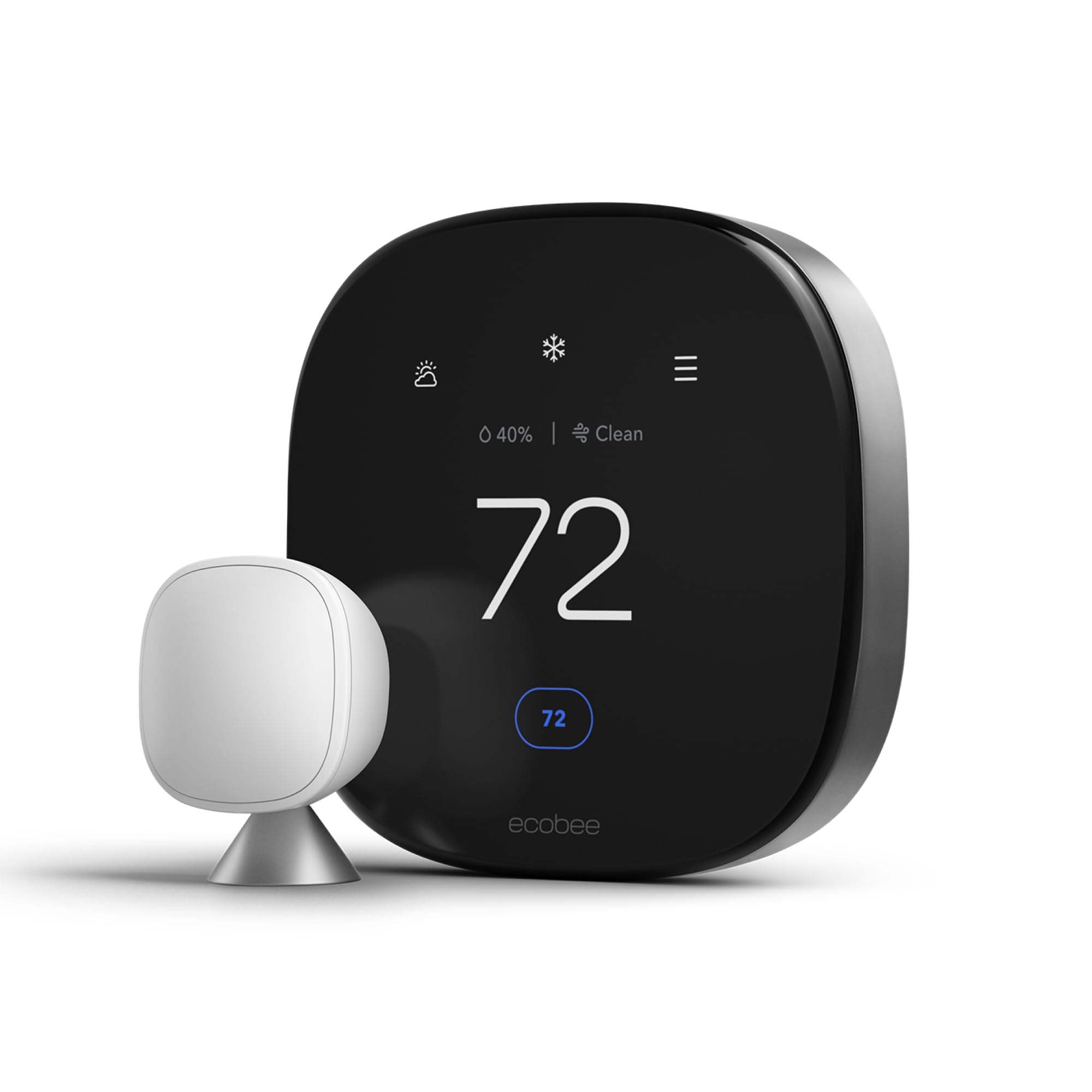 ecobee Smart Thermostat Premium | Best Premium Features |
Cost Tier: Premium Built for homes where one room runs hot and another feels like a freezer. | You want premium smart thermostat features, strong smart home support, and better control in homes where some rooms run hotter or colder than others. | You just need basic temperature control and don’t want to pay extra for advanced features or room-sensing support. | 90/100 |
 Emerson Sensi Touch | Best Integration |
Cost Tier: Mid-Range Smart control without a messy setup and clear touchscreen. | You want a clear touchscreen, simple app control, and smart home integration without a setup that feels overly complicated. | You want the most advanced learning features or room-by-room sensor control. | 89/100 |
 ecobee Smart Thermostat Enhanced | Best Integration |
Cost Tier: Mid-Range A strong fit if you want your smart home to handle the small stuff. | You want a strong balance of smart home control, energy-saving features, and everyday comfort without jumping to the highest ecobee price tier. | You want the most premium ecobee features or need included room sensors right out of the box. | 89/100 |
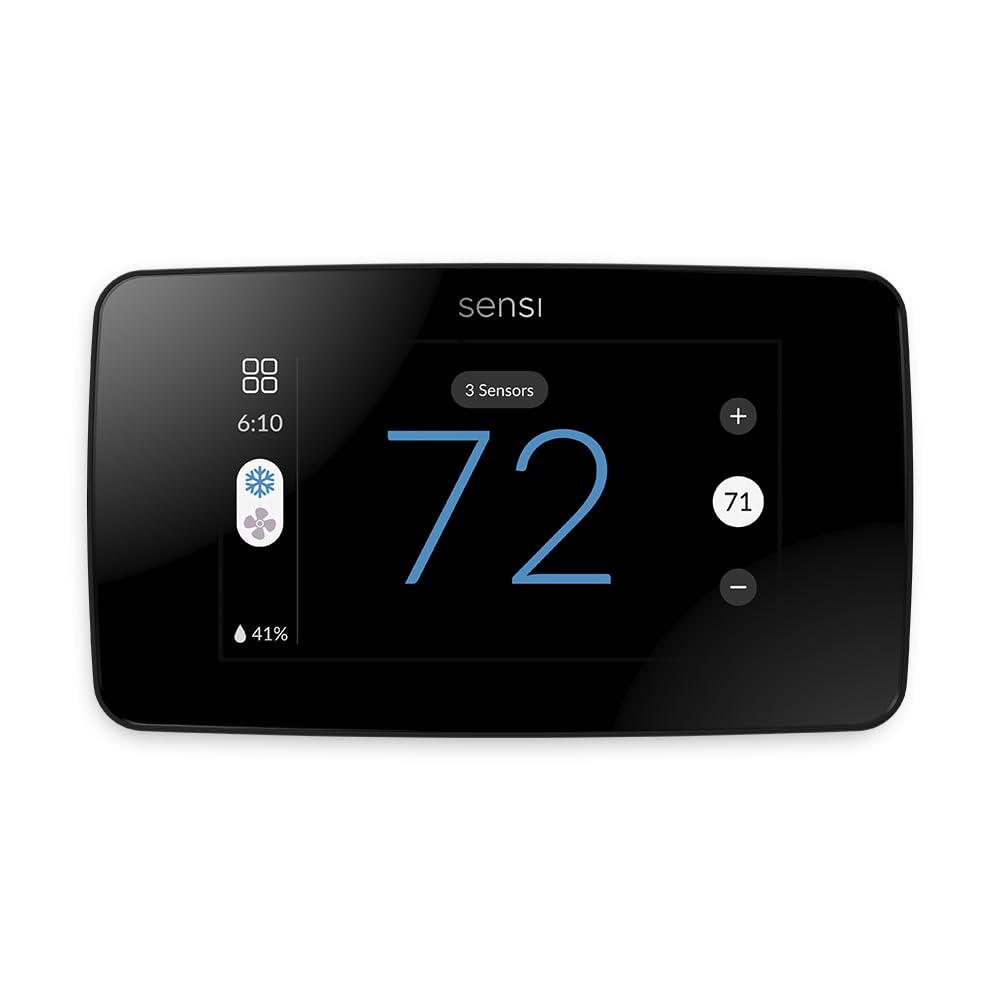 Sensi Touch 2 | Most User-Friendly App |
Cost Tier: Mid-Range Built for easy control, not endless menu diving. | You want an easy app experience, a modern touchscreen, and smart thermostat control without digging through endless settings. | You want a thermostat that learns your schedule automatically instead of relying more on your own setup and adjustments. | 88/100 |
 ecobee3 Lite | Best for Energy Savings |
Cost Tier: Value Smart control without paying for every extra bell and whistle. | You want reliable ecobee smart control, energy-saving scheduling, and good value without paying for every premium extra. | You want built-in voice control, included sensors, or the newest premium ecobee features. | 87/100 |
 Google Nest Learning | Best Design |
Cost Tier: Premium Learns the temps you like, then makes small changes based on your routine. | You want a polished design and a thermostat that can learn your temperature habits and make small adjustments around your routine. | You prefer manual schedule control, need the lowest upfront price, or don’t want to be tied closely to the Google Home ecosystem. | 86/100 |
 Google Nest Thermostat | Best Design |
Cost Tier: Value A cleaner wall look and simple app control. | You want a clean-looking thermostat with simple app control and a lower price than the Nest Learning model. | You want Nest’s full learning features, premium materials, or more advanced thermostat controls. | 86/100 |
 ecobee Essential | Best for Simplicity |
Cost Tier: Value Smart thermostat control without overbuying. | You want straightforward ecobee smart thermostat control, easy scheduling, and remote access without overbuying. | You want premium ecobee features, advanced room sensor support, or a thermostat built for more complex comfort control. | 85/100 |
 Honeywell T5+ | Best for Customization |
Cost Tier: Mid-Range Flexibly adapts to your ever-changing schedule. | You want flexible scheduling, app control, and geofencing that can adjust your heating and cooling when you leave or come home. | You don’t want location-based features or you prefer a thermostat with a more premium display and newer smart home features. | 84/100 |
 Honeywell Color | Best Color Display |
Cost Tier: Mid-Range Vibrant, customizable color display that adds personality to your wall. | You want a bright, customizable color display, flexible scheduling, alerts, and voice control through Alexa or Google Assistant. | You care more about advanced automation or learning features than having a colorful, customizable screen. | 83/100 |
 Amazon Smart Thermostat | Best Budget-Friendly |
Cost Tier: Budget Basic smart control without spending premium thermostat money. | You want basic smart thermostat control, Alexa integration, and a budget-friendly way to manage heating and cooling from your phone. | You don’t use Alexa, want broader smart home support, or need premium features like room sensors or a touchscreen display. | 80/100 |
 LEVOIT Smart | Best for Flexible Scheduling |
Cost Tier: Value Built for homes where rooms never seem to agree on temperature. | You want flexible scheduling, a large touchscreen, voice control, and support for multiple sensors to help manage rooms that don’t stay the same temperature. | You want the highest-scoring option in the roundup or prefer a more established thermostat brand with broader smart home recognition. | 75/100 |
How We Chose
When choosing the best smart thermostats, we focused on key factors that matter to you as a user. Ease of installation and intuitive control through apps or voice assistants are essential for straightforward daily use. Compatibility with various HVAC systems ensures the thermostat will work seamlessly in your home. Energy efficiency and cost savings are prioritized by models that learn your habits or provide customizable scheduling.
ecobee Smart Thermostat Premium
Ecobee Smart Thermostat Premium optimizes comfort while saving energy through superior intelligence and technology. It has a built-in air quality monitor, doorbell Live View, smoke alarm detection, and geofencing technology to understand occupancy.
Buy NowThis smart thermostat is built for homes where one room runs hot and another feels like a freezer. The included SmartSensor lets it focus on the rooms you use most, so it’s not just reading the hallway and calling it a day.
It also uses geofencing, which means it can tell when you leave or come home based on your phone’s location. That helps it save energy when the house is empty, then get things comfortable again before you walk in.
You also get more than basic heat and AC control. It can track indoor air quality and work with select smart home gear, including doorbell Live View and smoke alarm alerts. Those extras won’t matter to everyone, but they’re handy if you want your thermostat to do more than change the temperature.
Why People Like It
Most buyers like the balance of comfort and savings. The app and voice control make it easy to adjust settings, while the extra sensor helps smooth out hot and cold spots. People also like having air quality info built into the same device.
Where It Saves Money
The biggest savings come from not heating or cooling empty rooms. Occupancy sensing helps cut waste, especially in larger homes. It can also reduce wear on your HVAC system because it runs with more purpose, not just more often.
Best Seasonal Use
In winter, it helps keep key rooms from feeling too cold. In summer, it can stop the main living space from turning into a sweatbox. It’s a strong pick if comfort swings are your biggest thermostat headache.
Situational Benefits
| Situation | How It Helps |
|---|---|
| You have rooms with uneven temperatures | SmartSensor detects hot or cold spots and adjusts settings to balance temperatures |
| You want to monitor air quality | Built-in air quality sensor keeps you informed and can help trigger ventilation or alerts |
| You’re away frequently | Geofencing changes temperature based on your location, saving energy when you’re not home |
| You use multiple smart home devices | Compatibility with Siri, Alexa, Google Assistant, and HomeKit makes integration seamless |
Environmental Benefits
| Impact | Benefit |
|---|---|
| Energy reduction through smart scheduling | Cuts down on unnecessary heating and cooling, decreasing your carbon footprint |
| Improved HVAC efficiency | Runs your system only when needed, reducing wear and environmental waste |
| Air quality monitoring | Encourages healthier indoor air, which can reduce pollutants and allergens |
Ease of Use
| Feature | Ease Level |
|---|---|
| SmartSensor setup | Straightforward |
| App control | Intuitive |
| Voice assistant compatibility | Seamless |
| Installation | Moderate — best with some DIY confidence |
Energy Efficiency
This ecobee model uses sensors and geofencing to deliver air conditioning and heating only when and where it’s needed, reducing energy waste. Its intelligent algorithms fine-tune your system for optimal performance, contributing to significant energy savings over time.
Problem Solving Ability
It handles uneven temperatures well with its SmartSensor technology and addresses air quality concerns, giving you a twofold solution for comfort and wellness. It also tackles forgot-to-adjust settings by automatically adapting based on your presence, taking the guesswork out of energy saving.
Key Benefits
- Superior comfort control with SmartSensor for balanced temperatures
- Built-in air quality monitor keeps your home environment healthier
- Integrates with major voice assistants like Siri, Alexa, and Google
- Geofencing technology adapts settings based on your presence
- Extra smart home features like doorbell Live View and smoke alarm alerts
Emerson Sensi Touch
Sensi Touch smart thermostats offer energy savings and full home HVAC control with easy installation, intuitive app, and compatibility with Alexa, Apple HomeKit, and Google Assistant.
Buy NowThe Emerson Sensi Touch is a good fit if you want smart control without a messy setup. It works with many HVAC systems and gives you a clear touchscreen, app control, voice support, filter reminders, and basic smart scheduling.
Its geofencing feature can adjust the temperature when you leave or come home. That means you’re not paying to heat or cool an empty house, but you also don’t walk back into a room that feels off.
Why People Like It
Buyers often like how easy it is to install. The app walks you through setup step by step, which helps if you’re not used to thermostat wiring. People also praise the remote control, voice commands, and strong HVAC support.
Where It Saves Money
The savings come from smarter schedules and fewer wasted heating or cooling cycles. Filter reminders can also help your system breathe easier, which is good for comfort and long-term HVAC health.
Best Seasonal Use
It’s useful during weather swings when you don’t want to keep changing settings by hand. Set your schedule, let geofencing help, and let the thermostat do the boring work.
Situational Benefits
| Situation | How It Helps |
|---|---|
| You want voice control compatibility | Works with Alexa, Apple HomeKit, and Google Assistant for easy hands-free adjustments |
| You have an unpredictable schedule | Geofencing adjusts the temperature based on your location, saving energy when you’re away |
| You prefer a clear display | Large touchscreen with backlight ensures easy visibility and control |
| You need easy installation | App-based instructions simplify the DIY setup process |
Environmental Benefits
| Impact | Benefit |
|---|---|
| Lower energy consumption | Reduces wasteful heating and cooling through smart scheduling and geofencing |
| Prolongs HVAC lifespan | Efficient system use means less wear and tear |
| Supports eco-friendly living | Helps decrease your home's carbon footprint by optimizing energy use |
Ease of Use
| Feature | Ease Level |
|---|---|
| Installation | Straightforward with app support |
| Touchscreen use | Clear and responsive |
| App control | Intuitive and convenient |
| Voice assistant setup | Smooth and quick |
Energy Efficiency
Combines geofencing, scheduling, and smart controls to minimize energy waste while keeping your home comfortable.
Problem Solving Ability
Automatically adjusts to your presence and schedule to avoid unnecessary heating or cooling, solving common energy waste issues.
Key Benefits
- Works seamlessly with Alexa, Apple HomeKit, and Google Assistant
- Easy DIY installation with helpful app guidance
- Geofence technology adjusts temperature based on your location
- Touchscreen interface with backlight for clear visibility
- Energy Star certified for efficient operation
ecobee Smart Thermostat Enhanced
The ecobee Smart Thermostat Enhanced adapts to your lifestyle by adjusting temperature based on occupancy, suggesting schedule changes, and optimizing energy savings. Compatible with Apple HomeKit, Alexa, Google Assistant, and more.
Buy NowThis ecobee thermostat is a strong fit if you want your smart home to handle the small stuff. It can adjust the temperature when you’re away or asleep, so you’re not heating or cooling rooms for no reason.
It also uses occupancy sensing, which means it can tell when people are home. Pair that with smart schedules, and you get comfort that doesn’t need constant babysitting.
Why People Like It
Buyers like how well it works with other smart home gear. The app is easy to use, and the wired power setup means you don’t have to worry about dead batteries. People also like that it can make small energy-saving changes on its own.
Where It Saves Money
The savings come from cutting back when the house is empty or everyone’s asleep. That can help lower wasted heat and AC use, especially if your daily schedule changes a lot.
Best Seasonal Use
It’s helpful when the weather can’t make up its mind. The thermostat can switch between heat and AC as needed, so your home stays comfortable without you poking at the app all day.
Situational Benefits
| Situation | How It Helps |
|---|---|
| You want smart home system integration | Works smoothly with Apple HomeKit, Amazon Alexa, Google Assistant, and SmartThings for easy control |
| You have an unpredictable schedule | Suggests energy-saving schedule adjustments based on your activity patterns |
| You prefer wired devices | Powered by corded electric source for stable, continuous operation |
| You want remote control | Use the app to adjust temperature from anywhere |
Environmental Benefits
| Impact | Benefit |
|---|---|
| Reduced energy consumption | Occupancy-based adjustments avoid unnecessary heating, lowering energy waste |
| Optimized HVAC usage | Intelligent scheduling prolongs equipment life and lessens environmental strain |
| Supports sustainable living | Contributes to decreased carbon footprint through smarter energy management |
Ease of Use
| Feature | Ease Level |
|---|---|
| Installation | Moderate – recommended for those comfortable with wiring |
| App interface | Clear and simple to navigate |
| Voice control setup | Smooth integration with major platforms |
| Power source | Reliable corded connection ensures steady performance |
Energy Efficiency
Combines occupancy detection and schedule optimization to minimize energy usage while maintaining comfortable home temperatures.
Problem Solving Ability
Adjusts automatically to your lifestyle changes and occupancy, preventing wasted heat or cooling and enhancing overall system efficiency.
Key Benefits
- Automatic temperature adjustments based on occupancy
- Suggestions for optimizing your schedule and energy use
- Works with Apple HomeKit, Alexa, Google Assistant, and SmartThings
- Corded power source ensures consistent operation
- Easy app control from anywhere
Sensi Touch 2
Sensi Touch 2 smart thermostat makes it easy to remotely control and schedule home comfort anytime. It works with Sensi room sensors to balance temperatures and supports voice commands with Alexa and other platforms.
Buy NowThis smart thermostat is built for easy control, not endless menu diving. You can adjust it from the touchscreen, the app, or with Alexa and Google Assistant voice commands.
Room sensor support is the bigger win for larger homes. Sensors help the thermostat read temps beyond the hallway, so bedrooms, living rooms, and busy spaces don’t get ignored.
Why People Like It
Buyers like that the app makes setup feel less scary, with clear steps instead of guesswork. They also like the remote control, voice support, and room sensor support for keeping temps more even across the house.
Where It Saves Money
Smart schedules and occupancy sensing help cut back when no one’s home. That can reduce wasted heat and AC use, while also helping your HVAC system avoid extra run time.
Best Seasonal Use
It’s useful when your home needs both heat and AC during the same week. Let it switch modes as needed, and you won’t have to chase the weather from the app.
Situational Benefits
| Situation | How It Helps |
|---|---|
| You want hands-free control | Compatible with Alexa and Google Assistant for convenient voice commands |
| You have uneven temperatures in your home | Room sensors help balance temperatures across different spaces |
| You prefer clear installation instructions | The app provides tailored step-by-step guides to remove complexity |
| You want to schedule your HVAC easily | Flexible 7-day scheduling fits your lifestyle and helps save energy |
Environmental Benefits
| Impact | Benefit |
|---|---|
| Reduced energy consumption | Optimizes heating and cooling, avoiding wasteful use when you're away |
| Smarter HVAC operation | Extends the life of your system by preventing unnecessary wear |
| Supports greener living | Helps lower your household's carbon footprint through efficient energy use |
Ease of Use
| Feature | Ease Level |
|---|---|
| Installation guidance | Very easy with custom app instructions |
| Touchscreen interface | Intuitive and responsive |
| Remote control via app | Simple and reliable |
| Voice assistant setup | Quick and smooth |
Energy Efficiency
Its combination of scheduling, occupancy sensing, and room sensor integration helps minimize energy waste while maintaining comfort.
Problem Solving Ability
The thermostat addresses uneven heating issues and saves energy by automatically adjusting when rooms are unoccupied, offering smart comfort management.
Key Benefits
- Remote control and scheduling for convenience wherever you are
- Integrates with Alexa, Google Assistant, and SmartThings for voice control
- Works with room sensors to balance temperatures throughout your home
- Intuitive touchscreen display with backlight for easy use
- Installation guidance tailored to your home's HVAC system
ecobee3 Lite
Sleek design and elevated comfort meet impactful energy savings. Save up to 23% annually on heating and cooling costs with ecobee3 lite, the smart thermostat that helps you live smarter and save more.
Buy NowThe ecobee3 Lite is the practical ecobee pick if you want smart control without paying for every extra bell and whistle. You can manage the temperature from the app or with voice control, which is handy when you’re away or already planted on the couch.
It also works with room sensors, sold separately, so it can read temps beyond the hallway. That helps larger homes feel more even, instead of letting one room run hot while another feels cold.
Why People Like It
Buyers often like the simple setup and the app’s step-by-step help. They also like the remote control, voice support, and sensor-based comfort. Many say it helps them use less energy without needing to fuss with settings all day.
Where It Saves Money
Occupancy sensing helps it cut back when no one’s home. Room sensors can also reduce wasted heating and cooling in spaces you’re not using, which may help lower bills over time.
Best Seasonal Use
It’s useful when your home swings from chilly mornings to warm afternoons. It can switch between heat and AC as needed, so you’re not stuck babysitting the thermostat.
Situational Benefits
| Situation | How It Helps |
|---|---|
| You have an older HVAC system | Works well with various setups and supports smart sensors for improved control even in multi-zone homes |
| You want a modern look on your wall | Sleek touchscreen design fits nicely and updates older thermostat aesthetics |
| You’re often away from home | Automatic occupancy detection adjusts temperature to save energy when rooms are empty |
| You use voice-enabled devices | Integrates seamlessly with Alexa, Google Assistant, and HomeKit for voice control |
Environmental Benefits
| Impact | Benefit |
|---|---|
| Lower energy consumption | Reduces unnecessary heating and cooling by adjusting when rooms are unoccupied |
| Efficient system operation | Prolongs equipment life by minimizing overuse |
| Supports sustainable living | Helps limit greenhouse gas emissions linked to residential energy use |
Ease of Use
| Feature | Ease Level |
|---|---|
| Installation process | DIY friendly with clear instructions |
| App control | Intuitive and straightforward |
| Touchscreen interface | Responsive and user friendly |
| Voice assistant integration | Smooth and reliable |
Energy Efficiency
Uses occupancy sensors and smart scheduling to optimize heating and cooling, helping you reduce power usage without sacrificing comfort.
Problem Solving Ability
Handles uneven temperature distribution with sensors and adjusts for your presence, preventing wasted energy and keeping your home comfortable.
Key Benefits
- Smart sensors help maintain balanced temperatures throughout your home
- Manage your system remotely via app or with voice assistants
- Occupancy detection adjusts temperature automatically
- Sleek and modern touchscreen design
- Compatibility with Alexa, Google Assistant, and Apple HomeKit
Google Nest Learning
The Nest Learning Thermostat (4th gen) adapts to your preferences and lifestyle, helping you save energy while ensuring smooth heating and cooling system operation.
Buy NowThe Google Nest thermostat is a good fit if you don’t want to build a schedule from scratch. It learns the temps you like, then starts making small changes based on your routine.
That’s the real draw here. You get comfort with less tapping, less guessing, and fewer “why is it so hot in here?” moments. The clean aluminum design also helps it look like it belongs on the wall, not like a beige plastic leftover.
Why People Like It
Buyers often like how the Nest adapts over time instead of needing constant tweaks. The app and voice control make quick changes easy, and many people also like the more polished look.
Where It Saves Money
The savings come from cutting back when heating or cooling isn’t needed. If your routine is fairly steady, the learning features can help reduce wasted energy without making you babysit the schedule.
Best Seasonal Use
It’s handy when the seasons start playing tug-of-war. Nest can adjust between heat and AC as needed, so your home stays comfortable without constant fiddling.
Situational Benefits
| Situation | How It Helps |
|---|---|
| You want a thermostat that learns your schedule | Automatically adjusts temperature based on your habits and presence |
| You value modern design | Features a sleek aluminum finish that complements any room |
| You use voice assistants | Compatible with Alexa, Google Assistant, and more for easy control |
| You want to monitor your HVAC health | Provides alerts that help you keep your system running smoothly |
Environmental Benefits
| Impact | Benefit |
|---|---|
| Reduced energy usage | Adjusts heating and cooling to match your lifestyle, cutting waste |
| Longer equipment life | Smart management decreases wear on your HVAC system |
| Lower carbon footprint | Supports sustainable energy use through efficient temperature control |
Ease of Use
| Feature | Ease Level |
|---|---|
| Installation | Moderate - video guides available |
| App control | Smooth and intuitive |
| Voice control | Easy to set up |
| Design | Attractive and user-friendly |
Energy Efficiency
Learns your patterns and adjusts settings to save energy without compromising comfort, making your home more efficient.
Problem Solving Ability
Addresses energy waste by switching off or scaling back heating and cooling when you’re away, and alerts you to potential HVAC issues early.
Key Benefits
- Automatically learns and adjusts to your temperature preferences
- Helps save energy by turning down when you’re away
- Monitors your HVAC system for smooth operation
- Controls easily from your phone or voice assistant
- Sleek, modern aluminum design fits any home style
Google Nest Thermostat
Meet the Google Nest Thermostat, the smart thermostat at a cozy price. It saves energy by turning itself down when you’re away and can be controlled anywhere via the Google Home app.
Buy NowThis thermostat is a good fit if you want a cleaner wall look and simple app control. It works through the Google Home app, so you can adjust the temperature from the couch, bed, or halfway across town.
Setup is usually simple if your wiring is ready, but check compatibility before you buy. A quick HVAC check now can save you a long afternoon later.
Why People Like It
Buyers often like the clean design, easy app control, and simple setup. They also like being able to make quick changes from their phones instead of walking to the wall every time.
Where It Saves Money
It can cut back when you’re away or asleep, which helps reduce wasted heat and AC use. That’s where the savings come from, not magic thermostat dust.
Best Seasonal Use
It’s useful when the weather shifts and your home needs both heat and AC. Let it switch modes as needed, and you won’t have to keep chasing the forecast.
Situational Benefits
| Situation | How It Helps |
|---|---|
| You prefer hands-free control | Compatible with Alexa and Google Assistant for voice commands |
| You want to save energy effortlessly | Automatically lowers heating or cooling when the house is empty |
| You want quick installation | Designed for DIY setup usually in less than 30 minutes |
| You value aesthetics | Modern design fits neatly in any room’s decor |
Environmental Benefits
| Impact | Benefit |
|---|---|
| Reduces unnecessary energy use | Automatically cuts back heating and cooling based on your presence |
| Supports longer HVAC life | Smart adjustments reduce wear on heating and cooling systems |
| Contributes to lower emissions | Decreases your home’s carbon footprint by optimizing energy use |
Ease of Use
| Feature | Ease Level |
|---|---|
| Installation | Quick and user-friendly |
| App control | Intuitive and comprehensive |
| Voice control setup | Smooth integration |
| Device design | Clean and straightforward |
Energy Efficiency
Automatically adjusts based on occupancy and schedules, helping reduce wasted energy and ensuring your home stays comfortable efficiently.
Problem Solving Ability
Handles the common challenge of forgetting to adjust temperature when you leave by using sensors and smart scheduling to automatically reduce energy use.
Key Benefits
- Saves energy by automatically adjusting when you’re away
- Remote control from anywhere with the Google Home app
- Simple installation designed for most homes
- Works with voice assistants like Alexa and Google Assistant
- Sleek, modern design fits with any room style
ecobee Essential
Join the millions who love and trust ecobee products with our most affordable thermostat yet: Smart Thermostat Essential. It saves you up to 23% on your energy bills and is so efficient that it pays for itself in just six months.
Buy NowThe ecobee Essential is the simple ecobee pick for people who want smart thermostat control without overbuying. You get app control, voice support, and easy scheduling, so you can adjust the temperature from the couch, upstairs, or away from home.
It’s also built to be approachable. The setup is beginner-friendly, and the controls don’t feel like you need a tiny HVAC degree to use them. That matters if you just want your house to feel better without spending Saturday decoding thermostat menus.
Why People Like It
Buyers often like the easy installation, clear app guidance, and simple remote control. Many also appreciate being able to manage temps in multi-level homes without walking to the thermostat every time. If your setup supports extra sensors, those can help balance comfort in rooms that tend to run hot or cold.
Where It Saves Money
The savings come from smarter schedules and cutting back when you don’t need full heating or cooling. It won’t magically shrink your utility bill overnight, but it can help reduce wasted energy if your current thermostat runs on guesswork.
Best Seasonal Use
It’s helpful during spring and fall, when the weather keeps changing its mind. Let it switch between heating and cooling as needed, and you won’t have to keep nudging the temperature every time the forecast flips.
Situational Benefits
| Situation | How It Helps |
|---|---|
| You live in a multi-story home | Control your thermostat remotely from any floor to keep temperature balanced throughout your house |
| You want hassle-free installation | Clear instructions and simple wiring make setup manageable even if you’re not a pro |
| You want to save on energy bills | Auto-Away and customizable schedules help prevent energy waste when you’re not home |
| You use voice commands | Compatible with Alexa, Siri, and Google Assistant for hands-free control |
Environmental Benefits
| Impact | Benefit |
|---|---|
| Reduced energy usage | Efficient scheduling and occupancy detection lower overall energy consumption |
| Less HVAC wear and tear | Smarter temperature management helps extend the life of your heating and cooling systems |
| Supports sustainability | By cutting wasteful heating and cooling, you minimize your household’s carbon footprint |
Ease of Use
| Feature | Ease Level |
|---|---|
| Installation process | Beginner friendly |
| App interface | User-friendly |
| Remote sensor setup | Simple |
| Voice assistant integration | Effortless |
Energy Efficiency
Using auto-scheduling and remote sensors, the thermostat ensures your system runs only when needed, effectively lowering energy usage without sacrificing comfort.
Problem Solving Ability
This thermostat tackles common issues like uneven heating by working with remote sensors to balance temperatures and avoids wasted energy by adjusting when you’re away or rooms are empty.
Key Benefits
- Easy setup with clear, step-by-step instructions
- Control from your smartphone or voice assistant
- Supports remote sensors for comfort in multiple rooms
- Helps reduce energy bills with efficient scheduling
- Compatible with Siri, Alexa, and Google Assistant
Honeywell T5+
The T5+ smart thermostat offers flexible 7-day programming and geofencing technology, allowing you to control your home temperature with ease using your smartphone or tablet.
Buy NowThe Honeywell T5+ is a good fit if your schedule changes a lot and you don’t want to keep fixing the thermostat by hand. You can control it from the app, build simple schedules, or let geofencing help with the basics.
Geofencing means it uses your phone’s location to tell when you leave or come home. That way, it can cut back when the house is empty and start getting things comfortable again before you walk in.
Why People Like It
Buyers often like the easy app control and simple scheduling. The geofencing feature gets a lot of praise because it saves you from constantly adjusting settings. People also like that it works with popular smart home platforms, so it can fit into a setup you already use.
Where It Saves Money
The savings come from reducing wasted heating and cooling when no one’s home. If your old thermostat keeps running like everyone’s still there, the T5+ can help trim that waste without making comfort feel like homework.
Best Seasonal Use
It’s useful during seasons when your home needs heat in the morning and cooling by afternoon. Let it switch modes as needed, and you won’t have to keep chasing the weather from the app.
Situational Benefits
| Situation | How It Helps |
|---|---|
| Your schedule changes frequently | Flexible programming lets you update your thermostat to match your lifestyle easily |
| You forget to adjust when leaving home | Geofencing automatically scales back heating or cooling based on your location |
| You want voice control convenience | Works seamlessly with Alexa and other smart assistants for hands-free use |
| You have a complex HVAC system | Compatible with a wide array of HVAC systems, fitting into most homes |
Environmental Benefits
| Impact | Benefit |
|---|---|
| Reduced energy waste | Adjusts heating and cooling only when needed, saving resources |
| More efficient home energy use | Optimizes system operation, reducing unnecessary wear and emissions |
| Supports eco-conscious living | Helps lower your household’s carbon footprint |
Ease of Use
| Feature | Ease Level |
|---|---|
| Installation | Simple with detailed instructions |
| Touchscreen control | Responsive and clear |
| App interface | User-friendly and straightforward |
| Voice assistant setup | Quick integration |
Energy Efficiency
Combines geofencing with flexible schedules to minimize energy use while maintaining comfort.
Problem Solving Ability
Automatically adapts to changing routines and presence to avoid wasted heating or cooling, addressing common energy waste problems.
Key Benefits
- Flexible 7-day programming fits your unique routine
- Geofencing adjusts temperature automatically based on your location
- Compatible with Alexa, Apple HomeKit, SmartThings, and Vera
- Clear touchscreen display with backlight for easy use
- Works with a wide variety of HVAC systems
Honeywell Color
The Smart Color Thermostat features a bright color touchscreen, flexible programming, and smart alerts. Manage your comfort remotely with app control and voice assistants like Alexa and Google.
Buy NowThis Honeywell thermostat is a good fit if you want smart control with a display that’s easy to read at a glance. The customizable color screen adds some personality, but the real win is that it makes temperature changes, schedules, and alerts easier to see.
You also get app control, Alexa and Google Assistant support, and flexible scheduling. The nerdy bonus is utility rate-based programming, which can help you plan heating and cooling around times when energy may cost more.
Why People Like It
Buyers often like the bright, readable display and the ability to match the screen color to their home. They also appreciate the flexible schedules, helpful alerts, and simple phone or voice control for quick changes.
Where It Saves Money
The savings come from better scheduling and fewer wasted heating or cooling cycles. If your utility has peak pricing, rate-based programming may also help you avoid running the system hardest when power costs more.
Best Seasonal Use
It’s useful during those in-between weeks when your home needs heat one day and AC the next. Let it switch modes as needed, and you won’t have to keep playing thermostat referee.
Situational Benefits
| Situation | How It Helps |
|---|---|
| You want to personalize your thermostat’s look | Selectable color display lets you match your home’s decor or mood |
| You like having detailed scheduling options | Flexible 7-day programming adapts to your routine |
| You want easy remote control | Manage comfort from anywhere via the app |
| You value maintenance reminders | Smart alerts keep you informed about filter changes and temperature |
Environmental Benefits
| Impact | Benefit |
|---|---|
| Reduced electricity use | Optimizes heating and cooling schedules to minimize energy waste |
| Enhanced HVAC longevity | Smart alerts and efficient use reduce strain on your system |
| Supports eco-friendly habits | Encourages mindful energy consumption through data and notifications |
Ease of Use
| Feature | Ease Level |
|---|---|
| Touchscreen usability | User-friendly and responsive |
| App control | Highly intuitive |
| Voice assistant setup | Smooth and quick |
| Installation process | Manageable with basic skills |
Energy Efficiency
Flexible programming and real-time alerts help reduce electricity usage, making this a smart choice for energy-conscious homes.
Problem Solving Ability
Alerts and scheduling adjustments solve common problems like forgotten maintenance and inefficient heating or cooling, improving your home's overall comfort and costs.
Key Benefits
- Customizable color touchscreen fits your style
- Flexible 7-day programming for personalized scheduling
- Remote app control and voice assistant compatibility
- Smart alerts for air filter changes and temperature
- Energy Star certified for efficient operation
Amazon Smart Thermostat
Amazon Smart Thermostat works with Alexa and Ring, supports most 24V HVAC systems, and offers guided installation through the Alexa app with voice control options.
Buy NowThis thermostat is a smart pick if you want basic smart control without spending premium thermostat money. It works well for many conventional HVAC setups, but you’ll still want to check compatibility before buying. Thermostat wiring loves to be weird.
The big draw is simple control. You can use the Alexa app for setup, adjust temps from your phone, and use Alexa voice commands if your home already runs on Amazon’s ecosystem.
Why People Like It
Buyers often like the step-by-step setup in the Alexa app because it makes installation feel less intimidating. They also like the easy voice control, simple scheduling, and broad HVAC support for many common home systems.
Where It Saves Money
The savings come from better schedules and fewer wasted heating or cooling cycles. It’s also easier on the wallet upfront, which makes sense if you want smart thermostat basics without paying for extra features you won’t use.
Best Seasonal Use
It’s useful during normal seasonal shifts when you just want the house to stay steady. Set a schedule, make quick changes by app or voice, and let it handle the boring temperature stuff.
Situational Benefits
| Situation | How It Helps |
|---|---|
| You want simple voice-controlled comfort | Pair with Alexa or Echo devices to change temperature with your voice |
| You have a variety of HVAC setups | Works broadly across many 24V systems, including heat pumps and boilers |
| You prefer guided installation | The Alexa app walks you through each step for a smooth setup |
| You appreciate compact design | Small size fits nicely on modern walls and updates your home look |
Environmental Benefits
| Impact | Benefit |
|---|---|
| Improved energy use | Smart scheduling and remote control reduce unnecessary heating and cooling |
| Long-lasting system health | Better HVAC efficiency reduces wear and helps your equipment last longer |
| Lower carbon footprint | Optimized energy use supports a more sustainable home |
Ease of Use
| Feature | Ease Level |
|---|---|
| Installation | Easy with app guidance |
| App control | User-friendly |
| Voice control setup | Quick and straightforward |
| Device controls | Simple tactile buttons |
Energy Efficiency
Combines remote scheduling and voice control to help maintain comfort efficiently, cutting down on wasted energy.
Problem Solving Ability
Helps prevent energy waste by allowing easy scheduling and quick adjustments to your heating and cooling, so you don’t run systems unnecessarily.
Key Benefits
- Works with Alexa and Ring apps for flexible control
- Compatible with most 24V HVAC systems
- Guided installation through the Alexa app eases setup
- Supports voice control for hands-free tweaks
- Modern design with straightforward on-device buttons
LEVOIT Smart
LEVOIT Smart Thermostat offers 7x24 flexible schedules, supports up to 16 sensors, and features a large 4-inch touchscreen with auto brightness adjustment. It works with Alexa and Google Assistant.
Buy NowThe LEVOIT Smart Thermostat is a good fit if your home has rooms that never seem to agree on temperature. It supports multiple sensors, so it can read conditions in different spaces instead of trusting one hallway thermostat to speak for the whole house.
You also get flexible schedules, app control, Alexa and Google Assistant support, and a large touchscreen that’s easy to read. Installation should be manageable if you’re comfortable with basic thermostat wiring, but it’s still smart to check compatibility before buying.
Why People Like It
Buyers often like the flexible scheduling, phone control, and voice commands. The large touchscreen also gets praise because it’s simple to see and use. Many say setup is straightforward if they already understand basic wiring.
Where It Saves Money
The savings come from better schedules and smarter temperature readings across the home. If you’re not heating or cooling based on one misleading hallway reading, you’ve got a better shot at cutting waste.
Best Seasonal Use
It’s useful during hot and cold swings when certain rooms feel off before the rest of the house does. The extra sensor support helps you spot those comfort gaps instead of guessing from the wall display.
Situational Benefits
| Situation | How It Helps |
|---|---|
| You have a multi-room setup | Supports multiple sensors for balanced temperature control |
| Your schedule varies day-to-day | Customizable weekly schedules give you full flexibility |
| You use smart home assistants | Works with Alexa and Google for voice-controlled comfort |
| You want clear, simple controls | Large touchscreen with automatic brightness adjustment |
Environmental Benefits
| Impact | Benefit |
|---|---|
| Lower energy use | Schedules and sensors prevent heating/cooling empty rooms |
| Reduced wear on HVAC | Efficient system operation extends equipment life |
| Supports greener living | Encourages responsible energy consumption |
Ease of Use
| Feature | Ease Level |
|---|---|
| Installation | Moderate, with helpful C-wire adapter |
| Touchscreen operation | Easy to navigate |
| App control | Intuitive and reliable |
| Voice assistant setup | Smooth integration |
Energy Efficiency
Flexible scheduling and sensor use let you cut down energy waste while keeping your home comfortable.
Problem Solving Ability
Automatically adjusts heating and cooling based on presence and schedules, helping you avoid unnecessary energy use and maintain consistent comfort.
Key Benefits
- Supports up to 16 smart sensors for whole-home comfort
- Flexible 7x24 scheduling adapts to your lifestyle
- Large, clear IPS touchscreen with auto brightness
- Voice control compatible with Alexa and Google Assistant
- C-wire adapter included for easier installation
Wrapping Up
Making the right choice in smart thermostats can greatly impact your home's comfort, energy consumption, and control convenience. You will benefit from advanced features such as remote adjustments, occupancy sensing, and integration with your smart home ecosystem. Whether you seek a high-end model with premium features or a user-friendly budget option, the smart thermostats recommended here provide reliable solutions tailored to your needs.
Comparison Matrix
| Product Name | Connectivity | Special Highlights |
|---|---|---|
| ecobee Smart Thermostat Premium | Wi-Fi, Bluetooth | Air quality monitor, SmartSensors |
| Emerson Sensi Touch | Wi-Fi | Geofencing, touch display |
| ecobee Smart Thermostat Enhanced | Wi-Fi | Occupancy sensing, schedule optimization |
| Sensi Touch 2 | Wi-Fi | Remote control, voice command |
| ecobee3 Lite | Wi-Fi | 23% savings, sleek look |
| Google Nest Learning | Wi-Fi | Self-learning, aluminum design |
| Google Nest Thermostat | Wi-Fi, Bluetooth | Away mode, app control |
| ecobee Essential | Wi-Fi | Budget saving, 6-month ROI |
| Honeywell T5+ | Wi-Fi | 7-day programming, geofencing |
| Honeywell Color | Wi-Fi | Custom colors, filter alerts |
| Amazon Smart Thermostat | Wi-Fi | Alexa integration, guided setup |
| LEVOIT Smart | Wi-Fi | 16 sensor support, large screen |
Frequently Asked Questions
What If You Don’t Have a C-Wire?
If your current thermostat doesn’t have a C-wire, don’t panic. Some smart thermostats include a power adapter, while others may need one bought separately. Check the brand’s compatibility tool before buying, because this is where many smart thermostat installs go sideways.
How Do I Know If a Smart Thermostat Is Compatible With My Home HVAC System?
You’ll want to check if your system uses a 24-volt control circuit, as most best smart thermostats require that to work properly. Common types like forced air, heat pumps, and radiant boilers are usually compatible. Look for a C-wire or a power adapter in the package, as this is essential for continuous power.
What Are the Key Features to Look for When Choosing the Best Smart Thermostats?
Focus on features that fit your lifestyle, like remote app control, voice assistant compatibility, and easy scheduling. Sensors that manage temperature in different rooms can greatly improve comfort. Energy-saving technologies such as occupancy detection and geofencing help reduce bills without sacrificing comfort.
Can Smart Thermostats Really Help Reduce My Energy Bills and Improve Comfort?
Yes, they can. By learning your schedule and adjusting temperatures when you’re away or asleep, smart thermostats prevent unnecessary heating or cooling. Features like room sensors balance temperatures across your home, eliminating hot or cold spots.