
You might wonder how much energy your household devices consume when left on unnecessarily. The truth is, most standard smart plugs do not actually measure your energy usage. Instead, they help you optimize your home's efficiency by allowing you to schedule devices to turn off when you are not using them. Cutting power to energy vampires like space heaters, older televisions, or lighting displays is a practical way to stop wasting electricity.
A smart plug acts as a middleman between your wall outlet and your appliance. By integrating with ecosystems like Amazon Alexa, Google Home, or Apple Home, they give you remote control over dumb appliances. However, adding smart plugs to your home requires realistic expectations. They are not guaranteed to slash your utility bill simply by plugging them in; they require you to actively set up routines and stick to them.
We reviewed eight popular models to help you understand the tradeoffs of each. Some require specific hubs to function, some lock you into a single brand ecosystem, and only one actually provides real-time power monitoring data. Here is how they compare.
Top Picks
| Product Name | Best Category | Quick Note |
|---|---|---|
| Amazon Smart Plug | Best Alexa Integration | Locks you entirely into the Alexa ecosystem. |
| Kasa Smart Plug Mini | Best Value Multi-Pack | Highly compact, 15A limit, but lacks native Apple support. |
| GHome Smart Plug | Best For Timer Control | Basic timer features on a standard Wi-Fi connection. |
| Govee Smart Plug | Most Reliable 4-Pack | Excellent for grouping devices in the Govee app. |
| Tapo Matter Plug | Best Matter Compatible 3-Pack | Requires a Matter Controller to set up and operate. |
| Kasa Power Strip | Best Smart Power Strip | Three smart AC outlets, but USB ports cannot be scheduled. |
| Philips Hue Plug | Best For Hue Ecosystem | Premium Zigbee plug that requires a Hue Bridge for full features. |
| Kasa Matter Plug | Best Compact Energy Monitor | The only plug here that actually tracks kilowatt-hour usage. Requires a Matter Controller. |
How We Chose
When selecting these smart plugs, we focused heavily on ecosystem lock-in and hub requirements. The smart home market is highly fragmented, and a plug is useless if it cannot communicate with the voice assistant or smart hub you already own. We prioritized products that are transparent about whether they connect directly via standard 2.4 GHz Wi-Fi or if they require external bridges like a Matter Controller or a Zigbee hub.
We also evaluated form factor. A smart plug that blocks the second wall outlet creates more problems than it solves, so compact designs were given significant weight. Finally, we looked strictly at how each plug handles energy efficiency. Since most plugs rely purely on on/off scheduling rather than active energy monitoring, we separated the true power trackers from the basic remote switches so you know exactly what you are purchasing.
Amazon Smart Plug
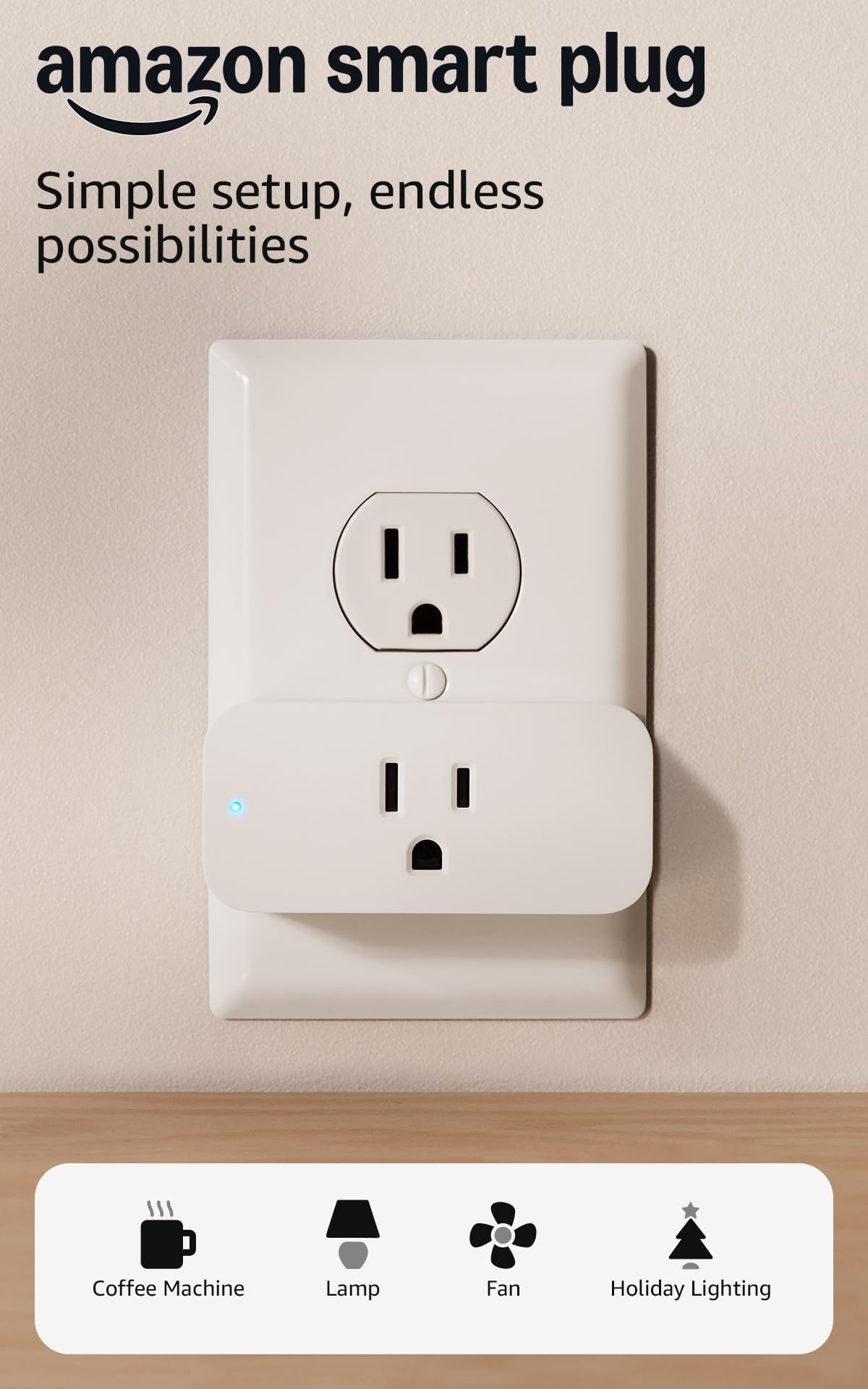
The Amazon Smart Plug is a Wi-Fi-based device built exclusively for households that run on Alexa. Because it operates within a walled garden, it does not support Google Home, Apple HomeKit, or SmartThings. However, this strict limitation is also its biggest advantage for the right user, as it offers a seamless, frustration-free setup process directly through the Alexa app.
If your home is already filled with Echo speakers and you have no intention of switching platforms, this plug is incredibly reliable. It beats similar alternatives simply because Amazon designed it to hook into their own network with zero third-party account linking required. The tradeoff is that if you ever switch to an iPhone or a Google Pixel, this plug becomes useless.
Pros
- Incredibly simple setup process
- Native Alexa support ensures fast response times
- Compact footprint
- No external hub required
Cons
- Completely incompatible with Google and Apple
- Does not monitor energy usage
Tech Specs
| Native voice control via Alexa | |
| App-based scheduling and routines | |
| Compact design that leaves the second outlet free | |
| 15A maximum load capacity | |
| Physical on/off toggle button | |
| Smart Home Compatibility | Alexa Only |
| Hub Requirement | No Hub Required (Wi-Fi) |
| Active Energy Monitoring | No |
| Form Factor | Compact (1-outlet) |
Ideal For
- Dedicated Alexa users who want the easiest possible installation.
- People who do not want to download third-party smart home apps.
Not For
- Households using Google Home, Apple Home, or SmartThings.
- Users who want to track real-time power consumption data.
Editor's Take
This is a solid, highly specialized piece of hardware. It is not flexible, but it is deeply reliable if you respect its boundaries. Do not buy this expecting cross-platform support. If you live in an Alexa household and just want a lamp to turn on at sunset without fiddling with account linking, pick this up.
Kasa Smart Plug Mini

The Kasa Smart Plug Mini (EP10P4) is an ultra-compact Wi-Fi plug from TP-Link that plays nicely with both Alexa and Google Home. Built with flame-retardant materials and featuring a 15-amp maximum load, it safely handles typical household appliances like fans, holiday lights, and coffee makers without blocking adjacent wall sockets.
It stands out in this roundup by offering a very small footprint alongside broad compatibility, beating out generic plugs with its reliable Kasa app ecosystem. While it lacks native Apple HomeKit integration and only offers limited cloud-based connectivity with SmartThings, it is an exceptionally stable choice for users needing basic scheduling across Alexa or Google platforms.
Pros
- Very small physical footprint
- High 15A capacity handles most appliances
- Works seamlessly with Google and Alexa
- No hub required
Cons
- Does not track energy consumption
- No Apple HomeKit or Matter support
Tech Specs
| 15A maximum load capacity | |
| Customizable schedules and timers | |
| UL Certified for safety | |
| Direct 2.4 GHz Wi-Fi connectivity | |
| Away mode to simulate occupancy | |
| Smart Home Compatibility | Alexa, Google Home, IFTTT |
| Hub Requirement | No Hub Required (2.4 GHz Wi-Fi) |
| Active Energy Monitoring | No |
| Form Factor | Ultra-Compact |
Ideal For
- Users needing reliable scheduling across Alexa or Google platforms.
- People plugging devices into tight spaces or crowded power strips.
Not For
- Apple HomeKit users.
- Advanced SmartThings users seeking local, hub-based execution.
Editor's Take
TP-Link's Kasa line has been a benchmark for basic smart home stability for years. This multi-pack is practical and space-saving. As long as you understand that "saving energy" here means setting strict on/off schedules rather than reading a live wattage graph, this is a highly dependable purchase for standard automation.
GHome Smart Plug

The GHome Smart Plug is a straightforward, budget-conscious Wi-Fi plug designed to get your basic appliances connected to the internet. It requires no hub, connecting directly to your standard 2.4 GHz router, and provides simple app-based controls for setting timers and schedules to help curb idle power usage.
This plug is aimed at buyers who just need a functional, certified (ETL and FCC listed) device to automate a few lamps or holiday decorations. It secures its spot here by providing reliable baseline features for Google and Alexa households without overcomplicating the setup process.
Pros
- Broad basic compatibility with major assistants
- Certified for electrical safety
- Does not block the second wall outlet
- Simple plug-and-play setup
Cons
- Generic brand app experience
- No active energy monitoring capabilities
Tech Specs
| Built-in app timer functions | |
| Remote control from anywhere | |
| ETL and FCC safety certifications | |
| Voice control via Google and Alexa | |
| Compact form factor | |
| Smart Home Compatibility | Alexa, Google Home, SmartThings |
| Hub Requirement | No Hub Required (Wi-Fi) |
| Active Energy Monitoring | No |
| Form Factor | Compact |
Ideal For
- Budget-conscious buyers who need basic timer functionality.
- Users automating seasonal lighting or daily living room lamps.
Not For
- Apple HomeKit users.
- Tech enthusiasts looking for advanced hardware features or energy tracking.
Editor's Take
This is a commodity smart plug that does exactly what it says on the box and nothing more. It lacks advanced features, but if your goal is simply to tell Google to turn off the living room fan before you go to sleep, this plug handles the job without forcing you to buy expensive bridge hardware.
Govee Smart Plug

If you already own Govee LED strips or smart lamps, the Govee Smart Plug is the logical next step for your ecosystem. Operating over standard Wi-Fi, it allows you to pull non-smart appliances into the Govee Home app, offering robust scheduling tools and the ability to group multiple plugs together to control whole rooms simultaneously.
It earns its place in this roundup because Govee’s app infrastructure handles group controls exceptionally well. Rather than switching between different apps, you can manage your bias lighting and your floor fans in one place. Just keep in mind that its integration with SmartThings is cloud-based, meaning it is not a native, local connection.
Pros
- Excellent for managing multiple devices simultaneously
- Integrates well with other Govee smart lights
- Compact footprint
- No external hub required
Cons
- No native Apple HomeKit support
- SmartThings integration relies on the cloud
Tech Specs
| Advanced group control via the Govee app | |
| ETL and FCC certified for safety | |
| Direct 2.4 GHz Wi-Fi connectivity | |
| Custom timers and daily scheduling | |
| Compact design | |
| Smart Home Compatibility | Alexa, Google Assistant |
| Hub Requirement | No Hub Required (2.4 GHz Wi-Fi) |
| Active Energy Monitoring | No |
| Form Factor | Compact |
Ideal For
- Users who already manage devices through the Govee app.
- Buyers looking to group multiple plugs into a single tap or command.
Not For
- Buyers looking for hardware energy tracking.
- Apple HomeKit users.
Editor's Take
Consolidating your smart home apps is always a wise move to prevent technical headaches down the road. If you are already invested in Govee's lighting environment, buying these plugs to handle your generic appliances is a smart, low-friction decision.
Tapo Matter Plug

The Tapo Matter Supported Smart Plug Mini (P125M) is a future-proof device that speaks the universal Matter protocol. This means it is natively compatible across Apple Home, Amazon Alexa, Google Home, and SmartThings without needing separate, brand-specific apps. It features a heavy-duty 15A rating, making it safe for demanding appliances.
It wins out for multi-ecosystem homes, but there is a critical hardware warning you must be aware of: Matter devices are not standalone. While they operate over Wi-Fi, the Matter protocol requires a specific "Matter Controller" (such as a HomePod, Apple TV 4K, Google Nest Hub, or compatible Amazon Echo) to live on your network. It will not work out of the box with just a router and your phone.
Pros
- Truly platform agnostic
- High power rating for larger appliances
- Does not block the second wall outlet
- Fast local response times
Cons
- Requires a compatible Matter Controller to function
- Setup can be frustrating if your network is unstable
Tech Specs
| Universal Matter protocol compatibility | |
| Works across Apple, Alexa, Google, and SmartThings | |
| 15A/1800W max power rating | |
| UL certified for durability | |
| Compact form factor | |
| Smart Home Compatibility | Matter (Alexa, Google, Apple Home, SmartThings) |
| Hub Requirement | Matter Controller Required |
| Active Energy Monitoring | No |
| Form Factor | Compact |
Ideal For
- Multi-ecosystem households (e.g., an iPhone user and an Android user living together).
- Users who already own a Matter Controller or Border Router.
Not For
- Beginners who only have a standard Wi-Fi router and a smartphone.
- Buyers hoping for real-time energy monitoring.
Editor's Take
Matter is the future of smart homes, but we are still in the awkward transitional phase. If you already own the required hardware infrastructure, this plug is a fantastic way to bridge the gap between rival brands. If you do not have a Matter Controller, avoid this plug until you upgrade your ecosystem.
Kasa Power Strip

If you have an entertainment center or a home office desk, adding individual smart plugs to a standard power strip quickly creates a bulky, ugly mess. The Kasa Smart Plug Power Strip (KP303) solves this by building the Wi-Fi connectivity directly into the surge protector. It offers three AC outlets that you can control and schedule independently through Alexa or Google Home.
This unit beats buying multiple individual plugs by offering built-in surge protection and keeping your wiring visually clean. However, it is important to note the limitations: while the three AC outlets are fully smart, the two built-in USB ports are standard, always-on charging ports that cannot be scheduled or controlled by voice.
Pros
- Consolidates multiple smart plugs into one clean strip
- Valuable built-in surge protection
- Independent outlet control
- No extra hub required
Cons
- USB ports cannot be controlled via app or voice
- No native Matter or Apple HomeKit support
Tech Specs
| Three independently controlled smart AC outlets | |
| Built-in hardware surge protection | |
| Two always-on USB charging ports | |
| Direct Wi-Fi connection with no hub needed | |
| Voice control via Google and Alexa | |
| Smart Home Compatibility | Alexa, Google Home |
| Hub Requirement | No Hub Required (Wi-Fi) |
| Active Energy Monitoring | No |
| Form Factor | Strip (3 AC) |
Ideal For
- Users managing dense clusters of electronics like PC setups or TV consoles.
- Buyers who want surge protection bundled with their smart controls.
Not For
- People who only need to automate a single lamp across the room.
- Users wanting to remotely schedule USB-powered devices.
Editor's Take
This is arguably the most practical product on the list for a home office. Being able to verbally reboot your router on plug one while leaving your monitor running on plug two is incredibly useful. Just remember that anything plugged into the USB slots will draw power continuously.
Philips Hue Plug

The Philips Hue Smart Plug is a premium, compact device built to solve a very specific problem: integrating your standard, dumb lamps into your expensive Philips Hue smart lighting scenes. While it does support basic Bluetooth control out of the box, it is fundamentally designed to run over the Zigbee protocol.
It justifies its higher price tag by offering rock-solid reliability that only a dedicated Zigbee mesh network can provide, making it the superior choice for users deeply invested in the Hue ecosystem. The tradeoff is strict: to access automation, out-of-home control, and smooth voice assistant integration, you realistically need to own the $60 Hue Bridge.
Pros
- Exceptional reliability via the Zigbee protocol
- Syncs perfectly with complex Hue lighting automations
- Broad voice assistant support
- Aesthetically pleasing design
Cons
- Expensive compared to standard Wi-Fi plugs
- Requires the Hue Bridge for full functionality
Tech Specs
| Deep integration with Hue app lighting scenes | |
| Dual Zigbee and Bluetooth radios | |
| Works with Alexa, Google Assistant, and Apple HomeKit | |
| Highly stable local network response | |
| Compact, non-blocking design | |
| Smart Home Compatibility | Alexa, Google Assistant, Apple HomeKit |
| Hub Requirement | Hue Bridge Highly Recommended (Bluetooth available) |
| Active Energy Monitoring | No |
| Form Factor | Compact |
Ideal For
- Existing Philips Hue users wanting to sync standard lamps with their smart bulbs.
- Buyers prioritizing network stability over cheap Wi-Fi devices.
Not For
- Users looking for a budget plug to turn on a coffee maker.
- Buyers who refuse to purchase external hubs.
Editor's Take
Do not buy this to automate a space heater; it is overkill. Buy this if you have spent time carefully crafting lighting moods in your living room using Hue bulbs and you want the vintage floor lamp in the corner to turn on at the exact same time without missing a beat.
Kasa Matter Plug

If you came to this article looking to actively track your power consumption, the Kasa Smart Plug with Energy Monitoring is the only hardware on this list that actually fulfills that promise. Beyond simple scheduling, this Matter-certified plug features internal sensors that provide real-time kilowatt-hour data to the Kasa app, allowing you to audit exactly how much power your appliances are drawing.
This plug beats the competition by combining true energy tracking with universal Matter compatibility across Apple Home, Alexa, and Google Home. However, because it utilizes Matter over Wi-Fi, it carries the same critical restriction as the Tapo model: you absolutely must have a Matter Controller actively running on your local network to set it up.
Pros
- Provides actual data to back up your energy-saving efforts
- Works natively across rival smart home ecosystems
- Does not block adjacent outlets
- High power limit for heavy-duty appliances
Cons
- Setup requires a dedicated Matter Controller
- Data visualization is mostly limited to the manufacturer's app
Tech Specs
| Hardware-level real-time energy monitoring | |
| Universal Matter protocol compatibility | |
| 15A/1800W max power rating | |
| Detailed usage charts within the app | |
| Compact design | |
| Smart Home Compatibility | Matter (Apple Home, Alexa, Google Home, SmartThings) |
| Hub Requirement | Matter Controller Required |
| Active Energy Monitoring | Yes |
| Form Factor | Compact |
Ideal For
- Users actively trying to audit and reduce their appliance power draw.
- Multi-platform smart homes that have a Matter Controller installed.
Not For
- Users looking for the absolute cheapest on/off switch.
- Buyers without a compatible Apple TV, HomePod, or Echo serving as a Matter hub.
Editor's Take
This is the definitive choice if you are serious about energy efficiency. While scheduling saves power by default, this plug gives you the hard numbers required to hunt down appliances that drain electricity in standby mode. Just ensure your network is Matter-ready before pulling the trigger.
Full Comparison Matrix
| Product | See Price Link | Thumbnail Photo | Best Feature | Star Rating | Smart Home Compatibility | Hub Requirement | Active Energy Monitoring | Form Factor |
|---|---|---|---|---|---|---|---|---|
| Amazon Smart Plug | See Price | | Frustration-Free Setup | N/A | Alexa Only | No Hub Required (Wi-Fi) | No | Compact (1-outlet) |
| Kasa Smart Plug Mini | See Price | | Ultra-compact footprint | N/A | Alexa, Google Home, IFTTT | No Hub Required (2.4 GHz Wi-Fi) | No | Ultra-Compact |
| GHome Smart Plug | See Price | | Built-in timer functions | N/A | Alexa, Google Home, SmartThings | No Hub Required (Wi-Fi) | No | Compact |
| Govee Smart Plug | See Price | | App-based group control | N/A | Alexa, Google Assistant | No Hub Required (2.4 GHz Wi-Fi) | No | Compact |
| Tapo Matter Plug | See Price | | Universal Matter compatibility | N/A | Matter (Alexa, Google, Apple Home, SmartThings) | Matter Controller Required | No | Compact |
| Kasa Power Strip | See Price | | Independent outlet control | N/A | Alexa, Google Home | No Hub Required (Wi-Fi) | No | Power Strip (3 AC) |
| Philips Hue Plug | See Price | | Hue scene integration | N/A | Alexa, Google Assistant, Apple HomeKit | Hue Bridge Highly Recommended | No | Compact |
| Kasa Matter Plug | See Price | | Real-time energy monitoring | N/A | Matter (Apple Home, Alexa, Google Home, SmartThings) | Matter Controller Required | Yes | Compact |
Buyer's Checklist
| Feature To Consider | Why It Matters |
|---|---|
| Verify Hub Requirements | Do not assume a plug connects straight to your router. Check if it requires a Matter Controller or a Zigbee bridge (like the Hue Bridge) before buying. |
| Monitoring vs. Scheduling | Decide if you want to see hard data on power consumption (requires energy monitoring hardware) or if you just want to set an off-timer to save electricity. |
| Check the Footprint | Look for ultra-compact or horizontally stacked designs to ensure the plug does not block the second socket on your wall outlet. |
| Ecosystem Fit | If you use Apple HomeKit, do not buy a plug that only lists Alexa and Google support. You will be stuck using a separate third-party app. |
| Consider Amp Limits | Most standard plugs support 15 amps, which is fine for lamps and coffee makers, but check the wattage limit if you intend to automate heavy-draw appliances like space heaters. |
Frequently Asked Questions
How do smart plugs actually save energy?
Most smart plugs save energy indirectly through scheduling and automation. By setting routines to kill power to idle electronics when you leave the house or go to bed, you prevent phantom power draw. Only specific models with built-in energy monitoring hardware can actually show you real-time kilowatt-hour usage.
What is a Matter Controller, and why do I need one?
Matter is a universal language that allows Apple, Amazon, and Google devices to talk to each other locally. However, to translate that language over your Wi-Fi network, you must have a Matter Controller plugged in at your house. Devices like an Apple TV 4K, a HomePod, or a newer Amazon Echo serve this purpose. Without one, Matter plugs will fail to set up.
Can a smart plug handle a space heater or air conditioner?
It depends entirely on the amperage and wattage limits of both the plug and the appliance. Most quality plugs cap out at 15 amps or 1800 watts. While they can handle brief loads, running a high-draw heating or cooling element continuously through a smart plug is not guaranteed to be safe long-term and can carry a fire risk. Always check the manufacturer's safety warnings.
Do I have to pay a subscription to use these smart plugs?
No. All of the smart plugs on this list allow you to use their core features, including basic scheduling and voice control integrations, without paying any monthly subscription fees.
Will these plugs work if my internet goes down?
Generally, no. Standard Wi-Fi smart plugs rely on cloud servers to process app commands and voice requests. If your internet drops, you will lose remote access, though physical buttons on the side of the plugs will still work manually. Plugs operating on local networks via Zigbee or Matter may retain local app control if your internal router is still broadcasting.

