Use a MoCA adapter to turn your old cable jacks into a faster, steadier home network without tearing open your walls.
Sleek mesh routers can’t beat the walls, ducts, and signal noise inside your home. If you pay for gigabit internet but still deal with choppy video calls, laggy games, or slow downloads, your Wi-Fi may be the problem. The truth is simple: for fast, steady speeds, a wired network still works best.
Running Cat6 Ethernet is the best fix. But pulling cable through finished walls can be costly, messy, and a real pain. The good news? You may already have a strong option in your walls: old cable TV coax lines.
That’s where MoCA comes in. MoCA stands for Multimedia over Coax Alliance. In plain English, it’s a way to send internet data through the same coax cables once used for cable TV. A MoCA adapter plugs into a coax wall jack, then connects to your router or device with Ethernet. This gives you a wired link without tearing open walls.
MoCA 2.5 is the faster version of that tech. It can turn those old coax wall jacks into fast wired network ports for streaming, gaming, work calls, and large downloads. We tested the ScreenBeam ECB7250K02 MoCA 2.5 Starter Kit for several weeks to see how it holds up. Here’s how it works, how it performed, and the setup limits the manual doesn’t make clear.

Last updated on 2026-08-14
The Core Concept: Ethernet Over Coax
A MoCA network acts as a transparent physical bridge. To establish the connection, you’ve got to use at least two MoCA adapters to link your router to your distant device.
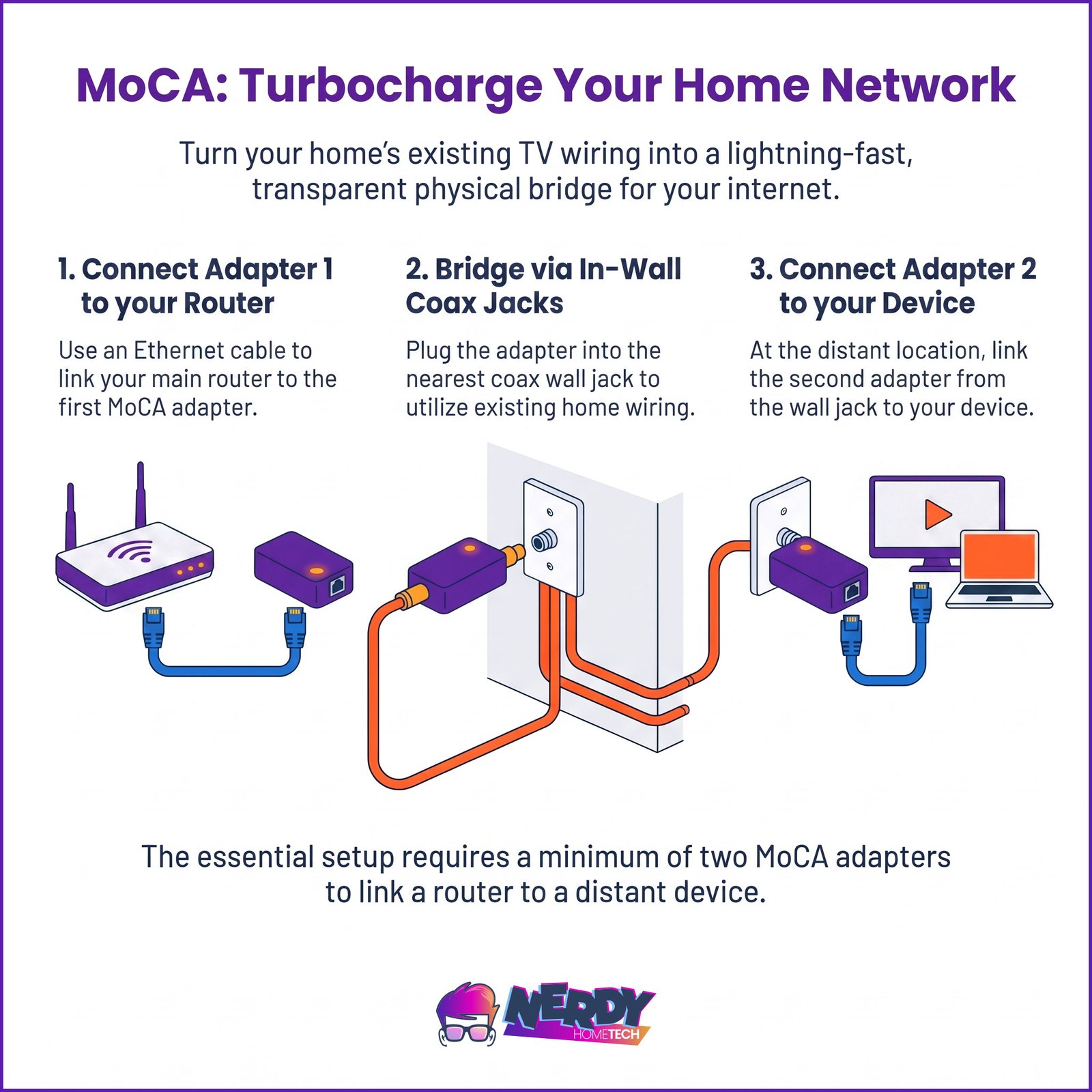
- Adapter 1 sits near your home router. It connects to a nearby power outlet, plugs into the coaxial wall outlet via a short coax patch cable, and plugs directly into one of your router’s LAN ports using standard RJ45 Ethernet.
- Adapter 2 sits in your target room (such as a home office or gaming space). It plugs into a local power outlet, connects to that room’s coax wall jack, and exposes a high-speed Ethernet port for your computer, console, or access point.
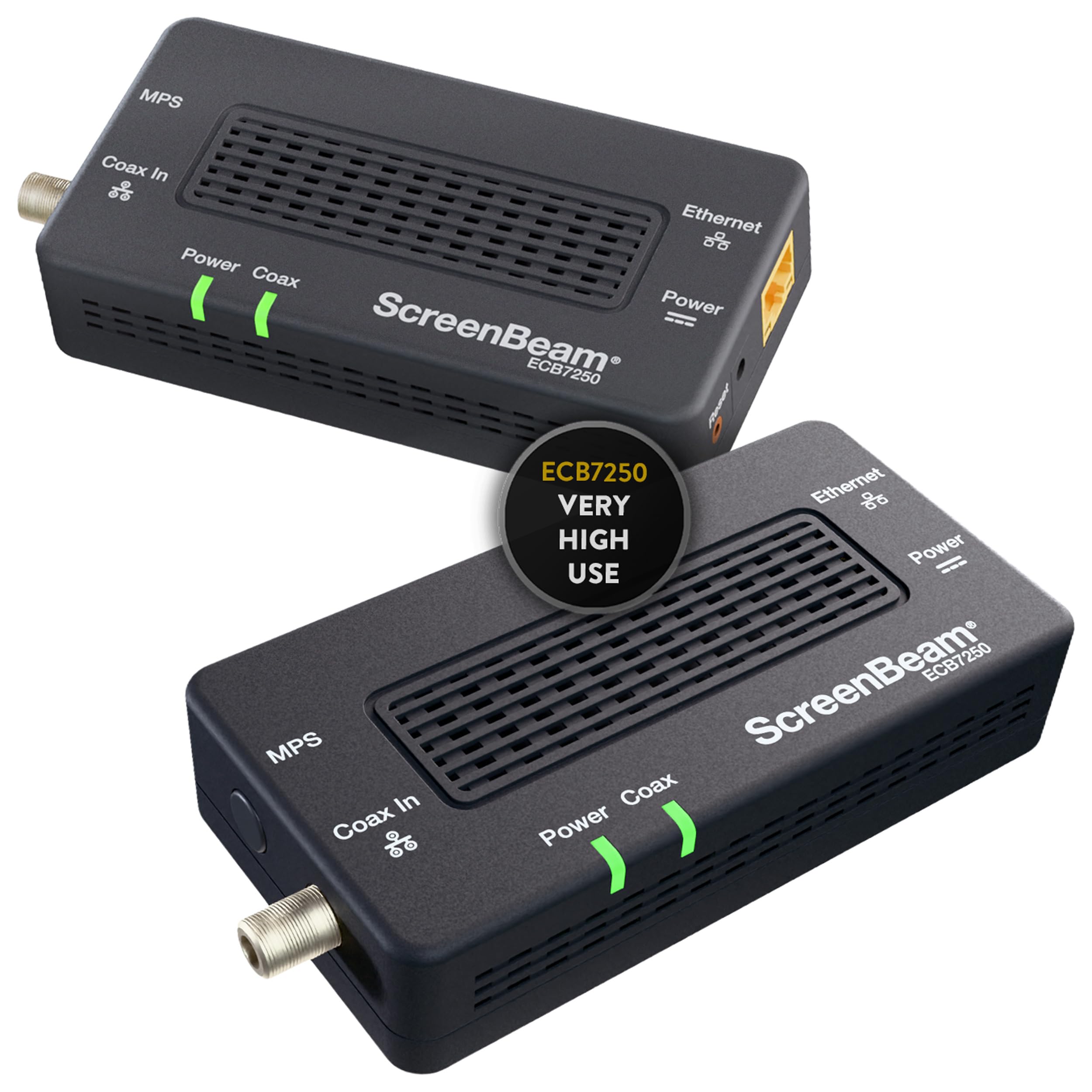
The ScreenBeam ECB7250 features a 2.5 Gbps RJ45 Ethernet port. This’s a massive upgrade over older MoCA 2.0 adapters, which were capped at standard gigabit (1000 Mbps) speeds.
CRITICAL ISP GATEWAY NOTE: Before spending money on a two-adapter starter kit, check your router. Many modern cable gateways provided by Comcast (Xfinity XB7/XB8), Cox, or Spectrum have MoCA 2.5 transmitters built directly into their internal firmware. If your gateway’s got this feature, you’ll only need to purchase a single MoCA adapter (around $80 to $90 USD) for your remote room, cutting your initial hardware cost in half.
Smart Home Beginner Blueprint: Gaps and Hidden Costs
While MoCA 2.5’s an incredible performance tool, first-time buyers should be prepared for several real-world design limitations that manufacturers rarely emphasize.
1. The Active Power Dependency
Unlike a standard Ethernet wall jack, MoCA adapters’re active electronics. Each ScreenBeam unit requires its own nearby AC power outlet (supplied by an included 5V, 2A power brick). Because coaxial wall plates in older homes’re frequently placed in awkward spots—such as low on baseboards behind heavy, flush-mounted furniture—you’ll likely need to budget for extension cords, low-profile power strips, or longer coax patch cables to find a safe mounting spot.
2. The Single Ethernet Port Bottleneck
The ScreenBeam ECB7250 features exactly one RJ45 Ethernet port. If you’re bridging the connection to a home office or entertainment center containing multiple wired devices (e.g., a gaming PC, a smart TV, and a work laptop), you can’t plug them all into the adapter directly. You’ll need to purchase a separate 5-port network switch. A standard gigabit switch’ll run you roughly $15, while a multi-gigabit (2.5G) switch costs closer to $30 to $45.
3. Troubleshooting “Dead” Wall Jacks
If you plug in your MoCA adapters and the “Coax Link” light remains dark, you’re dealing with a disconnected line. In most residential homes, only the coax lines actively used by the previous cable company’re actually plugged into the main splitter.
To fix this:
- Locate your home’s central coaxial distribution point (usually found in a basement, garage, attic, or an exterior plastic utility box).
- Look for loose, uncoupled coaxial cables dangling near the main splitter.
- You’ll need to perform a process of elimination—using a simple coaxial pocket tester or physically swapping cables—to find the lines running to your target rooms and screw them firmly into the active splitter ports.
Critical Infrastructure “Gotchas”
There’re several scenarios where MoCA’ll either struggle or outright fail to work. Ensure your home doesn’t fall into these categories before ordering hardware.
1. The Satellite TV Conflict
MoCA and Satellite TV (such as DirecTV or DISH Network) can’t coexist on the same physical cable run. Satellite providers use the 950 MHz to 2150 MHz frequency spectrum to send signals from the dish to your receiver. MoCA 2.5 operates in the 1125 MHz to 1675 MHz range. If you attempt to run both on the same wire, the signals’ll crash into each other, instantly knocking out your television feed and your data network.
Note: If you’ve cut the cord, or if you use a standard digital cable provider (like Xfinity or Spectrum) whose signals stay safely below 1002 MHz, MoCA’ll function perfectly.
2. The DOCSIS 3.1 Frequency Overlap
Modern high-speed cable modems utilize the DOCSIS 3.1 or DOCSIS 4.0 standard, which can expand downstream channels up to 1218 MHz (or higher in future configurations). This creates a direct frequency overlap with the bottom edge of the MoCA band (1125 MHz).
If this overlap occurs, the MoCA signals can overwhelm your modem’s sensitive input tuners. The symptoms’re immediate and highly frustrating: your modem’ll randomly drop connection, reboot, or experience severe packet loss the moment the MoCA adapters begin transmitting.
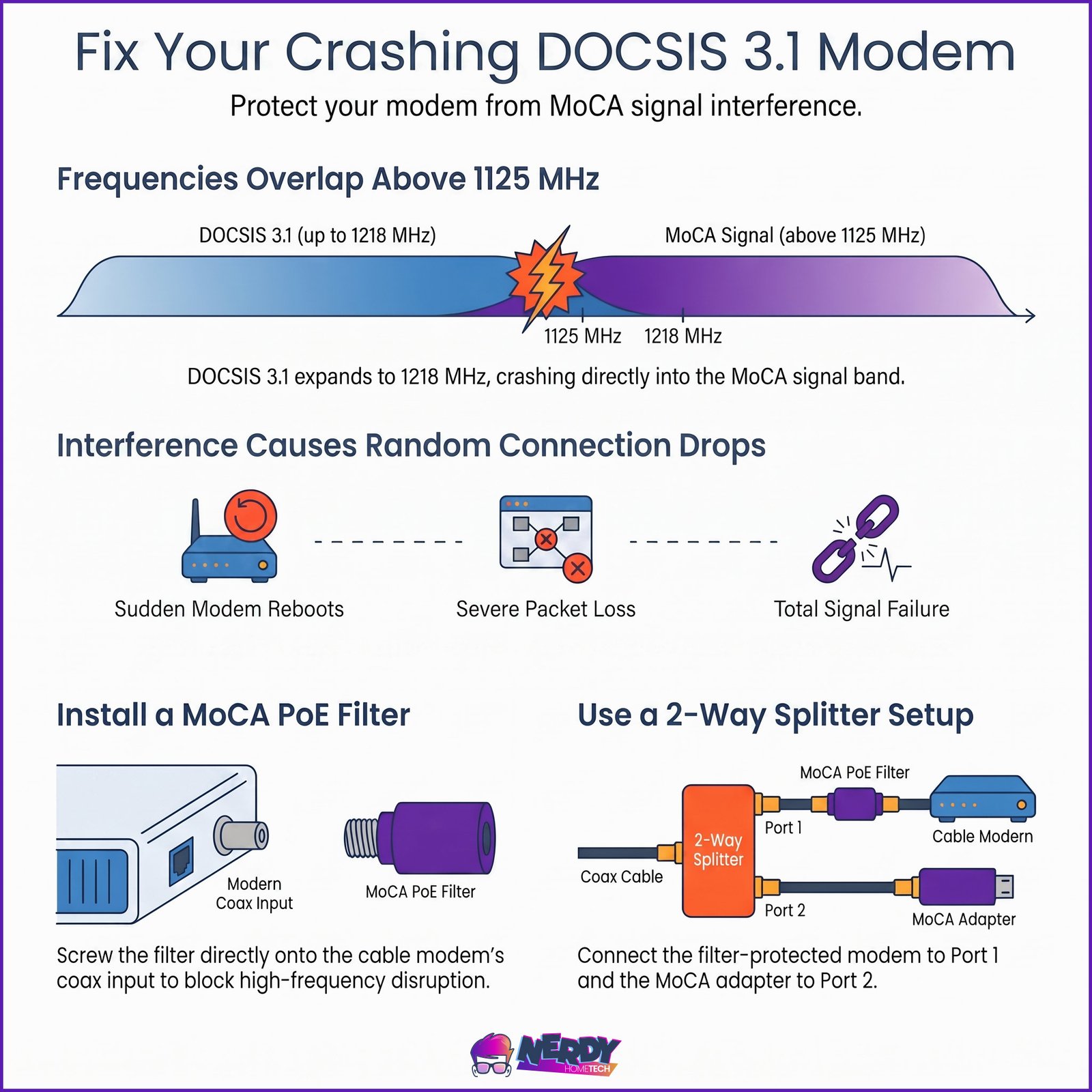
To prevent this frequency crash, you’ve got to screw a cheap, passive MoCA PoE (Point of Entry) Filter directly onto the coax input port of your cable modem. This filter acts as a physical barrier, blocking the higher-frequency MoCA signals from entering and disrupting the modem’s circuitry.
3. Securing Your Boundary (The Point of Entry Filter)
Because coaxial lines are physically connected throughout a neighborhood tap, MoCA signals are strong enough to travel right out of your home and onto the street. Without a proper boundary filter, your neighbors could theoretically see your local network traffic, and their own MoCA devices could join your network, severely degrading your bandwidth.
You’ve got to install a high-quality MoCA PoE filter at your home’s main physical point of entry—right before the primary coax cable from the street connects to your first internal splitter. This keeps your private data securely inside your home’s walls.
4. Legacy Coaxial Splitters
Coaxial splitters are passive metal blocks that divide a single incoming signal among multiple rooms. Older splitters installed in the 1990s or early 2000s were only designed to pass frequencies up to 1000 MHz. Because MoCA 2.5 requires frequencies up to 1675 MHz, these legacy splitters’ll physically choke the high-frequency MoCA signal.
If you live in an older home, you’ll likely need to locate your main splitter and swap it out for a modern model explicitly rated for 5-1675 MHz or 5-2000 MHz. These’re inexpensive (typically $8 to $12) and can be swapped in under five minutes with a simple crescent wrench.
Financial Analysis: Is the ScreenBeam ECB7250 Worth It?
The ScreenBeam ECB7250K02 starter kit (which includes two adapters, two power supplies, and two short coaxial patch cables) typically retails between $110 and $130 USD.
While this’s incredibly cost-effective compared to hiring a low-voltage electrician to fish a Cat6 line through your walls (which can easily run $200 to $400 per drop), it’s on the premium end of the MoCA market.
To make an informed purchasing decision, consider your budget and requirements against these direct market alternatives:
| Preview | Product | Rating | |
|---|---|---|---|
 | TRENDnet Ethernet Over Coax MoCA 2.5 Adapter, TMO-312C | Backward Compatible with MoCA… | CHECK PRICE |
Last updated on 2026-08-15
| Preview | Product | Rating | |
|---|---|---|---|
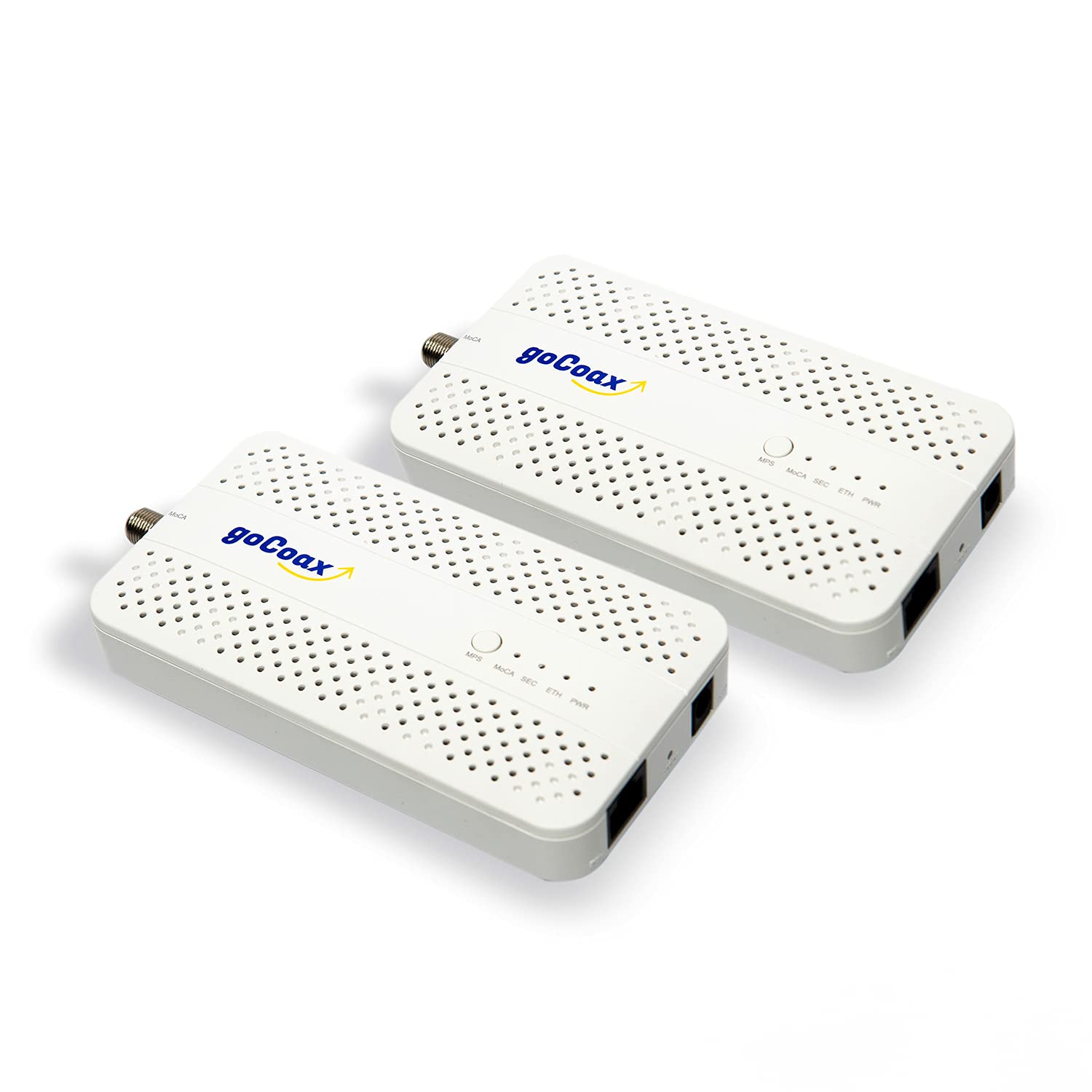 | goCoax MoCA 2.5 Adapter (2-Pack) with 2.5GbE Ethernet Port | MA2500D Ethernet Over Coax for Gaming… | CHECK PRICE |
Last updated on 2026-08-15
| Preview | Product | Rating | |
|---|---|---|---|
 | Hitron HTEM5 MoCA 2.5 Network Adapter (2-Pack) – Extends Network via Coax | NOT a Modem/Router/WiFi… | CHECK PRICE |
Last updated on 2026-08-15
The Nerdy Recommendation
The ScreenBeam ECB7250 remains the best choice for those seeking plug-and-play simplicity, retail availability, and robust customer support. It’s highly reliable, built well, and delivers on its performance promises. However, if you’re looking to wire a larger home requiring 4 or 5 nodes, opting for GoCoax or carrier-surplus Frontier adapters can save you over $100 in total hardware costs.
Last updated on 2026-08-14