
Introducing Echo Hub | 8” smart home control panel with Alexa

Who’s this for:
- Homeowners who want a simple wall hub for lights, locks, and cams.
- Alexa users ready to tidy up scattered smart speakers and apps.
- Families who need a shared control panel everyone can understand.
- Renters with growing smart gear who still want a compact hub.
- New smart home buyers wanting Matter support without complexity.
- Busy people who prefer quick taps over barking voice commands.
You might also be interested in these alternatives:

Use Cases
- Smart Home Control: Use the Echo Hub as a control center to manage smart lights, security systems, and other compatible devices with ease.
- Automation Routines: Create routines that automate daily tasks, such as turning off lights or locking doors with a single command or tap.
- Music and Audio: Stream music or use the speakers for news and weather updates, enriching the ambiance of your home.
The Amazon Echo Hub is a great pick if you’re looking for an easy way to manage all your smart home devices in one place. With its simple touchscreen, Alexa voice control, and compatibility with tons of smart gadgets, it’s a strong player in the smart home game. Whether you want to simplify your daily routines or keep your home under control with less hassle, the Echo Hub has you covered.
Streamline Your Smart Home
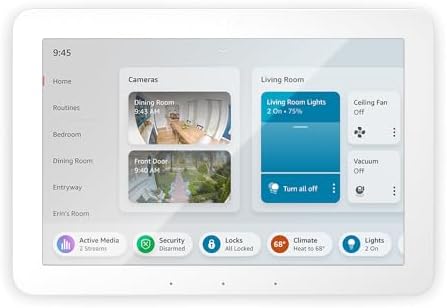
Make the Echo Hub work exactly how you want it! You can customize the dashboard with the controls and widgets that fit your smart home needs. Whether it’s adjusting devices, checking your camera feeds, kicking off routines, or more, the streamlined interface keeps everything simple. Personalizing your dashboard makes managing your smart home easier—and way more intuitive.
Works with Thousands of Devices
Compatibility is broad. The Hub supports major brands and standards. These include Philips Hue (Zigbee), Ring, Arlo, Nest, ecobee, TP‑Link, and popular smart locks. According to Amazon, the Hub works with over 140,000 compatible smart home devices. That compatibility matters. The fewer bridges you need, the smoother daily control becomes. Device grouping and multi-room control are available. Grouping could use refinement for power users who demand detailed scenes.
Some of the brands:
| Device Brand | Supported Device Type | Integration Type |
|---|---|---|
| Philips Hue | Smart Lighting | Zigbee |
| Samsung SmartThings | Smart Home Hub | Zigbee/Wi-Fi |
| Ring | Security Cameras | Wi-Fi |
| TP-Link | Smart Plugs/Switches | Wi-Fi |
| ecobee | Smart Thermostats | Wi-Fi |
| Nest | Smart Thermostats | Wi-Fi |
| WeMo | Smart Plugs | Wi-Fi |
| August | Smart Locks | Bluetooth |
| Schlage | Smart Locks | Z-Wave |
| Yale | Smart Locks | Z-Wave |
| Arlo | Security Cameras | Wi-Fi |
| iRobot | Robot Vacuums | Wi-Fi |
Home Security at Your Fingertips
Imagine walking through your front door after a long day, and with just a command, your home welcomes you back. The Echo Hub is not just about security; it’s about creating a seamless experience that enhances your lifestyle. You can easily check live feeds from your cameras, receive instant notifications if any unusual activity is detected, and even set schedules for your lights to mimic your usual patterns while you’re away.
Integrating with your smart home devices, the Echo Hub allows you to automate routines that fit your daily life. From locking your doors at a specific time to turning on your porch lights when the sun sets, the possibilities are endless. Plus, with the built-in voice control, even if your hands are full, securing your home is as easy as saying a simple command.
But it doesn’t stop there. With real-time alerts and updates, you can stay informed about your home’s status no matter where you are. Whether you’re at work, running errands, or on vacation, peace of mind is always within reach. The Echo Hub transforms security from a necessity into a feature of your connected lifestyle, giving you the freedom to focus on what truly matters.

Ring Alarm 8-piece kit (2nd Gen) – home security system
Dashboard and customization
Customization is one of the Hub’s strongest wins. Drag-and-drop widgets let you adjust the home screen for particular rooms or users. You can create shortcuts for routines—morning, away, bedtime. Multi-device actions run with a single tap or voice cue. This reduces mental effort. You no longer hunt through apps to trigger paired actions.
Alexa is central. Voice commands complement the touchscreen. They don’t replace it. When your hands are full, say “Alexa, lock the front door” or “Alexa, set movie mode.” Response time is typically snappy for common commands. Voice is ideal for quick checks and routine triggers. The touch interface handles precision tasks like adjusting camera views or fine-grain lighting levels.
Audio and entertainment
Audio works as expected for a control panel. It’s serviceable, not studio-grade. The speakers handle voice and ambient music well. For true sound quality, pair the Hub to dedicated speakers or a multi-room setup. The Hub’s value is control over audio more than audio excellence itself.
Installation and physical design
The Hub is compact and unobtrusive. Wall-mounting integrates it into your home aesthetic. PoE and cable pass-through options keep the installation tidy. If wiring is an issue, a stand works. Amazon sells the stand separately. The physical build feels solid and intentional. The screen’s color and clarity are good for viewing cameras and dashboards. The 8-inch size limits how many simultaneous feeds you can monitor.
Performance and user experience caveats
Most interactions feel polished. Some tablet-like behaviors could be smoother. Occasional lag and minor glitches crop up—especially with complex third-party integrations or weak Wi‑Fi. Long‑press and swipe behaviors are not always consistent across apps. Users expecting a fluid tablet experience may find the Hub feels like a focused appliance rather than a full tablet.
Power and networking
Power options are flexible. Standard DC, PoE, or in-wall pass-through all work for a clean install. That flexibility supports both permanent installs and renter-friendly setups. A stable, fast Wi‑Fi network is necessary. Weaker networks produce lag and sluggish discovery for devices. Consider using wired backhaul or a mesh system for large homes.
Echo Hub: A New Key Player in Smart Home Evolution
The Echo Hub represents a major leap forward in smart home technology, redefining convenience and integration. As the newest addition to Amazon’s product lineup, it effortlessly connects with a wide array of devices, showcasing Amazon’s dedication to delivering a seamless and cohesive smart home experience.
With Alexa at its core, the Echo Hub transcends being just a control panel—it becomes the central nervous system of a modern smart home. Boasting compatibility with thousands of devices, the Echo Hub isn’t just versatile—it’s a future-ready solution designed to adapt seamlessly to evolving smart home ecosystems. Whether you’re managing lights, thermostats, or security systems, its extensive compatibility ensures effortless integration. Paired with Alexa’s intuitive interface, the Echo Hub is an essential tool for anyone aiming to simplify and enhance their smart home experience.
Bridging the Gap in Smart Home Management
The Echo Hub serves as the perfect link between intricate smart home systems and everyday users. Featuring an 8″ touch screen display, it allows seamless monitoring and control of smart devices—no need for multiple apps or complex setups. Installation is effortless, whether you choose to wall-mount it or place it on a stand, making it a versatile addition to any space.
Thoughtful design elements, such as power-over-ethernet compatibility and in-wall cable pass-through options, demonstrate a strong focus on user convenience and practicality.
The Echo Hub’s emphasis on privacy and sustainability demonstrates Amazon’s commitment to responsible innovation. The device’s built-in privacy controls, including a microphone off button, offer peace of mind to users concerned about their personal information.
Meanwhile, the use of recycled materials in both the device and its packaging highlights Amazon’s steps towards reducing its environmental impact.
Echo Hub: Your Home’s Security and Entertainment
The Echo Hub offers much more than basic device management—it serves as a central hub for both home security and entertainment. Seamlessly integrating with Ring security systems and compatible cameras, it provides real-time surveillance and alarm control directly at your fingertips.
This enhanced level of oversight and functionality makes it an invaluable tool for homeowners seeking to elevate their property’s security and peace of mind.
The Echo Hub seamlessly connects to your preferred speakers and manages music playback across your home, making it the ultimate centerpiece for convenience and entertainment.
Whether you’re hosting a lively gathering or unwinding after a long day, your favorite songs are always just a voice command away. Its thoughtfully designed audio integration enhances functionality and solidifies its role as a versatile, indispensable addition to any smart home.
The Echo Hub: A Critical Analysis of User Experience
While the Echo Hub offers a wide array of features and compatibility options, it’s important to critically analyze its user experience and areas for improvement. Some users have reported challenges with device grouping and a desire for smoother tablet-like interactions. These feedback points highlight areas where the Echo Hub could evolve to better meet user expectations.
Looking towards the future, the Echo Hub has the potential to become even more integral to the smart home ecosystem. By addressing current limitations and incorporating user feedback into future updates, Amazon can enhance the Echo Hub’s functionality and user experience.
Potential updates could include improved group device management, enhanced customization options, and smoother operation, ensuring that the Echo Hub remains at the forefront of smart home technology.
What works best
- Households with many devices who want a unified control point
- Families that need a shared, always-on control surface
- Users invested in Alexa who want tighter integration across Echo devices
- Renters who prefer a tabletop setup but want hub-grade features
What needs improvement
- Tablet-like responsiveness could be faster
- Grouping and advanced scene management need polish
- Onboard audio is adequate, not exceptional
- Amazon sells the stand as an extra purchase for non-walled installs
Is the Echo Hub worth it?
If ease of use and centralization matter to you, yes. The Hub excels at reducing friction. Fewer apps. Faster routines. Shared access across household members. It won’t replace a high-end tablet or audiophile setup. Power users may notice some limits in device grouping and speed. For most smart-home owners—especially those invested in Alexa—the Echo Hub meaningfully simplifies daily life.
Final verdict
The Echo Hub shines as a focused control center. It consolidates devices. It streamlines routines. It gives families a visible, shared interface. Expect a few software rough edges. Expect solid integration with Alexa’s platform. If you want convenience, reduced app juggling, and centralized control, the Echo Hub earns a strong recommendation.
Ready to simplify your smart home? Check the latest Echo Hub pricing and availability on Amazon, or explore compatible devices to build your setup.
Introducing Echo Hub | 8” smart home control panel with Alexa
 Amazon.com
 - INTRODUCING ECHO HUB — An easy-to-use Alexa-enabled control panel for your smart home devices—just ask Alexa or tap the display to control lights, smart plugs, camera feeds, and more.
- STREAMLINE YOUR SMART HOME — Customize the controls and widgets, displayed on your dashboard to quickly adjust devices, view cameras, start routines, and more.
- WORKS WITH THOUSANDS OF ALEXA COMPATIBLE DEVICES — Compatible with thousands of connected locks, thermostats, speakers, and more. WiFi, Bluetooth, Zigbee, Matter, Sidewalk and Thread devices sync seamlessly with the built-in smart home hub.
- HOME SECURITY AT YOUR FINGERTIPS — Use the Echo Hub to arm and disarm your Ring security system. Use the Alexa app and compatible cameras, locks, alarms, and sensors to check in while you’re out.
- EASY TO INSTALL — Echo Hub can be wall mounted anywhere you have an outlet. Use in-wall cable pass throughs or a power-over-ethernet adapter (both sold separately) to hide cables. Also compatible with table-top stand (sold separately).
- PLAY YOUR MUSIC EVERYWHERE — Connect your preferred speaker to Echo Hub to play music, audiobooks, and podcasts in any room.
- DESIGNED TO PROTECT YOUR PRIVACY — Amazon is not in the business of selling your personal information to others. Built with multiple layers of privacy controls, including a mic off button.
- DESIGNED FOR SUSTAINABILITY – This device is made from 27% recycled materials. 97% of this device packaging is made of wood fiber-based materials from responsibly managed forests or recycled sources.