The bags are packed. The rideshare is idling outside. Right as you lock the front door, the anxiety hits. Did you leave a coffee maker on? Will your house sit dark and obviously empty for two weeks?
Smart home technology offers a practical fix, but building a system that actually mimics human occupancy takes strategy. No automated routine stops a determined, targeted intrusion, but a properly configured setup makes your property a much harder target.
Protecting your house without getting burned by restrictive ecosystems, surprise subscription costs, or devices that drop connection the minute you board your flight requires a realistic smart home vacation plan.
The Foundation: Before You Buy a Single Device
Don’t buy random smart devices the week before a trip. It guarantees a frustrating, incompatible mess. Start by understanding the technical baselines.
1. The True Cost and The Payment Trap
A basic lighting setup using Wi-Fi smart plugs costs around \$50. A comprehensive ecosystem—deadbolts, video doorbells, thermostats, and leak sensors—easily pushes past $1,500.
Hardware is just the baseline. Almost all major consumer cameras (Ring, Nest, Arlo) require a monthly subscription to actually record and save video. Stacking a camera plan with premium alarm features easily drains $50 to $80 a month.
The Payment Trap:
If your credit card expires while you travel, cloud-dependent features stop working. Set your subscriptions to a card that won’t expire mid-trip.
2. The Renter Liability Reality
Smart thermostats require rewiring an HVAC system. Smart deadbolts require replacing the physical hardware in your door. If you rent, your landlord will likely prohibit this.
Retrofit locks that attach to an indoor thumb-turn (like August) seem like the perfect plug-and-play fix, but check your lease. Many property management companies strictly forbid modifying entry hardware due to fire code liabilities. Furthermore, retrofit locks frequently jam if your door’s strike plate is even slightly misaligned—a physical repair renters are rarely authorized to perform.

August Home Smart Keyless Entry Door Lockes

3. The Wi-Fi and Bandwidth Bottleneck
Your ISP router is designed for a few laptops and phones, not 30 Wi-Fi smart bulbs. If you plan to connect more than 15 devices, upgrade to a mesh Wi-Fi system.
Cameras demand significant upload bandwidth. Running multiple 4K security cameras requires 2 to 4 Mbps of dedicated upload speed per camera.
Without it, your live feeds buffer endlessly while you sit at the departure gate. Continuous streaming can also push 1 TB of upload data over a ten-day trip, easily blowing past standard ISP data caps.
4. Protocols, Hubs, and The Matter Paradox
Advanced smart homes use devices communicating via low-power radio protocols, primarily Zigbee or Z-Wave, to keep the load off the Wi-Fi router.
You’ll likely see the Matter logo pitched as the ultimate beginner solution that works across Apple, Google, Amazon, and Samsung. However, Matter (specifically Matter over Thread) is currently experiencing severe growing pains regarding multi-admin stability and unexpected network drops.
For an empty house, a mature proprietary system or a strict Z-Wave setup is frequently far more reliable.
Smart Home Protocols: A Comprehensive Guide for 2026

Phase Two: Entertainment and Sound
A truly occupied house flickers with activity. The shifting glow of a television screen is highly convincing from the street.
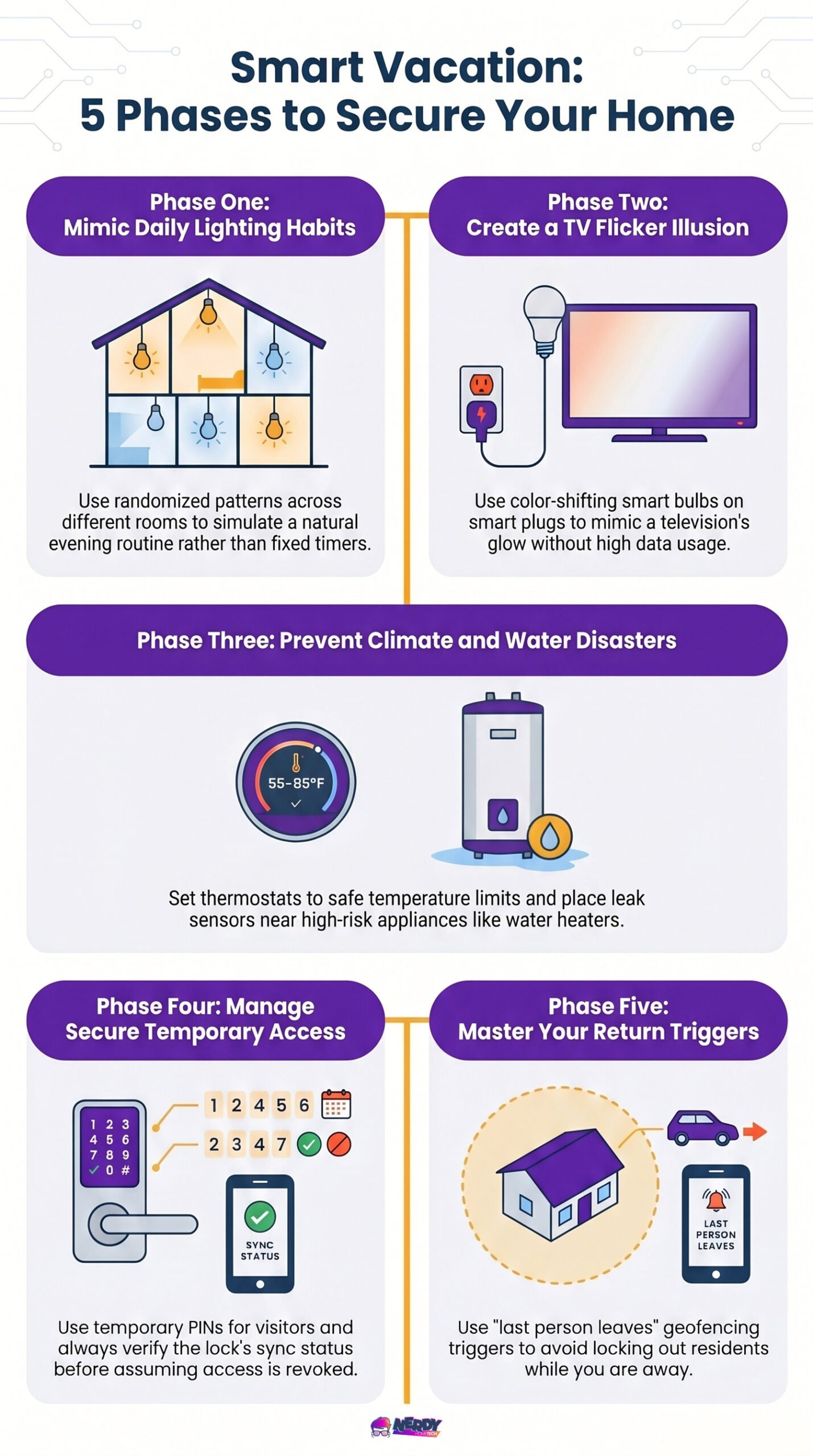
You can automate an Apple TV to stream content, but continuous streaming for a ten-day trip consumes massive data and might trigger account security flags. A smarter, cheaper alternative is using a smart plug to power a dedicated lamp equipped with color-shifting smart bulbs. Set them to mimic a TV’s flickering glow. It costs pennies to run and triggers no account alerts.
Phase Three: Climate Control and Leak Prevention
Turning your HVAC system completely off invites disaster. Set your smart thermostat to 85°F in the summer to prevent the house from turning into an oven, or 55°F in the winter to save fuel while protecting pipes.
The Installation Trap:
Smart thermostats require a “C-wire” (Common wire) to deliver continuous power. If your older home lacks one, don’t force a workaround unless you understand HVAC wiring. You can easily short out the control board on your furnace—a mistake costing hundreds of dollars.
The Alert-Only Flood Scenario:
Burglars are bad, but burst pipes are worse. Place smart water leak sensors under your kitchen sink, near the water heater, and behind the washing machine. However, receiving a push notification at 35,000 feet that your kitchen is currently flooding is psychological torture if the water keeps running.
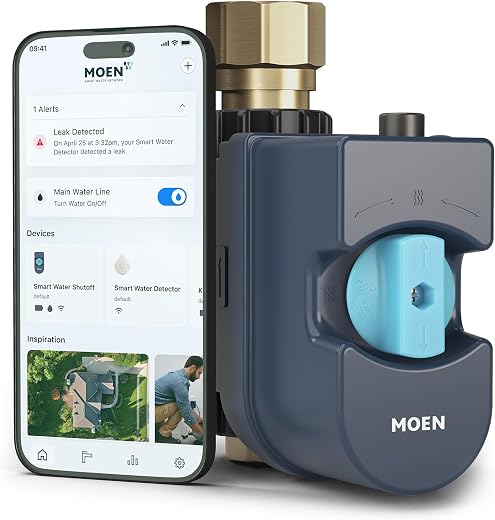
Alerts without automated mitigation are useless during a vacation. You need an automated water shutoff valve (like a Moen Flo) or a retrofit motorized valve turner that physically closes the main water line the second a sensor trips.
Pro tip: Check with your homeowner’s insurance. Many providers offer significant premium discounts or hardware rebates for installing these automated main-line valves.
Phase Four: Access and Perimeter Security
If a neighbor waters your plants, don’t hide a physical key under the welcome mat. Use a smart lock to manage temporary access, but understand the technical vulnerabilities.
The Smart Lock Sync Trap
Handing a pet sitter a temporary PIN code makes sense. Don’t assume deleting that code from your phone actually removes it from the door. If your smart lock loses its internet connection before syncing with the cloud, that deleted code stays cached in the physical hardware. Always check the lock’s sync status in your app before assuming access is revoked.

Yale Assure Lock 2 Wi-Fi Smart Door Lock with Touchscreen Keypad, Satin Nickel

The Dead Battery Trap
If your smart lock batteries die while you’re three states away, you’re locked out. Ensure your lock has either a physical key override or external 9V battery jumpstart terminals.
If it has a key, hide the spare inside a heavy-duty mechanical lockbox bolted out of sight. Drilling a dead cylinder at 11 PM costs hundreds in locksmith fees.
Garage Door API Lockouts & Physical Bypasses
A garage door is a primary perimeter vulnerability. Chamberlain blocked third-party apps from the myQ ecosystem, crippling many unified smart home setups. If you want a system that ignores Chamberlain’s closed servers, look at local-control alternatives like the Meross Smart Garage Controller.
Always verify current firmware compatibility for Apple Home or Google Home before purchasing.
More importantly, a smart controller tells you if the door opens, but it won’t stop a burglar from using a wire coat hanger to pull the emergency release cord from the outside. Take the extra five minutes to zip-tie or secure that release cord before you leave.
| Preview | Product | Rating | |
|---|---|---|---|
 | meross Smart Garage Door Opener Remote Work with HomeKit, Alexa and Google MSG100-HomeKit* | CHECK PRICE |
Last updated on 2026-09-24
Phase Five: Failsafes and Mid-Vacation Troubleshooting
A cloud-based home is fragile. You need backup plans for when things break.
The DNS Hangup Caveat
If your cameras drop offline, the router is usually the culprit. A massive soft failure is a DNS hangup. If your internet provider’s DNS crashes, a physical connection remains, but no data actually moves. Fix this before packing your bags by logging into your router’s admin panel and switching your DNS to Cloudflare (1.1.1.1) or Google (8.8.8.8). Note: Many consumer ISP-provided gateways hardcode their DNS and lock users out of changing it. This fix is likely only applicable if you own your routing hardware.
The “Watchdog” Reboot Reality
You might see advice to use a Wi-Fi smart plug to automatically reboot a crashed router. If the router’s internal routing table freezes, the Wi-Fi network itself drops.
Your Wi-Fi-based watchdog plug disconnects and cannot receive the command to power cycle. This watchdog strategy only works consistently if the plug operates on a local Zigbee or Z-Wave mesh entirely independent of the Wi-Fi router it monitors.
Power Outages and UPS Runtime Limitations
Plug your modem and router into a small Uninterruptible Power Supply (UPS). A basic 600VA unit might keep a low-power cable modem alive for 30 to 60 minutes, but this runtime is absolutely not guaranteed.
A multi-node Wi-Fi 7 mesh system coupled with a fiber ONT pulls significantly more wattage. Calculate the exact wattage draw of your specific networking gear to ensure the battery actually provides meaningful uptime during a blackout.


Last updated on 2026-09-24
Coming Home: Geofencing Realities
Vacation mode should end smoothly when you return. Many users rely on “geofencing”—using your phone’s location to create a virtual boundary that triggers your arrival scene.
It creates a predictable failure point. If you travel alone and your partner stays behind, a basic geofence will turn off the AC while they sit on the couch. Use native triggers like “When the last person leaves” to avoid freezing out your family.
Test your radius. If the boundary is too wide, your front door might unlock while you’re still parking down the street. While modern OS architectures use low-power cell tower handoffs and background Wi-Fi scanning rather than constant GPS polling, extreme battery drain is no longer the main issue—but precision still is.
The difference between a smart home and a false sense of security is knowing exactly where the system breaks.